
A Beginner’s Guide To jQuery-Based JSON API Clients

Email Newsletter
Weekly tips on front-end & UX.
Trusted by 200,000+ folks.


 Flexible CMS. Headless & API 1st
The goal of today’s tutorial is to create a simple Web app for grabbing movie posters from TMDb. We’ll use jQuery and the user’s input to query a JSON-based API and deal with the returned data appropriately.
I hope to convince you that APIs aren’t scary and that most of the time they can be a developer’s best friend.
APIs Are The Future But, More Importantly, The Present
JSON-based APIs are a hot property on the Web right now. I cannot remember the last time I went onto a blog or portfolio without seeing the owner’s tweets or Facebook friends staring back at me. This interactivity makes the Web an exciting place. The only limit seems to be people’s imagination. As demonstrated by everything from pulled tweets to a self-aware exchange-rates API, data is currently king, and websites are swapping it freely.
Developers are allowing us to get at their data much more openly now; no longer is everything under lock and key. Websites are proud to have you access their data and, in fact, encourage it. Websites such as TMDb and LastFM allow you to build entirely separate applications based on the data they’ve spent years accumulating. This openness and receptiveness are fostering an intertwined network of users and their corresponding actions.
This article is aimed at people who are competent in HTML and CSS and have basic knowledge of jQuery techniques. We won’t delve deep into advanced JavaScript techniques, but will rather help the beginner who wants to create more complex Web tools.
APIs in a Nutshell
In basic terms, an API enables you to access a website’s data without going near its databases. It gives us a user-friendly way to read and write data to and from a website’s databases.
Sure, Great, But What Code Do I Need?
Like many developers, I bounce merrily between back-end and front-end development, and I am as happy working in PHP as in jQuery. It just depends on which hat I’m wearing that day.
Because this article is mainly about jQuery-based JSON API clients, we’ll focus on client-side code (i.e. jQuery).
When dealing with APIs, and armed with jQuery, one is more likely to encounter JSON.
Player 1: JSON
JSON (or JavaScript Object Notation) is a lightweight, easy and popular way to exchange data. jQuery is not the only tool for manipulating and interfacing with JSON; it’s just my and many others’ preferred method.
A lot of the services we use everyday have JSON-based APIs: Twitter, Facebook and Flickr all send back data in JSON format.
A JSON response from an API looks like this:
([{"score":
null,"popularity":
3,"translated":true,"adult":
false,"language":"en","original_name":"The Goonies","name":"The Goonies","alternative_name":"I Goonies",
"movie_type":"movie","id":9340,"imdb_id":"tt0089218",
"url":"https://www.themoviedb.org/movie/9340",
"votes":16,"rating":9.2,"certification":"PG","overview":"A young teenager named Mikey Walsh finds an old treasure map in his father's attic.
Hoping to save their homes from demolition, Mikey and his friends Data Wang, Chunk Cohen, and Mouth Devereaux runs off on a big quest
to find the secret stash of the pirate One-Eyed Willie.","released":"1985-06-07",
"posters":[{"image":{"type":"poster","size":"original","height":1500,"width":1000,
"url":"https://cf1.imgobject.com/posters/76b/4d406d767b9aa15bb500276b/the-goonies-original.jpg",
"id":"4d406d767b9aa15bb500276b"}}],"backdrops":[{"image":{"type":"backdrop","size":"original","height":1080,"width":1920,
"url":"https://cf1.imgobject.com/backdrops/242/4d690e167b9aa13631001242/the-goonies-original.jpg",
"id":"4d690e167b9aa13631001242"}}],"version":3174,"last_modified_at":"2011-09-12 13:19:05"}])
A bit of a mess, right? Compare this to the same JSON viewed in Google Chrome’s developer console:
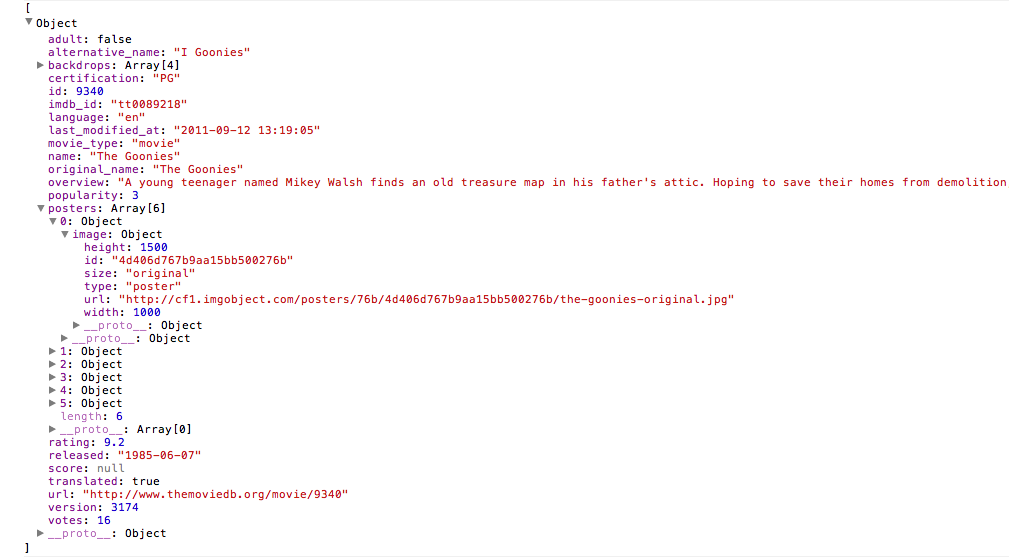
The JSON response is accessible via a jQuery function, allowing us to manipulate, display and, more importantly, style it however we want.
Player 2: jQuery
Personally, I’d pick jQuery over JavaScript any day of the week. jQuery makes things a lot easier for the beginner Web developer who just wants stuff to work right off the bat. I use it every day. If I had to complete the same tasks using native Javascript, my productivity would grind right down. In my opinion, JavaScript is for people who want a deeper understanding of the scripting language and the DOM itself. But for simplicity and ease of use, jQuery is where it’s at.
In essence, jQuery is a JavaScript library, with handy functions like getJSON. This particular function will be the glue that holds our API client together.
The Goal: A jQuery-Based JSON API Client
I recently submitted to An Event Apart the Web app that we’re about to go through now. It’s called Front Row.
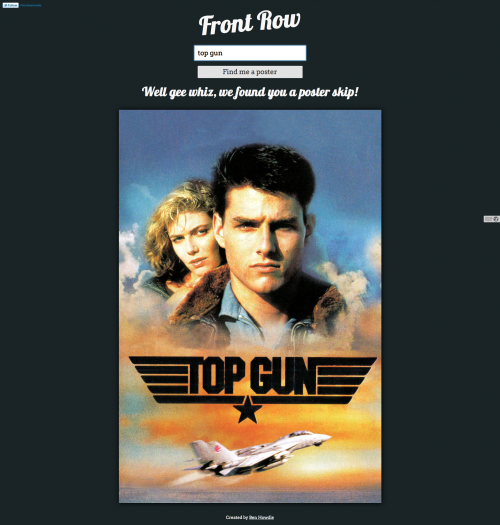
The idea of the Web app is to take a movie title inputted by the user, run it through TMDb’s API, and return the relevant poster. The user could then share it or save it to their computer.
The Web app is split into HTML, CSS and jQuery. We’ll focus on the jQuery, because that’s where the magic happens.
The HTML
Below is the basic structure of the Web app. Nothing special here.
<!DOCTYPE html>
<html>
<head>
   <meta name="author" content="Ben Howdle and Dan Matthew">
   <meta name="description" content="A responsive movie poster grabber">
   <title>Front Row by Ben Howdle</title>
   <meta name="viewport" content="width=device-width, minimum-scale=1.0, maximum-scale=1.0">
   <script src="https://ajax.aspnetcdn.com/ajax/jQuery/jquery-1.6.2.min.js"></script>
        <!--jQuery, linked from a CDN-->
   <script src="scripts.js"></script>
   <script type="text/javascript" src="https://use.typekit.com/oya4cmx.js"></script>
   <script type="text/javascript">try{Typekit.load();}catch(e){}</script>
   <link rel="stylesheet" href="style.css" />
</head>
<body>
<div class="container">
   <header>
      <h1>Front Row</h1>
   </header>
   <section id="fetch">
      <input type="text" placeholder="Enter a movie title" id="term" />
      <button id="search">Find me a poster</button>
   </section>
   <section id="poster">
   </section>
   <footer>
      <p>Created by <a href="https://twostepmedia.co.uk">Ben Howdle</a></p>
   </footer>
</div>
</body>
</html>
All we’ve got is a bit of Twitter self-indulgence, an input field and a submission button. Done!
The CSS is a bit off topic for this article, so I’ll leave it to you to inspect the elements of interest on the live website.
The jQuery
$(document).ready(function(){

   //This is to remove the validation message if no poster image is present

   $('#term').focus(function(){
      var full = $("#poster").has("img").length ? true : false;
      if(full == false){
         $('#poster').empty();
      }
   });
I like validation messages to disappear when the user starts retyping in an input field. The script below checks whether an image is present (i.e. a movie poster), and if not, empties the container of the validation message once the input field gains focus.
//function definition

   var getPoster = function(){

        //Grab the movie title and store it in a variable

        var film = $('#term').val();

         //Check if the user has entered anything

         if(film == ’){

            //If the input field was empty, display a message

            $('#poster').html("<h2 class='loading'>Ha! We haven't forgotten to validate the form! Please enter something.</h2>");
The reason why we store the main code that retrieves the data in a function will become clear later on (mainly, it’s for DRY programming).
We then store the value of the input in a variable, so that when we use it again in the code, the jQuery doesn’t have to rescan the DOM.
Basic validation is performed on the input, checking that something has actually been entered in the field.
In an attempt at humor on my part, I display a message warning the user that they haven’t entered anything and asking them to please do so.
} else {

            //They must have entered a value, carry on with API call, first display a loading message to notify the user of activity

            $('#poster').html("<h2 class='loading'>Your poster is on its way!</h2>");
If the input contains a value, we then process the user’s request. Another message is displayed, letting the user know that something is happening.
$.getJSON("https://api.themoviedb.org/2.1/Movie.search/en/json/23afca60ebf72f8d88cdcae2c4f31866/" + film + "?callback=?", function(json) {

               //TMDb is nice enough to return a message if nothing was found, so we can base our if statement on this information

               if (json != "Nothing found."){

                  //Display the poster and a message announcing the result

                     $('#poster').html('<h2 class="loading">Well, gee whiz! We found you a poster, skip!</h2><img id="thePoster" src=' + json[0].posters[0].image.url + ' />');
Here we get to the meat of our API client. We use jQuery’s getJSON function, which, by definition, loads “JSON-encoded data from the server using a GET HTTP request.”
We then use the API’s URL, suppled in this case by TMDb. As with many other APIs, you have to register your application in order to receive a key (a 30-second process). We insert the API key (23afca60ebf72f8d88cdcae2c4f31866) into the URL and pass the user’s movie title into the URL as a search parameter.
One thing to mention is that appending callback=? to the end of the URL enables us to make cross-domain JSON and AJAX calls. Don’t forget this, otherwise the data will be limited to your own domain! This method uses what’s called JSONP (or JSON with padding), which basically allows a script to fetch data from another server on a different domain. To do this, we must specify the callback above when jQuery loads the data. It replaces the ? with our custom function’s name, thereby allowing us to make cross-domain calls with ease.
In the function’s callback, we have put the word json (which holds our retrieved data), but we could have put data or message.
The next check is to see whether any data was returned. TMDb is kind enough to supply us with a message of “Nothing found” when it can’t find anything. So, we’ve based our if statement on this string’s value.
This check is API-specific. Usually if no results are found, we would expand the object to find a property named length, which would tell us how many results were returned. If this happens, the code might look something like this:
if (json.length != 0){As a side note, before writing even a line of code in the callback function of the JSON call, we should become familiar with the results returned in Chrome’s console or in Firebug. This would tell us exactly what to check for in if statements and, more importantly, what path to take to grab the data we want.
Let’s add console.log(json);, like so:
$.getJSON("https://api.themoviedb.org/2.1/Movie.search/en/json/23afca60ebf72f8d88cdcae2c4f31866/" + film + "?callback=?", function(json) {
         console.log(json);
This will output something like the following in the console of your favorite browser:
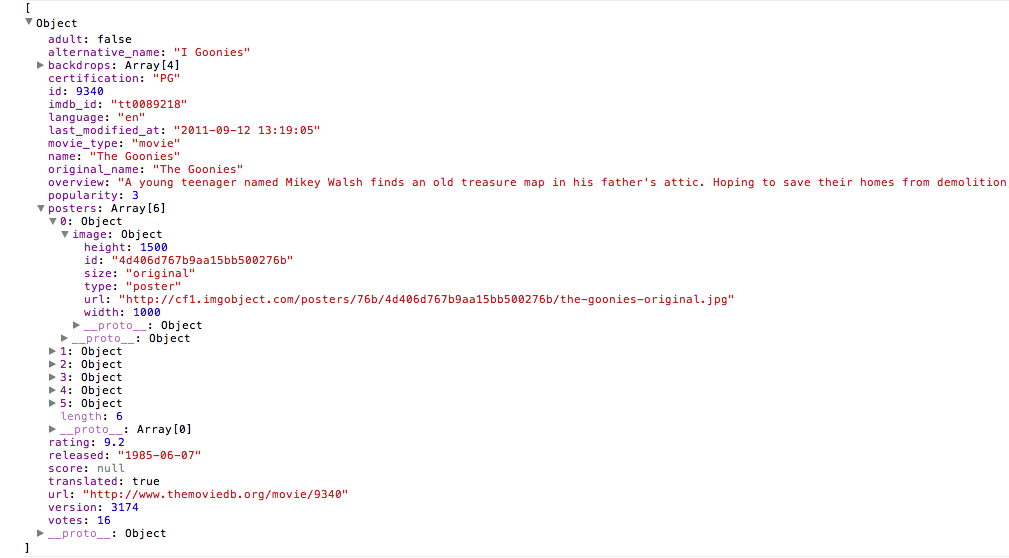
The last line of this code outputs our poster. We display another message to the user saying that we’ve found a result, and then proceed to show the image.
Let’s spend a moment figuring out how we got to the poster images using the line json[0].posters[0].image.url.
The reason we use json[0] is that — since we want to display only one poster, and knowing how relevant TMDb’s results are — we can gamble on the first result. We then access the posters array like so: json[0].posters[0]. Chrome even tells us that posters is an array, so we know what we’re dealing with. Again, we access the first value of the array, having faith that it will be most relevant. It then tells us that image is an object, so we can access it like so: json[0].posters[0].image. By expanding our object further, we see that image contains a property named url. Jackpot! This contains a direct image link, which we can use in the src attribute of our image element.
} else {

   //If nothing is found, I attempt humor by displaying a Goonies poster and confirming that their search returned no results.

   $.getJSON("https://api.themoviedb.org/2.1/Movie.search/en/json/
23afca60ebf72f8d88cdcae2c4f31866/goonies?callback=?", function(json) {

      $('#poster').html('<h2 class="loading">We're afraid nothing was found for that search. Perhaps you were looking for The Goonies?</h2><img id="thePoster" src=' + json[0].posters[0].image.url + ' />');

   });
}
Having determined that the API has no results for the user, we could display an error message. But this being a movie-related Web app, let’s give the user a preset poster of The Goonies and let them know we couldn’t find anything. We’ll use the exact same src attribute for the image that we used before, this time with goonies hardcoded into the API call’s URL.
});

          }

        return false;
   }

   //Because we've wrapped the JSON code in a function, we can call it on mouse click or on a hit of the Return button while in the input field

   $('#search').click(getPoster);

   $('#term').keyup(function(event){

       if(event.keyCode == 13){

           getPoster();

       }

   });

});
It is now clear why we wrapped our JSON call in a function: doing so allows us to run the function when the user hits the submission button or presses Enter while in the input field.
The Full Code
The HTML
<!DOCTYPE html>
<html>
<head>
   <meta name="author" content="Ben Howdle and Dan Matthew">
   <meta name="description" content="A responsive movie poster grabber">
   <title>Front Row by Ben Howdle</title>
   <meta name="viewport" content="width=device-width, minimum-scale=1.0, maximum-scale=1.0">
   <script src="https://ajax.aspnetcdn.com/ajax/jQuery/jquery-1.6.2.min.js"></script>
        <!--jQuery, linked from a CDN-->
   <script src="scripts.js"></script>
   <script type="text/javascript" src="https://use.typekit.com/oya4cmx.js"></script>
   <script type="text/javascript">try{Typekit.load();}catch(e){}</script>
   <link rel="stylesheet" href="style.css" />
</head>
<body>
<div class="container">
   <header>
      <h1>Front Row</h1>
   </header>
   <section id="fetch">
      <input type="text" placeholder="Enter a movie title" id="term" />
      <button id="search">Find me a poster</button>
   </section>
   <section id="poster">
   </section>
   <footer>
      <p>Created by <a href="https://twostepmedia.co.uk">Ben Howdle</a></p>
   </footer>
</div>
</body>
</html>
The jQuery
$(document).ready(function(){

   $('#term').focus(function(){
      var full = $("#poster").has("img").length ? true : false;
      if(full == false){
         $('#poster').empty();
      }
   });

   var getPoster = function(){

        var film = $('#term').val();

         if(film == ’){

            $('#poster').html("<h2 class='loading'>Ha! We haven't forgotten to validate the form! Please enter something.</h2>");

         } else {

            $('#poster').html("<h2 class='loading'>Your poster is on its way!</h2>");

            $.getJSON("https://api.themoviedb.org/2.1/Movie.search/en/json/
23afca60ebf72f8d88cdcae2c4f31866/" + film + "?callback=?", function(json) {
               if (json != "Nothing found."){
                     $('#poster').html('<h2 class="loading">Well, gee whiz! We found you a poster, skip!</h2><img id="thePoster" src=' + json[0].posters[0].image.url + ' />');
                  } else {
                     $.getJSON("https://api.themoviedb.org/2.1/Movie.search/en/json/
23afca60ebf72f8d88cdcae2c4f31866/goonies?callback=?", function(json) {
                        console.log(json);
                        $('#poster').html('<h2 class="loading">We're afraid nothing was found for that search. Perhaps you were looking for The Goonies?</h2><img id="thePoster" src=' + json[0].posters[0].image.url + ' />');
                     });
                  }
             });

          }

        return false;
   }

   $('#search').click(getPoster);
   $('#term').keyup(function(event){
       if(event.keyCode == 13){
           getPoster();
       }
   });

});
Conclusion
That’s it: a handy method of reading data from a remote API with jQuery, and manipulating the JSON output to fit our needs.
Every API is different, and every one returns different results in a different structure — it’s all part of the fun! So, get used to using console.log(), and familiarize yourself with the results set before trying to access it with code or using it in your application.
Start with something practical and entertaining: build a check-in checker with Gowalla’s API; visualize trends with Twitter’s API; or make a face-recognition app with Face.com’s API.
APIs are fun. By definition, the data they bring to the page is dynamic, not static.
If you have any problems with the API we’ve used here or you have any success stories with other APIs, please do leave a comment.
Further Resources
- “How to Use JSON APIs With jQuery,” Joel Sutherland, HiFi
- “How to Use jQuery With a JSON Flickr Feed to Display Photos,” Richard Shepherd
- “Bing Instant Search With jQuery and Ajax,” Srinivas Tamada, 9Lessons
Further Reading on SmashingMag:
- A Beginner’s Guide To Progressive Web Apps
- Local Storage And How To Use It On Websites
- Understanding REST And RPC For HTTP APIs
- Server-Side Rendering With React, Node And Express
 (al, il)

