
Getting Started With The PayPal API

Email Newsletter
Weekly tips on front-end & UX.
Trusted by 200,000+ folks.

 Flexible CMS. Headless & API 1st
 Register!


PayPal is the most popular platform for receiving online payments today. The ease of opening a PayPal account and receiving payments compared to opening a merchant account with a traditional payment gateway is probably the number one reason for its popularity, with a close second being the comprehensive API that PayPal provides for its payment services. In this post, I will break down some of the techniques and approaches to working with the PayPal API, in order to make integration and troubleshooting simpler and easier.

Disclaimer: PayPal’s API is among the worst I’ve ever had to deal with. Inconsistencies, sometimes poor or conflicting documentation, unpredictable failures and account changes, and major differences between the live and sandbox versions all conspire to make the PayPal API quite a pain in the arse to work with. Over the years, I’ve taken my lumps from working quite a bit with the PayPal API, and I’ve published the results of my hard-learned lessons as a commercial PHP PayPal API component on the source-code marketplace Binpress.
The Different Payment Options
PayPal offers a variety of payment options, which might be confusing at first:
- Express Checkout.
The premier PayPal service. Express Checkout allows you to receive payments without having a merchant account and without having to meet special requirements other than verifying your account (either via a bank account or a credit card). Previously, you could receive Express Checkout payments from PayPal users only, but PayPal has since added a credit-card option for non-PayPal users, making this service accessible to practically anyone with a major credit card. Note that the Express Checkout process occurs on PayPal’s platform and thus can never be fully integrated in your website’s experience. - Direct Payment.
The Direct Payment method allows you to receive credit-card payments directly through an API call. This enables you to host the payment process on your website in full, which might make for a more complete shopping experience for your customers. The Direct Payment method has several variations that enable you to authorize a payment and complete it at a later date: the appropriately named Authorization and Capture methods. These variations are a part of the Website Payments Pro API, which is available only to US, Canadian and UK accounts. - Recurring Payments.
This allows you to set up a recurring transaction (i.e. a subscription payment). - Mass Payments.
This allows you to transfer money to multiple accounts at once. - Adaptive Payments.
Here is another API for sending funds to multiple recipients, with some differences from the Mass Payments API. (Did I mention that the PayPal API is confusing and a bit redundant?)
This list is not comprehensive, but it covers the main payment options (see the API documentation for more).
Making API Requests
PayPal supports two main formats over HTTP: NVP and SOAP. NVP is short for Name-Value Pair, and SOAP stands for Simple Object Access Protocol. I will cover the NVP approach, which I prefer to SOAP’s relatively verbose and complex syntax.
Each of the API methods has different parameters, but they all share some basic parameters, which are used to identify the API account and sign the transaction. These include:
USER
Your PayPal API user name.PWD
Your PayPal API password.VERSION
The version number of the NVP API service, such as 74.0 (the most recent as of this writing).SIGNATURE
Your PayPal API signature string. This parameter is optional if you use a certificate to authenticate.
The last required parameter is METHOD, which declares which API method we are calling.
Requests are made over HTTPS. We’ll use cURL to build our basic request, and then encapsulate the process in a class:
class Paypal {
   /**
    * Last error message(s)
    * @var array
    */
   protected $_errors = array();

   /**
    * API Credentials
    * Use the correct credentials for the environment in use (Live / Sandbox)
    * @var array
    */
   protected $_credentials = array(
      'USER' => 'seller_1297608781_biz_api1.lionite.com',
      'PWD' => '1297608792',
      'SIGNATURE' => 'A3g66.FS3NAf4mkHn3BDQdpo6JD.ACcPc4wMrInvUEqO3Uapovity47p',
   );

   /**
    * API endpoint
    * Live - https://api-3t.paypal.com/nvp
    * Sandbox - https://api-3t.sandbox.paypal.com/nvp
    * @var string
    */
   protected $_endPoint = 'https://api-3t.sandbox.paypal.com/nvp';

   /**
    * API Version
    * @var string
    */
   protected $_version = '74.0';

   /**
    * Make API request
    *
    * @param string $method string API method to request
    * @param array $params Additional request parameters
    * @return array / boolean Response array / boolean false on failure
    */
   public function request($method,$params = array()) {
      $this -> _errors = array();
      if( empty($method) ) { //Check if API method is not empty
         $this -> _errors = array('API method is missing');
         return false;
      }

      //Our request parameters
      $requestParams = array(
         'METHOD' => $method,
         'VERSION' => $this -> _version
      ) + $this -> _credentials;

      //Building our NVP string
      $request = http_build_query($requestParams + $params);

      //cURL settings
      $curlOptions = array (
         CURLOPT_URL => $this -> _endPoint,
         CURLOPT_VERBOSE => 1,
         CURLOPT_SSL_VERIFYPEER => true,
         CURLOPT_SSL_VERIFYHOST => 2,
         CURLOPT_CAINFO => dirname(__FILE__) . '/cacert.pem', //CA cert file
         CURLOPT_RETURNTRANSFER => 1,
         CURLOPT_POST => 1,
         CURLOPT_POSTFIELDS => $request
      );

      $ch = curl_init();
      curl_setopt_array($ch,$curlOptions);

      //Sending our request - $response will hold the API response
      $response = curl_exec($ch);

      //Checking for cURL errors
      if (curl_errno($ch)) {
         $this -> _errors = curl_error($ch);
         curl_close($ch);
         return false;
         //Handle errors
      } else  {
         curl_close($ch);
         $responseArray = array();
         parse_str($response,$responseArray); // Break the NVP string to an array
         return $responseArray;
      }
   }
}
Note that I use a CA certificate file for SSL certificate validation. You can obtain the file from the cURL website or any trusted source. Update the path to the certificate file according to where you’ve placed it.
The response returned will be in NVP format as well, and I reformat it into an array before returning it. A parameter named ACK signifies the status of the request: Success or SuccessWithWarning when the request succeeds, and Error or Warning when the request fails.
A request could fail for many reasons, and there are different reasons for each API method, which are covered in detail in the manual. We’ll go over some further down in this article and look at ways to handle them. Keep in mind that the parameter values are case-sensitive, so code against them accordingly.
Express Checkout
One of the most popular APIs is the Express Checkout API, which enables you to receive payments without opening a Website Payments Pro account (which is available only to verified US accounts) or hosting the actual transaction yourself (which requires additional security).
The Express Checkout process works as follows:
- We request a checkout token from PayPal using the transaction details;
- If successful, we redirect the user to the PayPal endpoint using the received token;
- The user completes or cancels the payment on the PayPal platform and is redirected back to our website;
- We complete the payment either when the user is redirected back or via an Instant Payment Notification (IPN).
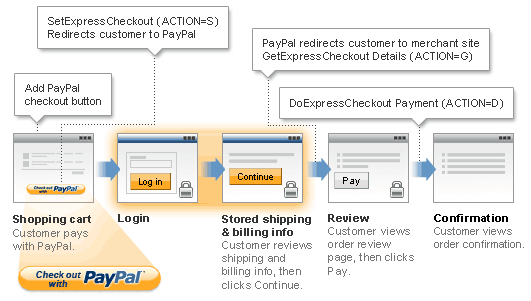
1. Getting the Checkout Token: SetExpressCheckout
We initiate the Express Checkout process by passing the order details to the PayPal API, and we receive a token string that identifies it. This token would be used in the next step to redirect to PayPal.
Here are the required parameters:
METHOD
This is the API method that we’re using (i.e.SetExpressCheckout).RETURNURL
The URL that the user will be redirected to after the payment process is completed.CANCELURL
The URL that the user will be redirected to after having cancelled the payment process.PAYMENTREQUEST_0_AMT
The transaction’s total amount. This must have two decimal places, with the decimal separator being a period (.). The optional thousands separator must be a comma (,).PAYMENTREQUEST_0_ITEMAMT
The total cost of the items in the order, excluding shipping, taxes and other costs. If there are no extra costs, then it should be the same value asPAYMENTREQUEST_0_AMT.
We can pass additional parameters to add more information about the order, some of which have default values:
PAYMENTREQUEST_0_CURRENCYCODE
The payment’s currency, as a three-letter code. The default is USD.PAYMENTREQUEST_0_SHIPPINGAMT
The total shipping costs for this order.PAYMENTREQUEST_0_TAXAMT
The total tax amount for this order. This is required if per-item tax is specified (see below).PAYMENTREQUEST_0_DESC
The order’s description.
We can also add details about individual items in the order:
L_PAYMENTREQUEST_0_NAMEm
The item’s name.L_PAYMENTREQUEST_0_DESCm
The item’s description.L_PAYMENTREQUEST_0_AMTm
The item’s cost.L_PAYMENTREQUEST_0_QTYm
The quantity of an item.
The variable index m identifies the item. (Use the same variable for all details of the same item.)
There are many other optional parameters, which can be found in the API documentation.
We’ll use the function that we wrote above to build the SetExpressCheckout request:
//Our request parameters
$requestParams = array(
   'RETURNURL' => 'https://www.yourdomain.com/payment/success',
   'CANCELURL' => 'https://www.yourdomain.com/payment/cancelled'
);

$orderParams = array(
   'PAYMENTREQUEST_0_AMT' => '500',
   'PAYMENTREQUEST_0_SHIPPINGAMT' => '4',
   'PAYMENTREQUEST_0_CURRENCYCODE' => 'GBP',
   'PAYMENTREQUEST_0_ITEMAMT' => '496'
);

$item = array(
   'L_PAYMENTREQUEST_0_NAME0' => 'iPhone',
   'L_PAYMENTREQUEST_0_DESC0' => 'White iPhone, 16GB',
   'L_PAYMENTREQUEST_0_AMT0' => '496',
   'L_PAYMENTREQUEST_0_QTY0' => '1'
);

$paypal = new Paypal();
$response = $paypal -> request('SetExpressCheckout',$requestParams + $orderParams + $item);
2. Redirecting To PayPal Using The Checkout Express Token
If the request is successful, we’ll receive a checkout token in the TOKEN parameter of the response.
if(is_array($response) && $response['ACK'] == 'Success') { //Request successful
      $token = $response['TOKEN'];
      header( 'Location: https://www.paypal.com/webscr?cmd=_express-checkout&token=' . urlencode($token) );
}
The user now goes through the purchase process on PayPal’s website. When they confirm or cancel it, they will return to one of the URLs that we’ve specified in the request.
3. Completing The Transaction
Assuming the user confirms the transaction, they will be redirected to our website by PayPal. At this point, we should use two relevant API methods: DoExpressCheckoutPayment will complete the transaction, but before that we might want to get additional information on the buyer using GetExpressCheckoutDetails.
PayPal will redirect the user back from the purchase with the checkout token, which we will use to call those methods. The token will be available in the URL query parameters via the token parameter. We will check for its existence in the confirmation URL and then send our API requests if we find it.
The GetExpressCheckoutDetails method requires only the checkout token. DoExpressCheckoutPayment requires a couple of additional parameters:
PAYMENTREQUEST_0_PAYMENTACTION
This is the payment action. It should be set toSaleunless we’ve specified a different action in theSetExpressCheckoutmethod (possible values includeAuthorizationandCapture).PAYERID
This is the unique identification for the PayPal account. This, too, is returned in the URL query parameters (in thePayerIDparameter) and can also be retrieved from the details returned byGetExpressCheckoutDetails.
if( isset($_GET['token']) && !empty($_GET['token']) ) { // Token parameter exists
   // Get checkout details, including buyer information.
   // We can save it for future reference or cross-check with the data we have
   $paypal = new Paypal();
   $checkoutDetails = $paypal -> request('GetExpressCheckoutDetails', array('TOKEN' => $_GET['token']));

   // Complete the checkout transaction
   $requestParams = array(
       'TOKEN' => $_GET['token'],
       'PAYMENTACTION' => 'Sale',
       'PAYERID' => $_GET['PayerID'],
       'PAYMENTREQUEST_0_AMT' => '500', // Same amount as in the original request
       'PAYMENTREQUEST_0_CURRENCYCODE' => 'GBP' // Same currency as the original request
   );

   $response = $paypal -> request('DoExpressCheckoutPayment',$requestParams);
   if( is_array($response) && $response['ACK'] == 'Success') { // Payment successful
       // We'll fetch the transaction ID for internal bookkeeping
       $transactionId = $response['PAYMENTINFO_0_TRANSACTIONID'];
   }
}
Direct Payment
The Direct Payment API allows you to receive payments directly on your website or application, giving you complete control over the checkout process. PayPal tends to push users to register and use a PayPal account, which is understandable, but this conflicts somewhat with our interest to make the payment process as simple and clear as possible for our customers. For this reason, full control over the checkout process is preferred and gives us more options to optimize sales and generate more sales.
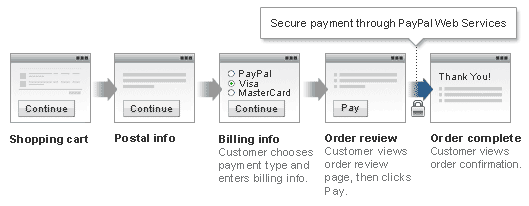
The process is a bit simpler than that of Express Checkout, because the entire interaction occurs on our website, and we need to perform just one API call to process a normal payment: DoDirectPayment.
A couple of more API requests are required if you want to perform a transaction that is billed at a later date (for example, when you ship the product or confirm availability). These would be the Authorization & Capture API methods, which I will not cover in this post, but be aware that this option exists.
DirectPayment Parameters
DirectPayment requires different parameters than Express Checkout, as to be expected. While the transaction details parameters are similar (with different key names, to make it more interesting), the method also requires credit-card and address information.
DirectPayment’s basic parameters:
METHOD
This isDoDirectPayment.IPADDRESS
This is the IP address of the payer. In PHP, we can retrieve it using the superglobal$_SERVER['REMOTE_ADDR']. You’ll have to do a bit more work to get the IP when dealing with set-ups that have a proxy between the PHP process and the outside network (such as nginx).PAYMENTACTION
This is the type of action that we want to perform. A value ofSaleindicates an immediate transaction. A value ofAuthorizationindicates that this transaction will not be performed immediately, but rather will be captured later using the Authorization & Capture API mentioned earlier.
Credit-card details:
CREDITCARDTYPE
The credit-card type (Visa, MasterCard, etc.). See the API documentation for the full list.ACCT
The credit-card number. (Don’t you love these abbreviated key names?) This must conform to the particular format of the card’s type.EXPDATE
The expiration date, in MMYYYY format (i.e. a two-digit month and a four-digit year, as one string).CVV2
The “card verification value,” or security code, as it’s sometimes known.
Payer information and address parameters:
FIRSTNAME, LASTNAME
The payer’s first name and last name, respectively (in separate fields). You can also provide an email address in anEMAILparameter, but it’s not required.CITY, STATE, COUNTRYCODE, ZIP
The city, state, country code (as a two-letter code) and zip code parts of the address, all required.STREET, STREET2
Two lines for the address (only the first is required).
This address will be used in the address verification system (AVS). You’ll receive a specific error code if a transaction has failed due to an address verification failure.
The payment details parameters are the same as the ones for Express Checkout, but with slightly different names (AMT, ITEMAMT, CURRENCYCODE, SHIPPINGAMT, TAXAMT and DESC) and without the PAYMENTREQUEST0 prefix. Refer to the previous section or the API documentation for specific details on those.
Similarly, the item details parameters are similar to those of Express Checkout. These include L_NAMEm, L_DESCm, L_AMTm and L_QTYm, giving you granular control of item details in the order summary. The m integer variable is used to account for multiple items (replace with 0, 1 and so on for numbered items in the order). See the API documentation for a comprehensive list of item details.
Performing The Transaction
Sending the request using our function is very similar to GetExpressCheckoutToken. We pass all of the parameters into the request function as before, with the method set to DoDirectPayment.
$requestParams = array(
   'IPADDRESS' => $_SERVER['REMOTE_ADDR'],
   'PAYMENTACTION' => 'Sale'
);

$creditCardDetails = array(
   'CREDITCARDTYPE' => 'Visa',
   'ACCT' => '4929802607281663',
   'EXPDATE' => '062012',
   'CVV2' => '984'
);

$payerDetails = array(
   'FIRSTNAME' => 'John',
   'LASTNAME' => 'Doe',
   'COUNTRYCODE' => 'US',
   'STATE' => 'NY',
   'CITY' => 'New York',
   'STREET' => '14 Argyle Rd.',
   'ZIP' => '10010'
);

$orderParams = array(
   'AMT' => '500',
   'ITEMAMT' => '496',
   'SHIPPINGAMT' => '4',
   'CURRENCYCODE' => 'GBP'
);

$item = array(
   'L_NAME0' => 'iPhone',
   'L_DESC0' => 'White iPhone, 16GB',
   'L_AMT0' => '496',
   'L_QTY0' => '1'
);

$paypal = new Paypal();
$response = $paypal -> request('DoDirectPayment',
   $requestParams + $creditCardDetails + $payerDetails + $orderParams + $item
);

if( is_array($response) && $response['ACK'] == 'Success') { // Payment successful
   // We'll fetch the transaction ID for internal bookkeeping
   $transactionId = $response['TRANSACTIONID'];
}
There are plenty of parameters, but all relatively simple.
Error Handling
In a perfect world, this section would not exist. In reality, you will be referring to it quite a lot. PayPal can fail a transaction for a multitude of reasons, not all of which you can control.
The $response variable we returned from our paypalApiRequest() function could contain a different value than Success for the ACK parameter. That value could be:
Success
Indicates a successful operation.SuccessWithWarning
Indicates a successful operation, and that messages were returned in the response that you should examine.Failure
Indicates a failed operation, and that the response contains one or more error messages explaining the failure.FailureWithWarning
Indicates a failed operation, and that messages were returned in the response that you should examine.
This gives us two success statuses and two failure statuses. The mock code above tests for the Success value only, but we could change it to check for SuccessWithWarning as well; and keep in mind that we need to find out what the warning is. A common scenario is that a Direct Payment charge will have been performed successfully, but the credit-card company responds that the transaction has failed, for whatever reason.
Errors from PayPal are returned in four parameters in the response:
L_ERRORCODE0
A numeric error code, which can referenced against PayPal’s error code list (there are quite a few).L_SHORTMESSAGE0
A short error message describing the problem.L_LONGMESSAGE0
A longer error message describing the problem.L_SEVERITYCODE0
The severity code. (I couldn’t find any useful documentation on this, and it doesn’t really matter, so let’s put it aside.)
The 0 part of these parameters is an incrementing integer for multiple error message (1, 2, etc.).
Here are some common errors you’ll run into:
10002
Authentication or authorization failed. This usually indicates invalid API credentials, or credentials that do not match the type of environment you are working in (such as a live or sandbox environment).81***
Missing parameter. There are quite a few of these, all starting with81. Each refers to a specific required parameter that is missing from the request.104**
Invalid argument. This indicates that one of the supplied parameters has an invalid value. Each argument has specific errors, all starting with104. A common one is10413, which means that the total cost of the cart items does not match the order’s amount (i.e. the total amount parameter,AMT, does not equal the items’ total plus shipping, handling, taxes and other charges).
How Do We Handle These Errors in Practice?
PayPal error messages vary and could contain private information that you do not want your users to see (such as an invalid merchant configuration). That being the case, showing PayPal error messages directly to users is not advisable, even though some of them might be useful.
In most cases, I would do the following:
- Set up a white-list array of errors that can be shown safely (such as a missing credit-card number and expiration date);
- Check the response code against that array;
- If the error message is not white-listed, then display a generic message, such as “An error has occurred while processing your payment. Please try again in a few minutes, or contact us if this is a recurring issue.”
If an error falls outside of the white-listed array, I will also log it to a file on the server and send an email to the administrator, with the full details so that someone is up to speed on payment failures. In fact, logging PayPal requests and responses is good practice regardless of errors, so that you can monitor and troubleshoot payment failures (I provide this option in the commercial component that I mentioned at the beginning of this article).
Ready To Get Started With The PayPal API?
In this post, I’ve covered two of the most widely used API methods, as well as error handling with the PayPal API. This should be enough for you to get started using the most popular payment platform online.
The PayPal API has many more methods and processes, more than can be covered in any one post. Once you get up to speed on the basic methods, learning the others should be relatively straightforward (even if somewhat exhausting). I hope this guide has given you a good head start on using the API. If you have questions or comments, I would love to hear from you in the comments!
Further Reading
- Taking Credit Card Payments Online: What’s Involved?
- Testing Credit-Card Numbers In E-Commerce Checkouts
- Getting Started With E-Commerce: Your Options
 (al, mrn)

