Cross-Browser Testing: A Detailed Review Of Tools And Services

As you probably know, cross-browser testing is an important part of any developer’s routine. As the number of browsers increase, and they certainly have in recent years, the need for automatic tools that can assist us in the process becomes ever greater. In this article, we present an overview of different cross-browser testing applications and services. Surely, you are already familiar with some of them, and you may have even stumbled across another overview article, but this one takes a different approach.
This is not just a list of available tools, but rather a comprehensive analysis based on my experience with each of them. For the impatient among you, a summary table is at the end summarizing key metrics and unique features for each service. But if you’re interested in my personal experience with these tools, then read on.
Probably the most important metric of these services is the capture delay, which I measured for the URL stackoverflow, with the following browsers enabled: Firefox, IE, Chrome and Safari.
BrowserShots
BrowserShots is the oldest and best known free online multi-browser screenshot service. It supports the largest number of browsers: a total of 61 different browser versions and operating systems, which is great, but I can hardly imagine anyone wanting to test their website under Kazahakase 0.5 running on BSD Unix. Feature-wise, it allows you to enable and disable Javascript, Java and Flash and change the screen size. I find the latter very useful, especially nowadays when one has to take into account smartphone browsers with non-standard resolutions.
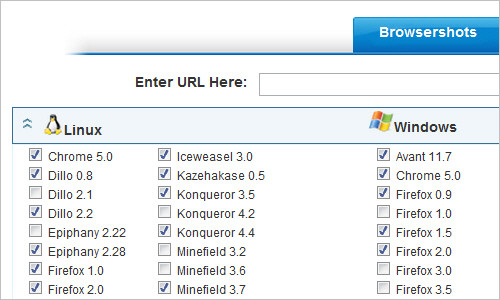
The interface is not very user-friendly. Selecting the browsers and options you want takes time, and because it is a Web service you have to do it over every time you want to take a screenshot. When (and if) you finally get your screenshots, there is no easy way to compare different captures in order to find rendering inconsistencies. HTTP redirect is not fully automated: BrowserShots displays the URL you are being redirected to, but you have to start the screenshot again manually.
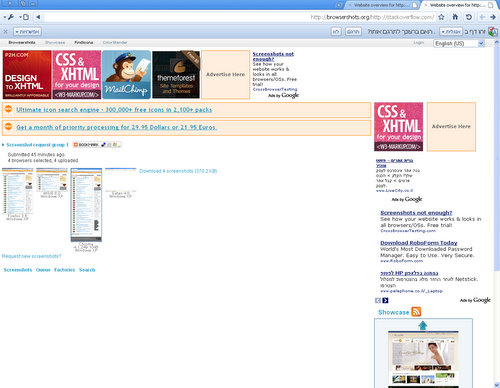
The biggest disadvantage of BrowserShots—which, in my opinion, makes it practically unusable for a professional developer — is the response time. In our test scenario, it was more than 45 minutes. Note that a screenshot expires in 30 minutes, unless you manually extend it. As you can see from the shot below, BrowserShots has serious bugs with scrolling (see MSIE 8.0 screenshot) and at least one browser screenshot failed, even though it said the operation was successful.
Conclusion
Unless you need only a single test on a particular browser, this service is not for you. Even then, by the way, it would probably take less time to install that browser, test the page and then uninstall it.
Unique features: None.
Disadvantages: Painfully slow.
BrowserCam
BrowserCam is another well-known screenshot service. Unlike BrowserShots, this is a commercial service. The cheapest plan cost $159.80 a year and provides access for five users. The interface is nice. It allows you to create a project and specify the URL and browsers you want to capture, so that you do not have to do it all over again to re-test the page. But because it is a non-AJAX Web-based interface, its response time is not comparable to that of a native application, which is a bit annoying.
Browser support is slightly more limited than that of BrowserShots, but it is good enough for practical purposes; it supports multiple versions of IE, Firefox, Safari, Opera and Chrome, as well as some older browsers on OS X, Linux and multiple versions of Windows. Capture speed is decent: it took about two minutes to take a screenshot of our test scenario.
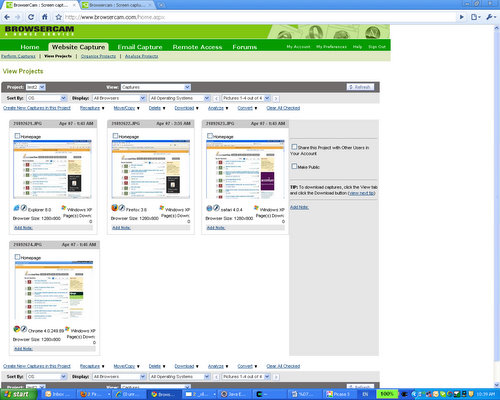
BrowserCam supports multiple resolutions and has window and full-page capture, which means scroll bar support. Another nice feature is mobile device capture: it supports Blackberry, iPhone, Android and Windows Mobile devices. Note that mobile capture support is not part of the browser capture plan and costs $999.95 extra annually. It also has an email capture service, which in my opinion is of limited use, and remote access, which can be useful for troubleshooting rendering inconsistencies that are detected from a screen capture. Both services cost extra. The screenshot below is of a BrowserCam results window.
Remote access packages allow you to connect using VNC to your choice of Linux, Windows and Mac machines with different browser versions. This can be a good option for debugging on hardware that you do not have, such as Mac. But the price of $499.95 a year is not far from the price of Mac mini, and because the VNC protocol is not terribly efficient, extensive remote debugging via VNC can be daunting.
Conclusion
A very good professional service with advanced features and thoughtful interface.
Unique features: Mobile device support, remote access.
Disadvantages: Expensive.
Adobe BrowserLab
BrowserLab is a new offering from Adobe and was previously known as Meer-Meer. It is written in Flash and as such has the advantage of being cross-platform compatible and of having the look, feel and (most importantly) response time of an application. It is currently offered free of charge in preview mode while Adobe “is monitoring the performance.” Because it will monitor it for more than one year, one wonders whether it has other reasons for this. According to Adobe, it will charge $10 to $20 per month for this service starting in 2011.
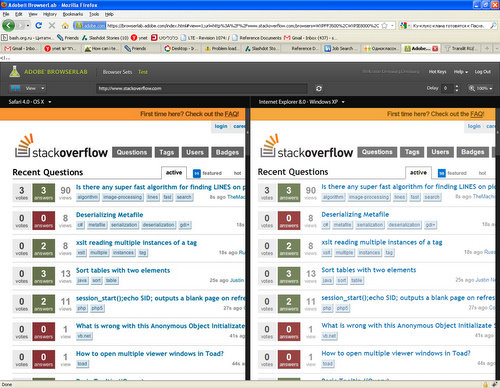
The interface is attractive, polished and easy to use, as you can see from the screenshot below. You can inspect captures one by one or view two captures side by side, which is more useful. The much lauded “onion skin” option is not very practical: most of the time, browsers will not render a page identically pixel by pixel, but the page might still look the same.
Browser support is modest compared to the competition. At the time of writing, BrowserLab supports only Chrome, Firefox, IE and Safari: a total of 12 browsers and OS version combinations. But it looks like the quality of the product is still at beta level; in two captures, it actually cut the image horizontally. Scroll bar support is buggy, too.
Screenshot speed is very good. Our test scenario did it in less than one minute.
Conclusion
A very nice interface, and free till the end of 2010.
Unique features: None.
Disadvantages: Modest browser support, minor bugs.
Microsoft Expression Web SuperPreview
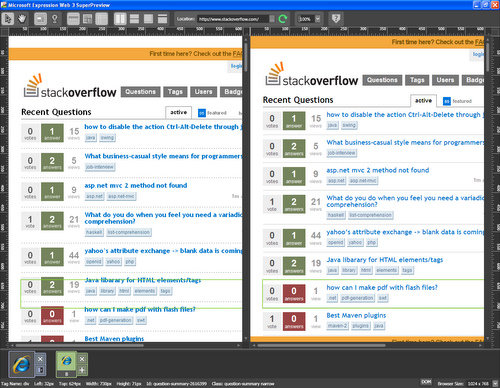
SuperPreview is a new addition to Microsoft’s Expression Web WYSIWYG development environment. This is the standalone version, limited to Internet Explorer and available for download free of charge. Browser support is limited. The standalone version supports only IE 6, 7 and 8, while the full version has support for Firefox and Safari. The user experience, on the other hand, is very impressive.

Because it is an application that runs on your PC, the response time and screenshot delay are among the best in class. In our test scenario, it loaded the website in a matter of seconds. Please note, though, that because SuperPreview works with only two browsers at a time and does not support Chrome, this test was not identical to that of other services.
SuperPreview cannot be purchased without the Expression Web, whose retail price is $149.
Conclusion
The interface is extremely easy to use, and the speed is incredible. But browser support is very limited, and being part of the Expression Web package, it’s almost unusable.
Unique features: None.
Disadvantages: Limited browser support, expensive.
BrowserSeal
BrowserSeal is a new tool. Similar to SuperPreview, it is an application rather than a Web service, and as such its capture speed is very good. BrowserSeal finished our test case in less than one minute. Browser support is quite broad. With multiple versions of IE, Firefox, Safari, Opera and Chrome, it pretty much covers every browser anyone would want to test. It has two good features that set it apart from the competition: standalone browser support and a command-line interface for automation scripting.
All browsers supported by BrowserSeal can be launched manually, which means that once you’ve found a rendering inconsistency in a browser, you can actually run the problem browser and troubleshoot the issue. This is something most other services do not offer.
The price is very competitive, too: the standard version sells for $49. There is also an automation version with a command-line interface that lets you capture multiple URLs from a script or batch file. The interface is attractive and easy to use. The optional tabbed interface makes it easy to spot even the slightest rendering difference when switching from one capture to another.
Conclusion
A very nice tool, with comprehensive browser support. The interface is easy to use, the capture speed is great, and the price is competitive.
Unique features:: Comes with standalone versions for all major browsers; has command-line mode for automation scripts.
Disadvantages:: Runs on Windows only.
Litmus
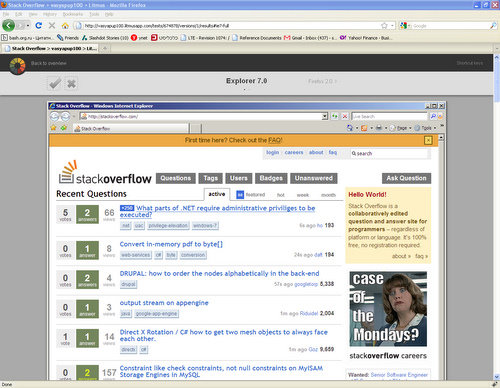
Litmus is another Web-based screenshot service. Its browser support is impressive, with 23 browser versions and operating system combinations, including IE, Firefox, Chrome, Safari, Opera, Flock, Camino, SeaMonkey and Netscape. Capture speed is okay but not comparable to that of native applications: our test took five minutes.

The interface is clear and simple but lacks some features. For instance, there is no easy way to compare capture results. All you can do is view them one by one or download them to your PC. The app, though, does support projects, so you don’t have to enter URLs and change browser settings every time you want to take a screenshot, but this is pretty much all it does.
Litmus does not support scrolling; that is, it captures only the top of long pages, which is a major drawback. The price is a bit high for a service that has such basic features: a single-user license costs $588 annually.
Conclusion
Good browser support, and average capture speed, which is probably good enough for most users. But very few features.
Unique features:: None.
Disadvantages: Does not support scrolling, and lacks other standard features found in competing products.
Multi-Browser Viewer
Multi-Browser Viewer is an application but relies on a server farm for browser rendering; in other words, the application is just a graphical interface, so it is as easy to use as an application but suffers the delays of a typical Web-based service.
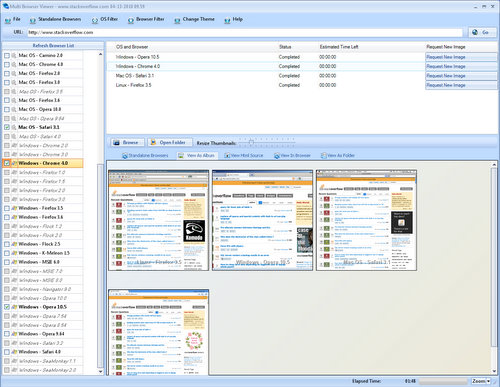
One interesting feature is that it comes with standalone browsers that can be used for debugging. But note that these are not the same browsers used for screen capture. Multi-Browser Viewer has standalone browsers that can be used for debugging, and it has a rendering farm with many more browsers that can be used for screen capture.
Browser support is impressive, with 54 browser and OS version combinations (out of which 17 are available in standalone versions), including IE, Firefox, Chrome, Opera, Safari, Camino, Konqueror. The price is reasonable: a single-user license costs $129.95 annually.
Feature-wise, it does lag significantly behind the competition: there is no support for authentication or capture delay. Scroll bar support is buggy; in our test case, it worked for IE, Firefox and Safari, but not for Opera.
Conclusion
A good interface and impressive browser support.
Unique features: Standalone versions of some (but not all) browsers.
Disadvantages: Lacks many features of competing products, buggy scroll bar support, runs on Windows only.
Browsera
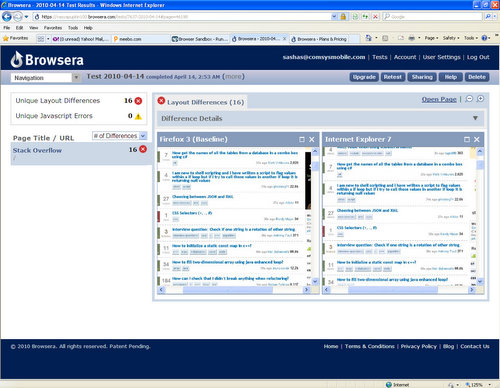
Browsera is a Web-based screenshot service. Browser support is limited compared to that of most competitors: only IE, Firefox and Safari are supported. The standard plan costs $588 annually. The interface is attractive, fast and clean. You can conveniently organize your screenshot sessions into projects.
Browsera supports authentication, scroll bars and page crawling (i.e. you can ask Browsera to crawl your website recursively and take a screenshot of every page). The screenshot response time is very fast for a Web-based service; it completed our test in three minutes.
Conclusion
A professional service with a good interface and interesting features, but limited browser support.
Unique features: Recursive website crawling.
Disadvantages: Limited browser support, expensive.
Browser Packs
If all you need is to test your website in specific browsers with and you are willing to perform the tests manually, there are a few free services and applications that could help:
At first glance, Spoon looks convenient because it is a Web service, which relieves you from having to install many browsers locally. But I had some stability problems with this service.
Meanwhile, both the IE Collection and BrowserSeal.BrowserPack (offered free of charge, separate from the BrowserSeal commercial screenshot service) work very reliably. I did not have any issues with browsers installed by these packs. The IE Collection has every IE version you could think of. BrowserSeal.BrowserPack, which relies on the IE Collection for IE support, also supports two Firefox, three Opera and two Safari versions.
Conclusion
The following table summarizes services that were tested and analyzed in the article. You can use the separate page for the full table for a better overview. I have included some metrics for each service to make it easier for you to choose the best one based on price, features and performance trade-offs.
| Supported Browsers | Capture speed | Price (1 year) | Interface | Authentication | Capture delay | Scroll bars | Special features | |
| BrowserShots | IE, Firefox, Chrome, Opera, Safari, Dilo, SeaMonkey, Minefield, Epiphany, Flock, Galeon, Konqueror, K-Meleon, Avant, Netscape, Shireteko, Kazehakase, Iceweasel | 45 mins | Free | Bad | No | No | No | None |
| BrowserCam | IE, Firefox, Chrome, Opera, Safari, Konqueror, Camino, Netscape, AOL | 2 mins | $999.95 | Good | Yes | Yes | Yes | Mobile browsers support, remote access service |
| BrowserLab | IE, Firefox, Chrome and Safari | 1 min | Free (till end of 2010) | Good | No | Yes | Buggy | None |
| SuperPreview | IE, Firefox and Safari | 1 min | $149 | Good | No | No | Yes | None |
| BrowserSeal | IE, Firefox, Chrome, Opera and Safari | 1 min | $49 | Good | Yes | Yes | Yes | Standalone browser versions, support for automation scripts |
| Litmus | IE, Firefox, Chrome, Opera, Safari, Flock, Camino, SeaMonkey, Netscape | 5 mins | $588 | Basic | Yes | No | No | None |
| Multi Browser Viewer | IE, Firefox, Chrome, Opera, Safari, Flock, SeaMonkey, Netscape, K-Meleon, Camino, Konqueror, Epiphany, Kazehakase | 2 mins | $129.95 | Good | No | No | Buggy | Standalone browser versions |
| Browsera | IE, Firefox, Safari | 3 mins | $588 | Good | Yes | No | Yes | Recursive crawling |
Obviously, we have no clear winner. Each service has its advantages and disadvantages, and you are left to decide what is the best trade-off for your case. Professional developers would likely not use BrowserShots because of the unreasonably long response time. SuperPreview and Browsera are probably also impractical because of their very limited browser support.
BrowserLab will probably remain popular as long as it is free. Once Adobe starts charging about $20 per month for it, one would hardly have reason to use it, unless you worked in Dreamweaver, which has a BrowserLab extension, because there are much better alternatives.
When choosing a tool, one of the most important factors in your decision will be whether to use a Web service or application. Some people prefer Web-based tools because they do not require installation. Personally, I prefer applications, at least for the development tools that I use frequently. They generally have a better interface and faster response time; they never have outages, and they can be used to debug locally (i.e. on my hard drive or company intranet — although some Web-based services offer a workaround for this issue).
BrowserCam, BrowserSeal, Litmus and Multi-Browser Viewer are all very good choices. But they do vary significantly in price. If you need to test mobile browsers, BrowserCam is probably your only option. For everyone else, I would recommend either BrowserSeal or Multi-Browser Viewer; both come with standalone browser versions that are extremely important for testing. Unfortunately, both of them are Windows only, so Mac users will probably have to go with BrowserLab or BrowserCam. If automatic testing is important to you, then the BrowserSeal automation edition is your best bet.
(al)


Design Earth
June 4th, 2010 4:30 amVery Useful! Thanks…
Gyanguru
June 4th, 2010 4:30 amExcellent collection!
I personally found BrowserShots to be the best :)
The advantage with it is that I can actually leave it over for sometime and carry on with other things till the time they get processed.
Nox
June 6th, 2010 11:19 amProvided your page displays ok, but then having every refresh take an hour is not something I would describe as “best”…
Actually rather than working with BS it’s faster to install respective OS as virtual one and whatever browser you need…
Alok Jain
June 12th, 2010 10:04 pmIs it possible to install mac. as virtual OS ?
Beowolf
June 13th, 2010 2:09 pmYou can only run MacOS X on a Mac legally.
nate
June 4th, 2010 4:32 amI am more interested in the application type services than the web based services. Too often I am working locally or on restricted servers and do not have the opportunity to move it to a public server just for testing. Looks like browser seal is one of my few options.
Diego
June 4th, 2010 10:37 amGood list, although most of these take a screenshot, you can test how HTML renders, but what about DHTML or javascript. Proper browser testing should also validate that.
I recommend installing at least:
IE Tester: http://www.my-debugbar.com/wiki/IETester/HomePage
Firefox and Chrome.
And I’m still not sure if Safari on Windows runs the same as Mac, I really don’t think so.
This also works most of the times:
http://spoon.net/browsers/
Drake
June 5th, 2010 5:27 pmI’d personally vote for http://spoon.net/browsers/ as this site allows you to test on any browsers as you wish.
baljit
December 15th, 2010 3:31 amspoon.net has stopped its service for IE with the request of Microsoft. Now we can preview our html in ie6.
baljit
December 15th, 2010 3:31 amspoon.net has stopped its service for IE with the request of Microsoft. Now we can not preview our html in ie6.
Fernando de Sá
June 4th, 2010 4:55 amgreat post, thank you very much
Tilt
June 4th, 2010 4:56 amNice round-up! For a non-dedicated application approach, I use Safari, Firefox, Opera, Chrome and IE8 installed on Windows 7, and run IE7 and IE6 embedded in Virtual PC’s (which means I can run that browser without the VPC).
Pro – native apps, fast
Con – no legacy version of non-IE browsers
gabel
June 4th, 2010 4:58 amWhat about Lunascape (http://www.lunascape.tv/) – it does not have such variety of browsers but got 3 engines (Trident, Gecko and Webkit) and can display webpages in splitted windows in every of those 3 browser engines.
Lee
June 4th, 2010 5:02 amYou don’t mention that Litmus (I have no affiliation, I’m just a satisfied customer) also lets you email it and then screen-caps the rendered email in all the popular email providers / browsers.
This service is really useful for email design and why, perhaps, it’s more expensive than some of the other services.
They also provide Alkaline, a OS X desktop app that integrates with their web app for windows browser testing.
Christopher
June 4th, 2010 5:05 amI have had a lot of success with the Spoon.net browser sandbox, It has virtualized versions of several browser versions and lets me interact with the pages to test my javascript and jquery functionality.
http://spoon.net/Browsers/
kemy
June 4th, 2010 5:10 amIf it can be free, It will be more beneficial for our poor developers .. lolzz.. :P
kemyweb
June 4th, 2010 5:16 amright
Danna Bobanna
June 4th, 2010 5:16 amThe only sure fire way to ensure that the design is fit for each browser is to install each browser and then open your website in each.
Firefox and others provide a repository of older versions of the browser which you can install on your machine side by side, and the same is available for IE. In some instances you may need to run Virtual PC for multiple IE installations but it is possible to run separate installations alongside one another.
Not only is this free, it isn’t browser emulation.
James
June 4th, 2010 7:54 amhttp://finalbuilds.edskes.net/iecollection.htm is what you want to use to run multiple IE versions at the same time.
everlearner
June 7th, 2010 7:05 pmYes, I tried and tested after reading your comment, iecollections rock! It is real time saver for me. The included IE developer toolbar also very nice.
Now my computer screen is busy with FF, Chrome, IE6+7+8, Firebug and Developer Toolbars. But I’m happy with iecollections.
Thanks for your info.
Pete
August 19th, 2010 6:02 pmProblem with the IE pack is that I found the rendering is not the same as the default installed IE’s. This goes for the IE pack used by Browserseal as well. The only solution above that has actual standalone browsers is Multi-Browser Viewer.
Chris
June 4th, 2010 8:00 pmI thought I was crazy thinking that I should test everything myself on each browser, but you put my mind at rest. I agree. I think it would be beneficial to you and your clients if you as the designer/developer tested your work.
James
June 11th, 2010 3:00 amNothing that claims to run more than one version of IE one the same machine can ever be entirely trusted.
Danna Bobanna
January 25th, 2011 7:03 amYou can also try this: http://tredosoft.com/Multiple_IE
Ben
June 4th, 2010 5:16 amAlmost all of these services only let you “see” how a page looks in another browser – but they don’t let you “test” the website properly – e.g. Javascript etc.
I use Virtual PC to test IE.
James
June 4th, 2010 7:56 amI’d agree. You can see a screenshot, but what about functionality? JavaScript, ajax, jQuery, etc.
Btw Virtual PC still exists?? I thought it died off when Fusion and Parallels took over.
nadim, mauritius
June 6th, 2010 11:18 amNo Fusion, no Parallels. VirtualBox.org now!
Pam Griffith
June 4th, 2010 9:27 amI do this too. A screenshot just isn’t good enough to test interactivity.
Demiurg
June 4th, 2010 10:59 amYou are right in that these tools do not allow to test functionality. For this you will need a different kind of tool such as Selenium or Watir.
However, the functionality you intend to test is not too complex, at least two of these apps (BrowserSeal and Multi Browser Viewer) come with standalone versions of all major browsers which you can use to test your Javascript, etc
Ben
June 7th, 2010 7:20 amThose services you mention are expensive – virtual machines are free :)
And if there is a bug there is no way to know if the bug is an origianl browser bug – or a new bug from the app/service.
This is why I recently stopped using Multi IE Tester. I could not reliably test Javascript in IE6. I was running into strange bugs – but they were Multi IE Tester bugs – not IE6 bugs.
“proper” testing is the only way to be 100% sure :)
Virtual PC HDD Images:
http://www.microsoft.com/downloads/details.aspx?FamilyId=21EABB90-958F-4B64-B5F1-73D0A413C8EF&displaylang=en
jeff
June 4th, 2010 5:26 ambig omission here: http://ipinfo.info/netrenderer/
free IE testing, works great.
Dialog
June 4th, 2010 7:12 pmAnother vote for this service. I personally develop on OS X 10.6 and check IE on my Windows netbook which presently has IE 7 installed. Considering my experience with Windows, I’m personally hesitant installing multiple IE versions. This lets me check 6 and 8 quickly, easily, and for free.
Keri
June 4th, 2010 5:27 amAwesome, thanks! Your articles are always timed so perfectly for me; I was just looking for tools like this yesterday. It’s like you’re reading my mind… o_O
Stefan
June 4th, 2010 5:45 am@Ben .. wrong
I use spoon all the time and it runs the browser for you so you can test live. It’s just like a browser installed on your machine.
In my opinion it is much better than the web based tools, because you don’t have to wait for screenshots to be processed..
I strongly recommend checkin it out:)
SlowX
June 4th, 2010 7:01 amI’m with Stefan: Spoon is great because you work with the site in the actual browser. You can even make changes to a site and try again and again until things look right (or in the case of IE6, acceptable).
It is slow (especially on a Mac when run via VMWare Fusion), but IMHO it’s a LOT faster than a service when used as a development tool.
Greg
June 4th, 2010 1:13 pmAlmost always just use Spoon, as well. Shocked it wasn’t on the list.
Rowan
June 4th, 2010 6:17 pmSpoon’s far better isn’t it.. don’t know why a live version would not be better for anyone and everyone. Especially when its quick and free and ive never had any bugs with it
Why wait several days with Browsershots…
http://spoon.net/browsers/
Hazel
June 5th, 2010 7:27 amVery nice, thank you.
BrowserSeal looks interesting, will check it later
Ben
June 7th, 2010 7:28 am@ Stefan
Eh?
Spoon IS a web service.
Virtual PC is NOT a web service (it’s a Windows application). There are no screenshots involved. Check it out:
http://www.microsoft.com/windows/virtual-pc/default.aspx
http://www.microsoft.com/downloads/details.aspx?FamilyId=21EABB90-958F-4B64-B5F1-73D0A413C8EF&displaylang=en
Shane Hudson
June 4th, 2010 5:45 amThis would have been great yesterday, though I ended up going for BrowserLabs :)
One tool that has not been mentioned is Lunascape. It is a browser that gives access to Trident, Gecko and Webkit engines. Very useful!
Tomáš Kapler
June 4th, 2010 5:51 amHey, SmashingMagazine, stop sniffing my e-mail and work.
Yesterday: working on our eshop with maps with map on the homepage (http://www.freytagberndt.cz/), you have published article about Lithuania with main image with homepage with a map
Then I have been working on my jewellery eshop (http://www.darkyluxus.cz/) built on Magento and you have published free Magento theme, which perfecly fit, so i have imediately used it
Now I am trying to solve some bug with IE 6 on that http://www.freytagberndt.cz/ web and you have published list of browser tester.
I’m woried what you will be writing tomorrow ;)
JonnyIrving
June 4th, 2010 5:51 amVery nice collection. I’ve speny a lot of time look for tool like these. The only ones I found worth using in the past were browser shots and IE tester. Looking forward to giving some of these a try.
Louis Camassa
June 4th, 2010 5:59 amI’ve found browsercam to be the best in the business. As mentioned in the article they have; bulk URL testing, email testing, remote access, mobile testing, waterfall charts, and a good array of browsers to test in.
I have yet to find another service offer the same features for such a low price.
You can get the full browsercam plan which includes everything for $25 a year; check out their Premium plan at http://www.browsercam.com/Default2.aspx. This includes all the bells and whistles, and has been the same price for the last 3-4 years I have been using it. Feel free to message me if you want an invitation to this plan (you need at least 25 users to get the price break).
William
June 4th, 2010 6:12 amGood list. I just checked out the Adobe Labs and it’s pretty nice. If you have dual screen monitors, you can see two browser comparisons at once full size.
Bummer they are going to start charging for it in 2011.
Brian Cody
June 4th, 2010 6:21 amAs a Mac user with Win XP on a virtual machine, I use http://tredosoft.com/Multiple_IE to test IE6. I have IE7 installed and it lets me ALSO install any other previous versions of IE.
Works great!
John
June 4th, 2010 6:34 amIf you’re on a PC, use Spoon’s browser sandbox: http://www.spoon.net/browser/. It’s free and will run IE 6, 7, and 8, Firefox 2.5, 3, and 3.5, Chrome, Opera 9 and 10, and Safari 3 and 4, all as a firefox plugin.
Josh
June 4th, 2010 6:46 amI have been a customer of CrossBrowserTesting.com for almost a year and it’s GREAT for testing multiple versions AND multiple OS via VNC! Very affordable and extremely useful, I would recommend it above any other service
John
June 2nd, 2011 12:13 pmI’m looking for an affordable solution for cross browser testing as well. Via CrossBrowserTesting.com, are you able to test internal test sites? Like local host or sites only available within your domain?
Thanks,
John
ari salomon
August 13th, 2011 1:50 pmI have alot had great luck working with crossbrowsertesting.com. Now they support mobile browsers.
Alex Crooks
June 4th, 2010 7:08 amMust take so long to do cross browser testing if you have to make amendments based on screenshots; refreshing the image request every time!
I would recommend virtual machines (VMware (fusion for OSX)) as the only way to experience your website in other browsers is if you can actually use the page as the user would.
Travis
June 4th, 2010 7:08 amSpoon looks very promising…but it is Windoze only at the moment. What is the closest thing to Spoon for us Mac Fanboys?
matt
June 4th, 2010 8:05 amThanks for the list. I hope Adobe doesn’t charge an arm & leg for Browser Lab next year, as it’s certainly my fave.
At first glance, some of these seem absurdly expensive. One could almost justify buying/installing an assortment of operating systems, licenses, and browsers for some of the pricier options (providing the added advantage of actual in-browser testing). Then again, a service that loads, screen caps, and compiles designs from a bevy of browsers is a somewhat intensive process…and this is arguably one of the more important tests designers/developers perform.
RaJaKen
June 4th, 2010 8:06 amThe same article a few days ago? -> http://www.hongkiat.com/blog/complete-guide-to-cross-browser-compatibility-check/
Those sites listed, you cannot do actual testing – you can only see screenshots.
Just use Virtualbox or Virtual PC. Install different OS and browsers and that’s what you call cross-browser testing.
This one is just cross-browser seeing…
Demiurg
June 4th, 2010 11:03 amOne of the points I was trying to make is that if you are using a PC you don’t have to install virtual machines anymore.
cancel bubble
June 4th, 2010 8:48 amThere’s also Lunascape (http://www.lunascape.tv/) which renders pages with either the Trident, Gecko and/or Webkit engines. It looked promising when I checked it out, but I don’t want to see engine names, I want to see what browser versions those engines translate to.
It would also be awesome to have multiple IEs in this (IE 6/7/8). I had sent feedback to the company that made the app, received a nice reply, but not really implying that they were planning on anything like this. I think it has the potential to be a killer testing app, but wasn’t really there when I checked it out.
Catherine
June 4th, 2010 9:15 amPersonally, i go on the website http://spoon.net/browsers/ to test my website on many browsers live.
I don’t like snapshop system since i want render of the interactive reaction on each browsers.
Since i am on a Mac, i use parallel to run this in it
Fraser Revie
June 4th, 2010 9:17 ambrowsershots.org is my poison, I think like many others it makes the process very easy as you can just leave it and get back to it later.
Chris
June 4th, 2010 9:20 amGood post! Thanks for that. Although using VMs can help a bit, I would rather not do that. I like local apps that can test pages located on my local testing server, versus browser screenshot apps, that usually require the page to be out on the general internet. I have been using IETester from DeBugBar http://www.my-debugbar.com/wiki/IETester/HomePage, its not the greatest, so I’ll be checking out some of the other apps here too.
PerryCollective
June 4th, 2010 9:22 amMany of these only work for pages that are live on the ‘net! I’d like to see another column which lets us know which support viewing test pages from our local (or other internal/intranet) boxes.
Another distinguishing feature would be, as a few people have mentioned above, support for js/dom testing & other interactivity (keyboard support, etc.).
I do appreciate the artcicle, though, and will use this to find a better solution. I think my company even has an Expression license, so I may try that first.
Demiurg
June 4th, 2010 11:08 amBrowserLab can test intranet sites if configured correctly. BrowserSeal and Multi Browser Viewer, being an app, can test both intranet sites and html pages from you local hard disk.
pawan
June 4th, 2010 9:29 amIETESTER is a nice tool for testing multiple versions of IE.
Pam Griffith
June 4th, 2010 9:33 amI would not use Microsoft expression. Last time I used it the screenshot of IE6 did *not* look like the output of an actual installation of IE6.
Alex Moskwa
June 8th, 2010 11:54 amHi Pam,
I’m a Program Manager with the SuperPreview team. We have made every effort to have the IE 6 renders match what the user sees in the browser. If you have found particular sites where the renderings don’t match we would love to know about them so we can investigate.
You can contact us at: superbug (at) microsoft.com. Please feel free to send any site links you’ve found that don’t match or to tell us about any other bugs you’ve uncovered.
David Hucklesby
June 4th, 2010 9:56 amThe big pain in the arms I have right now is IE 7–the zoom feature seems completely borked, yet I have clients who love it! Do any of these services test at other than default browser settings?
Very useful article. Thank you.
lush
June 4th, 2010 10:06 amI prefer to buy new/old hardware, it’s almost the same price.
Michelle
June 4th, 2010 11:06 amFantastic post, thank you so much!
Jay Dalisay
June 4th, 2010 11:35 amVery useful!
Mike Ilsley
June 4th, 2010 11:39 amIE tester all the way! Other than that, just check in the friggin browser itself! ;)
Eclipse
June 4th, 2010 11:40 amIncredible how expensive those utils can be… $588 and more to get some screenshots taken???
Ed
June 4th, 2010 12:01 pmI used to use Litmus at a previous company and it deffinately does have full page screen capturing, and isn’t limited to top-of-the-page.
From what I recall (sorry I no longer have my login) when you’re viewing a grab there’s a button to flick between top-half and full page.
Apart from that, very useful article :)
:: Ed
Andres Jaimes
June 4th, 2010 12:04 pmVery useful, thanks!
Just a tip: there are so many “conclusions” on the document…
Nicole
June 4th, 2010 12:33 pmThanks, that was super useful!
(One little complaint- I wish the table at the end said whether or not it was Windows only- a lot of the better inexpensive ones are off-limits to me since I’m using OSX. Oh well!)
Luke Sideris
June 4th, 2010 1:00 pmNice article! But I think browser render snapshots are simply not good enough for the serious developer. There’s no substitute for real browser testing where you can check mouse-overs, use developer tools to debug, and just refresh when you update some CSS. It’s worth the time to set up some browsers and virtual PCs if nessisary.
—Luke Sideris
John
June 4th, 2010 1:11 pmI use IE Collections to test Internet Explorer. It allows you to have multiple versions of IE. There might be some compatibility issues depending on what version of windows you have or if you have certain updates installed.
http://finalbuilds.edskes.net/iecollection.htm
Tünde
June 4th, 2010 1:19 pmPerfect post! Thanks!
Adrian
June 4th, 2010 1:21 pmOver 10 years ago evolt.org created the first, and perhaps only, browser archive (I should know, I started it). Granted, you have to install all the browsers against which you want to test, but you don’t need to deal with emulators, services, internal networks and all that. You might need a VM, and maybe access to other OSes, but it’s at least a cheap way to start. And if you really want to experience the web in the old days, grab Netscape 2.0. http://browsers.evolt.org/
David
June 4th, 2010 2:18 pmWhy so expensive?
Just install the main browsers all on your local machine and manage IE6-8 with IETester 0.4 etc.
Stuart H
June 4th, 2010 3:50 pmGuys, as a few others have mentioned it here, I have no idea why you didn’t mention Virtual PC. OK, it’s Windows (XP/Vista) only, but it’s by far the best and most certain way of testing multiple browsers (and not only IE6/7/8, but you can install a different version of Opera, Safari, Chrome, or Firefox on there too). Get it from http://www.microsoft.com/downloads/details.aspx?FamilyId=04D26402-3199-48A3-AFA2-2DC0B40A73B6 and get the vhd files (the IE application image) from http://www.microsoft.com/downloads/details.aspx?FamilyId=21EABB90-958F-4B64-B5F1-73D0A413C8EF
Unfortunately, you may have problems with Windows 7 (and you WILL have problems with the Mac using these) but for testing, nothing beats ‘em!
g0dkar
June 5th, 2010 6:12 pmI use Sun’s VirtualBox. It’s free, and there’s Windows, Mac and Linux versions available. And it’s the best VM software I’ve ever used =P Just install it, build up some VMs with the desired OS’es and Browsers and there you go.
nadim
June 6th, 2010 10:56 am+1
I prefer this option too. http://www.VirtualBox.org – Install all the OSes I want with the browsers I want. The browser-based screenshot services or IETester are not good enough for me. VirtualPC from Microsoft expires at a given time; and so have to re-install with the latest versions. Anyway VirtualBox is best for me.
Nadim, Mauritius.
FunkyDude
June 4th, 2010 5:50 pmIETester ftw!
John Faulds
June 4th, 2010 8:03 pmJust a comment on Browsercam being expensive: for the first couple of years that I used the service, I was part of a group purchase which meant that I only paid $25/year but had access to a full account. It’s been a while since I used so don’t know if that sort of thing is still available, but it’s worth looking into.
Nowadays I set up Windows virtual machines on my Mac so test everything in their native environment. Previously when I was on Windows 7 I used XP Mode/Virtual PC which was also good for testing different versions of IE.
Ken
June 5th, 2010 4:56 amDemiug – I was surprised not to see CrossBrowserTesting.com covered in an otherwise exhaustive review. Below are the details on the service:
Supported browsers: Chrome, Firefox 2, 3.0, 3.5, Internet Explorer 5.5, 6, 7, 8, Konqueror, Opera, Safari. More with the live (vnc) testing option. These can be tested across 5 different operating systems – Mac OSX, Ubuntu, Win XP, Vista, & Win 7.
Capture speed: 1 – 2 minutes
Price: $215.46 / year, $19.95/month
Interface: Good
Authentication: Both basic authentication and ability to login to form based (ie user name / password) sites and take screenshot of interior page.
Capture delay: Yes
Scroll bars: Yes
Special features: Can take screenshots at multiple resolutions and across several different os. Has the best remote access service in the business.
Thanks,
Ken Hamric
Founder – crossbrowsertesting.com
p.s. I was surprised to see you not emphasis the importance of live testing (ie vnc). Screenshots are great for quickly checking for display rendering issues, but they do not let you check for javascript errors, ajax related failures, etc – just the complex stuff that developer of complex sites run into. Our customers use the live testing much more actively than the screenshots, and find it more useful by far.
Demiurg
June 5th, 2010 1:19 pmI wanted to cover CrossBrowserTesting as well, however you don’t provide a trial version and I never rely on vendor supplied information in my reviews – I always test everything myself.
Hazel
June 5th, 2010 7:28 amVery nice, thank you.
BrowserSeal looks interesting, downloading a trial while typing this…
Browsera
June 5th, 2010 7:33 amThanks for the mention. We’re working on adding support for Chrome and Opera in the near future. Our service does much more than any of the others, including automatic error detection, application based login and scripting error detection, so it takes us longer to integrate browsers.
Husien Adel
June 5th, 2010 8:06 amthanks for great post ,
actually i am using Adobe Browser lan and IE tester and they are totally good , browser shots actually the first web capture services but very very boring :D you should wait and sleep then it response to your request :D
the rest of web & application services i think very very expensive ;)
thanks a lot
Gee
June 5th, 2010 9:16 amVery useful!
Kevin
June 5th, 2010 11:40 amWhat about programs like Paparazzi? Thogh they’re good for one page at a time, I think it’s a great app
Devon
June 5th, 2010 6:01 pmFor what it’s worth Litmus just added mobile testing on all mobile platforms and has some really extensive email testing features as a previous poster mentioned.
Worth checking out, a good pro level tool.
g0dkar
June 5th, 2010 6:02 pmMeh… I install all browsers I wish to fully support and test my websites on them all =) – this is the ultimate test!! :P
It’s a bit of a PITA but the trade-off is pretty good IMHO.
Ken Hamric
June 5th, 2010 8:22 pmDemiurg – We have a 7 day free trial with any signup, as well as a 30 day money back guarantee. Shoot me an email and I will setup an account for you.
Thanks
Ken
CrossBrowserTesting.com
Reinier
June 6th, 2010 4:05 amThe easiest way for cross-browser testing is by using Spoon.net/Browsers. For Windows users, but for Mac users as well.
I use VMWare Fusion and Spoon.net on my Mac to test cross-browser. Especially with Spaces enabled in OSX you just put VMWare fullscreen in one space so you can switch fast and easy between the two operating systems.
Demiurg
June 6th, 2010 6:13 amSpoon is nice, but unfortunately it does not work flawlessly on all platforms.
Ian
June 6th, 2010 10:21 amInteresting. I never heard about BrowserSeal and Multi Brtowser Viewer before, will check them out.
Fen
June 6th, 2010 2:24 pmPersonally, I think screen-shot testing is bad testing.
Continuity between browsers of the interaction between user and interface is not something that can be tested by still images.
The best way to perform multiple browser testing is to install virtual machines with different Operating Systems and different browsers on them depending on your (projected) user base – it’s the only real way you can be sure you are delivering a consistent experience across the board.
Lach
June 6th, 2010 3:34 pmI always develop offline in a dev/local environment, so the screenshot services aren’t useful for me. I agree that you can’t test properly without interactivity (how do you test hover states in a screenshot?).
On an Vista machine, I use FFox3 by default, FFox2 portable, Chrome, IE8, Opera, Safari, IETester for IE6/IE7, and also VirtualPC images of IE6 and IE7 once on a staging server to be certain and for the Developer Toolbar (essential for IE debugging).
On an XP machine I use the same as on Vista, but use MultipleIE for IE6/IE7, as well IE6Eolas for Developer Toolbar support on IE6.
Will be checking out Internet Explorer Collection today to see if IE6/IE7 work with Developer Toolbar on Vista… this could make my day!
Thanks for an awesome and very relevant article.
Ken
June 30th, 2010 6:41 amYou are right in that there are currently no good tools for testing complex staff such as hover states on multiple browsers.
As for testing local sites, some of the above tools such as BrowserSeal can do the job
Deezy
June 6th, 2010 7:14 pmThese are all way too expensive! Why not just test with the real deal? Buy a cheap test machine and you’ll be saving money compared to these services. Plus, you’ll actually be running REAL tests and not relying on a web-based system.
Raymond
June 6th, 2010 8:53 pmExcellent! i am looking for the right ones to use at this moment.
How about Gomez, from Compuware (http://www.gomez.com/products-solutions/products/cross-browser-testing/)?
The website mentions that it is capable to perform testing across hundreds of combinations of browsers, operating systems, mobile devices and screen sizes too.
Demiurg
June 7th, 2010 3:51 amGomez=BrowserCam
Aditya Menon
June 6th, 2010 9:52 pm“These are all way too expensive! Why not just test with the real deal? Buy a cheap test machine and you’ll be saving money compared to these services. Plus, you’ll actually be running REAL tests and not relying on a web-based system.” – Deezy
I actually think Deezy is right. In fact, testing with a cheap machine will make sure that your website is working on real and cheap machines, not just on your awesome powerful development computer.
But if I *really* had to make a choice, I’d blindly make a beeline to BrowserSeal, it’s priced very competitive, and I _love_ all the features it has…
Abdul Ahad Bukhari
June 7th, 2010 3:46 amVery nice article, Thank you
Nik
June 7th, 2010 2:27 pm“The biggest disadvantage of BrowserShots—which, in my opinion, makes it practically unusable for a professional developer — is the response time. In our test scenario, it was more than 45 minutes.”
Well… a professional developer probably wouldn’t mind paying for BrowserShot’s priority processing, which for me usually takes a couple of minutes for 50 odd browsers.
They don’t exactly make it easy to find information about being able to pay for the service though, which is probably why you missed it.
Demiurg
June 29th, 2010 7:51 amThanks. Will check it.
Anna Ullrich
June 7th, 2010 4:36 pmVersion 4 of Expression Web and SuperPreview just launched today and includes new syntax highlighting in the DOM tree view, and support for Safari on the Mac:
http://www.microsoft.com/expression/products/Web_Overview.aspx
And note that this article is wrong to mark SuperPreview as having no unique features. SuperPreview has DOM highlighting and no other screenshot services can do this. No subscription is required, and it runs locally except for the new Mac Safari support we added in version 4.
Alex
June 7th, 2010 5:55 pmThanks for the article!
I’m using Spoon and I’m almost happy with it, except some wrong displayin in IE8 (sometimes it doesn’t show me the same result as my other PC with IE8)
Genie
June 7th, 2010 7:22 pmThese tools are incredible!
However, I try to install two browsers on each of my 4 pc’s and also two on my laptop. While this is not comprehensive – I find it to be very helpful.
Sara
June 7th, 2010 11:24 pmI used the Adobe Browser Lab for a while, and it was great. But for the past two days, it’s been down. Anyone else not able to access it?
Demiurg
June 29th, 2010 7:50 amThis is “normal”. I also experienced outages from time to time with BrowserLab.
Chopper
June 8th, 2010 6:28 amI too am surprised CrossBrowserTesting.com was’nt covered here.
I can’t stand the whole screenshots thing either. I would rather just remote onto a machine and do a full test of the site and functionality…
J6891
June 9th, 2010 8:13 am“Litmus does not support scrolling; that is, it captures only the top of long pages, which is a major drawback.” – This isn’t true, Litmus does give you the full length view of a web page – and has done for as long as I’ve used the service which is about 2 years.
Also, you can test emails in Litmus which now includes mobile testing, so you can see how your emails look on the iphone and the ipad etc.
mike ilsley
June 10th, 2010 5:41 amAre there any good services for testing in mobile browsers?
Demiurg
June 29th, 2010 7:49 amCheck BrowserCam device capture service
Ant Gray
June 11th, 2010 2:16 amI am using spoon for IE6. And sometimes IETester (my png-24’s with fix turn invisible for some reason on spoon ie6), but it has awkward user interface, and often crashes, when there is js/jquery on page.
Jason
June 12th, 2010 3:49 pmIt’s a totally different type of testing but using Selenium can have a huge learning curve but it makes things quick/easy/automated.
I ran across this site and am currently trying them out for web-sourced screenshots: https://saucelabs.com/
You can get back a textfile that says whether it passed or not and see a video of it all happening. Very, very nice =)
Cal Johnsson
June 24th, 2010 4:43 amSelenium IDE does not need that step of a learning curve.
The bigger problem with Selenium is browser support. It pretty much works reliably with IE and FF only.
Mohammad Ashour
June 20th, 2010 1:10 amI think some of these services are catering to developers who want to test every browser under the sun. While I understand that, because it gives you control over your site to a great degree, it’s also very impractical. Look at Yahoo! They guarantee support for a small subset of available browsers for CSS and JavaScript: http://developer.yahoo.com/yui/articles/gbs/
I like the Yahoo! approach. I don’t think cross-browser means supporting every browser. I think it means starting with a common-sense subset, going live, and then analyzing the traffic on the site to see what browsers people actually use when they visit. Then you have real data and can adjust your browser support list and retest.
Cal Johnsson
June 24th, 2010 4:39 amI could not agree more. I believe that automatic testing tools with “good enough” browser support, such as BrowserSeal, are the way to go.
Cal Johnsson
June 24th, 2010 4:38 amInteresting. Thank you.
Kevin Menard
June 24th, 2010 11:29 amExcellent summary of the field and good comparison of the various services. I’d love to hear what you think about Mogotest (http://mogotest.com/). We’re a new player in the space and offer several unique features.
Thanks,
Kevin
Cod
June 28th, 2010 1:03 pmOne more screenshot service!? Jesus…
Are you really sure that there is market for all these tools :) ?
Demiurg
July 2nd, 2010 4:45 amThis is something I could not figure myself too. I can hardly believe that there is market for so many services and tools.
Demiurg
July 2nd, 2010 4:44 amI understand that it is based on Selenium. Is it just a “web interface” to Selenium Grid of different browsers and operating systems or is there more than that ?
Kevin Menard
July 7th, 2010 8:24 amWhile we do make use of Selenium Grid (I’m currently the maintainer of that project), there’s much more to it than that. We provide screenshot comparison tools over full canvas captures, so you can quickly see how two pages look relative to one another. Beyond the screenshot component we detect a wide variety of problems as we process your site such as redirect loops, 404s, 500s, empty content documents, and CSS & HTML validation results. We’ve also customized the CSS validator to handle commonly used, yet technically invalid, browser extensions so you can focus on true errors.
And we have an API available for whatever integration you might need. We will shortly be releasing an open-sourced Firebug plugin that uses the API and will provide you with renders in different browsers as you interactively develop.
We’re actively working on a bunch of other things too, like client approval tools. But, I’ve begun rambling, so sorry for that. If you want to check it out, feel free to signup for the alpha at http://mogotest.com/ or email me at kevin@mogotest.com. I’d love to hear any feedback, good or bad.
Thanks,
Kevin
digest
June 28th, 2010 2:16 pmAlways used a WM for the task and always preferred tools over services. Now it seems that a few more cool tools have came to the picture and I’d definitely try them. I downloaded a Browserseal trial because never heard about them and it looks very promising. It manages standalone installations of real browsers which is very smart and reliable solution. Reliability was my concern. Does it look the same on a REAL browser? Does a service provide same results after upgrade? Here you have them all, standalone and real… I’ll play more before I have final conclusions but anyways, it’s very nice to hear about the progress in the area. And a big-big 10x to the author for great review!
Alexandra
June 28th, 2010 10:52 pmGreat article! Thanks
Andy
June 29th, 2010 2:20 amReally a unique & comprehensive research in this growing field. Got me thinking.. thanks.
veniamin
June 30th, 2010 7:22 amVery promising tool!
May be the same work must be done for smart phones.
inna
June 30th, 2010 11:25 amThank you, very usefull!
BrowserSeal
July 14th, 2010 11:03 pmThanks for covering BrowserSeal. Please note that we just released a new 1.6 version which improves stability and solves some issues, mainly for IE6, IE7 and IE8. More info is available on our web site.
Vikesh Patel
July 15th, 2010 5:03 amA very good collection of cross browser testing websites.
I personally have only used browsershots which is very useful as it tests most browsers, however can be very tedious and time consuming to use.
Also I’ve found that using browsershots on pc and mac give different resulting screenshots which isn’t helpful.
It would be helpful if there was a browser testing application that worked well on mac computers.
Jim
August 8th, 2010 5:51 amVery informative article, thank you.
Jacob Rask
August 15th, 2010 7:58 amI got inspired and created BrowserBox, an appliance with 22 bundled browsers you can download and run in VMWare Player, VirtualBox or as a Live CD.
John
August 19th, 2010 5:34 pmWhy all the emphasis on screen testing. Although I found the onion skin feature of multibrowserviewer great the real test is to use the site in the different browsers.
For response, nothing beets running the browser and I love how multi-browser viewer didn’t clog my machine yet allowed me to test 23 browsers and 5 mobile browsers. Especially lived the fact ther were all just stand alone exe’s. No all,s registry entries etc. Using the iPhone emulator to develop a mobile site was a breeze :-)
Don
August 29th, 2010 12:21 amNice article, thank you. Never heard about many of these services. Will check BrowserSeal and maybe some others
James Westgate
September 19th, 2010 11:13 amInstall IE9 and press F12. Then you can select browser mode and rendering mode from IE7 upwards. On the same machine I have Chrome, Safari and Firefox. I have IE6 and an older version of Firefox running in Virtual PC which is free.
Alastair Taylor
September 20th, 2010 10:59 amWould be great to have an update on this article. A few of the tools now seem to have different features or have changed direction (litmus for example seems to be an email testing suite)
Vivek
September 23rd, 2010 6:13 amIs there any good mobile browser testing tool available??
Please send the response at v ivekgarg 79 @ gmail.com
BrowserSeal
September 25th, 2010 10:12 amIf you are interested in mobile browser testing you may want to take a look at BrowserSeal 2 (this version was released after this article was published), which now comes with Opera Mini support, including Opera Mini version for PC.
Kevin Leary
January 17th, 2011 5:31 pmOne option you hadn’t mentioned is a Windows package called Utilu IE Collection. It allows you to run stand-alone, independent, versions of IE5,6,7,8 & even Beta-9.
For more info I’d suggest checking out the review I’ve written on it:
http://www.kevinleary.net/testing-websites-multiple-versions-internet-explorer-ie6-ie7-ie8/
Depending on your situation it may or may not be the best browser testing option for you.
Jon
June 15th, 2011 8:55 pmDid you actually read the article ? IE collection is mentioned…
ric
September 7th, 2011 1:26 pmthank you
Julien
May 11th, 2012 8:16 pmhttp://browshot/ is a new screenshot service with 15+ mobile browsers (iPhone, iPad, Nook, etc.) and desktop browsers. You can try out the service with a free account.

