PHP: What You Need To Know To Play With The Web

Advertisement

In this article, I’ll introduce you to the fundamentals of PHP. We’ll focus on using PHP to access Web services and on turning static HTML pages into dynamic ones by retrieving data from the Web and by showing different content depending on what the user has entered in a form or requested in the URL.

You won’t come out a professional PHP developer, but you’ll be well on your way to building a small page that uses Web services. You can find a lot of great PHP info on the Web, and most of the time you will end up on PHP.net itself. But I was asked repeatedly on several hack days and competitions to write this quick introduction article, so here it is.

What Is PHP?

PHP is a server-side language that has become a massive success for three reasons:

  • It is a very easy and forgiving language. Variables can be anything, and you can create them anytime you want.
  • It is part of the free LAMP stack (Linux, Apache, MySQL, PHP) and thus available on almost any server you can rent on the Web.
  • It does not need a special editor, environment or build process. All you do is create a file of the .php file type, mix PHP and HTML and then put it on your server for rendering.

Installing PHP Locally, And Your First Code

To run PHP locally on your computer, you’ll need a local server with PHP enabled. The easiest way to do this is to download and install MAMP for OS X or XAMPP for Windows. Once you’ve installed any of these packages, you can start using PHP. Simply create a file named index.php in the htdocs folder of your MAMP or XAMPP installation.

In this file, type (or copy and paste) the following:

<?php
  $myname = 'Chris';
  echo '<p>This is PHP</p>';
  echo "<p>My name is $myname</p>"
  echo '<p>My name in another notation is still  '.$myname.'</p>';
?>

If you open this file in a browser by accessing your XAMPP or MAMP installation (via http://localhost/index.php or http://localhost:8888/index.php), you should see the following:

This is PHP
My name is Chris
My name in another notation is still Chris

But you won’t see that. The problem is that the third line does not end in a semicolon (;). This is an error. Depending on your PHP installation, you’ll get either an error message or simply nothing. If you get nothing, then find the file named php_error.log on your hard drive, and open it. It will tell you what went wrong.
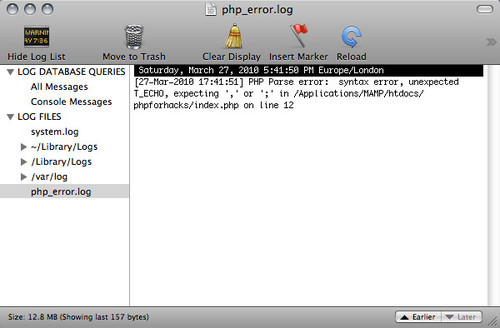
The PHP error log as shown on a Mac

The first thing to remember, then, is that every line of PHP has to end in a semicolon. If we fix this problem, we get this result:
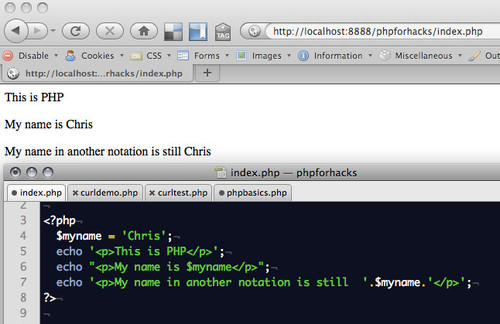
PHP rendered in a browser

<?php
  $myname = 'Chris';
  echo '<p>This is PHP</p>';
  echo "<p>My name is $myname</p>";
  echo '<p>My name in another notation is still  '.$myname.'</p>';
?>

We can see here the first few important features of PHP:

  • PHP blocks start with <?php and end with ?>. Anything between these two commands is interpreted as being PHP and returned to the document as HTML.
  • Every line of PHP has to end with a semicolon (;), or else it is an error.
  • Variables in PHP start with a $, not with the var keyword as you do in JavaScript (this is where it gets confusing with jQuery and Prototype).
  • You print content to the document in PHP with the echo command. There is also a print command, which does almost the same, so you can use that, too.
  • In this example, we have defined a string named myname as “Chris”. To print it with the echo command surrounded by other text, you need to either embed the variable name in a text with quotation marks or concatenate the string with a full stop when you use single quotation marks. This is line 3 and 4: they do the same thing but demonstrate the different syntax. Concatenation is always achieved with a full stop, never with a + as you do in JavaScript.

You can jump in and out of PHP anywhere in the document. Thus, interspersing PHP with HTML blocks is totally fine. For example:

<?php
  $origin = 'Outer Space';
  $planet = 'Earth';
  $plan = 9;
  $sceneryType = "awful";
?>
<h1>Synopsis</h1>

<p>It was a peaceful time on planet <?php echo $planet;?>
and people in the <?php echo $sceneryType;?> scenery were unaware
of the diabolical plan <?php echo $plan;?> from <?php echo $origin;?>
that was about to take their senses to the edge of what could be endured.</p>

This outputs the following:
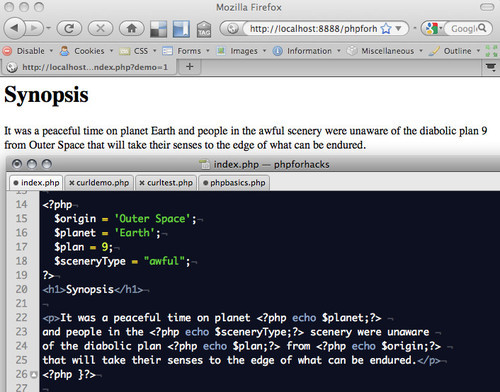
Rendered variables in PHP

Are you with me so far? To show something on the screen, particularly numbers or a string, we use echo. To show more complex structures, we need loops or specialized debugging methods.

Displaying More Complex Data Types

You can define arrays in PHP using the array() method:

$lampstack = array('Linux','Apache','MySQL','PHP');

If you simply want to display a complex data type like this in PHP for debugging, you can use the print_r() command:

$lampstack = array('Linux','Apache','MySQL','PHP');
print_r($lampstack);

This gives you all the information, but it doesn’t help you structure it as HTML:
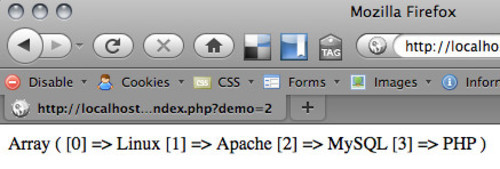
Displaying arrays with print_r

For this, you need to access the elements with the array counter. In PHP this is done with the [] brackets:

<ul>
<?php
$lampstack = array('Linux','Apache','MySQL','PHP');
echo '<li>Operating System:'.$lampstack[0] . '</li>';
echo '<li>Server:' . $lampstack[1] . '</li>';
echo '<li>Database:' . $lampstack[2] . '</li>';
echo '<li>Language:' . $lampstack[3] . '</li>';
?>
</ul>

See this demo in action.

This is, of course, stupid programming because it is not flexible. If a computer is able to the dirty work for you, make it do it. In this case, we can define two arrays and use a loop:

<ul>
<?php
$lampstack = array('Linux','Apache','MySQL','PHP');
$labels = array('Operating System','Server','Database','Language');
$length = sizeof($lampstack);
for( $i = 0;$i < $length;$i++ ){
  echo '<li>' . $labels[$i] . ':' . $lampstack[$i] . '</li>';
}
?>
</ul>

The for loop works the same as it does in JavaScript. The only difference is that you read the size of an array not with array.length but with sizeof($array).

Again, this example is not very clever because it assumes that both the $lampstack and the $labels array are of the same length and in the same order. Instead of using this, I’d use an associated array:

<ul>
<?php
$lampstack = array(
  'Operating System' => 'Linux',
  'Server' => 'Apache',
  'Database' => 'MySQL',
  'Language' => 'PHP'
);
$length = sizeof($lampstack);
$keys = array_keys($lampstack);
for( $i = 0;$i < $length;$i++ ){
  echo '<li>' . $keys[$i] . ':' . $lampstack[$keys[$i]] . '</li>';
}
?>
</ul>

The function array_keys() gives you back all the keys of an array as an array itself. This way, we can display the keys and the values at the same time.

A shorter way to achieve the same principle, and which works with both arrays and objects, is to use the foreach() loop construct:

<ul>
<?php
$lampstack = array(
  'Operating System' => 'Linux',
  'Server' => 'Apache',
  'Database' => 'MySQL',
  'Language' => 'PHP'
);
foreach( $lampstack as $key => $stackelm ){
  echo '<li>' . $key . ':' . $stackelm . '</li>';
}
?>
</ul>

This is the shortest way to display a complex construct. But it will fail when $lampstack is not an array. So, checking for sizeof() is still a good plan. You can do this with a conditional.

Using Conditionals

Conditionals are “if” statements, both in the English language and in almost any programming language I know. So, to test whether an array is safe to loop over, we could use the sizeof() test:

<ul>
<?php
$lampstack = array(
  'Operating System' => 'Linux',
  'Server' => 'Apache',
  'Database' => 'MySQL',
  'Language' => 'PHP'
);
if( sizeof($lampstack) > 0 ){
  foreach( $lampstack as $key => $stackelm ){
    echo '<li>' . $key . ':' . $stackelm . '</li>';
  }
}
?>
</ul>

Common conditionals are:

  • if($x > 10 and $x < 20)
    Is $x bigger than 10 and less than 20?
  • if(isset($name))
    Has the variable $name been defined?
  • if($name == 'Chris')
    Does the variable $name have the value of "Chris"?
  • if($name == 'Chris' or $name == 'Vitaly')
    Does the variable $name have the value of "Chris" or "Vitaly"?

Cool, but what if we want to make this reusable?

Functions In PHP

To make a task even more generic, we can write a function. In this case, we put the loop and the testing in a function and simply call it with different arrays:

<?php
function renderList($array){
  if( sizeof($array) > 0 ){
    echo '<ul>';
    foreach( $array as $key => $item ){
      echo '<li>' . $key . ':' . $item . '</li>';
    }
    echo '</ul>';
  }
}
$lampstack = array(
  'Operating System' => 'Linux',
  'Server' => 'Apache',
  'Database' => 'MySQL',
  'Language' => 'PHP'
);
renderList($lampstack);

$awfulacting = array(
  'Natalie Portman' => 'Star Wars',
  'Arnold Schwarzenegger' => 'Batman and Robin',
  'Keanu Reaves' => '*'
);
renderList($awfulacting);
?>

Note that functions do not begin with a dollar sign.

We've already seen most of the magic of PHP. The rest is all about building functions to do all kinds of things: converting strings, sorting arrays, finding things in other things, accessing the file system, setting cookies and much more, each of which does one and only one thing right. I keep catching myself writing complex functions in PHP, only to realize from looking at the documentation that a native function already exists for it.

Interacting With The Web: URL Parameters

Let's start playing with the Web in PHP… or, more precisely, playing with information that comes from the browser's address bar or with forms that we can re-use. To get parameters from the current URL, we use the global $_GET array. So, if you call the index.php script with http://localhost/index.php?language=fr&font=large, you can change the display and locale by checking for these settings. The language parameter will be available as $_GET['language'], and the font parameter as $_GET['font']:

<?php
$name = 'Chris';

// if there is no language defined, switch to English
if( !isset($_GET['language']) ){
  $welcome = 'Oh, hello there, ';
}
if( $_GET['language'] == 'fr' ){
  $welcome = 'Salut, ';
}
switch($_GET['font']){
  case 'small':
    $size = 80;
  break;
  case 'medium':
    $size = 100;
  break;
  case 'large':
    $size = 120;
  break;
  default:
    $size = 100;
  break;
}
echo '<style>body{font-size:' . $size . '%;}</style>';
echo '<h1>'.$welcome.$name.'</h1>';
?>

This means we can now send URL parameters to change the behavior of this document:
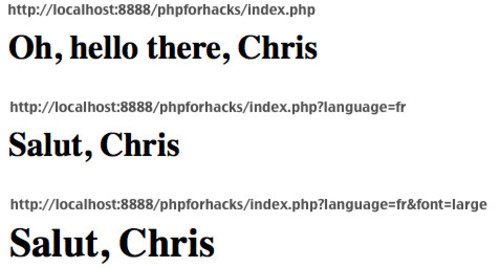
changing the content and look of a document with parameters

Notice that predefining a set of values that are acceptable for a certain parameter is always best. In the earlier example, we may as well have set the font size in pixels as a parameter and then written that to the document—but then we would have needed a good validation script to prevent end users from sending bad values or even malicious code through the parameter.

Sending malicious code via a parameter without filtering is called cross-site scripting (XSS), and it is one of the big security problems of the Web. You can prevent it by not printing out the values of parameters, and instead using them in comparisons, and by using the filters provided by PHP.

Say you want to allow users to enter data in a form that you will display later on. Make sure to filter out the results:

<?php
  $search_html = filter_input(INPUT_GET, 's',
                              FILTER_SANITIZE_SPECIAL_CHARS);
  $search_url = filter_input(INPUT_GET, 's',
                             FILTER_SANITIZE_ENCODED);
?>
<form action="index.php" method="get">
  <div>
    <label for="search">Search:</label>
    <input type="text" name="s" id="search"
           value="<?php echo $search_html;?>">
  </div>
  <div class="bar"><input type="submit" value="Make it so"></div>
</form>
<?php
if(isset($_GET['s'])){
  echo '<h2>You searched for '.$search_html.'</h2>';
  echo '<p><a href="index.php?search='.$search_url.'">Search again.</a></p>';
}
?>

See this filtering example in action. Without the filters, attackers could send parameters like index.php?s="<script>, which would execute third-party code on your website. With filtering, this malicious code is converted to HTML entities.

If you want to use POST as the method to send the data in your form, then the PHP variables will change accordingly to $_POST for the array and INPUT_POST for the filter.

Loading Content From The Web

PHP comes with a lot of file functions that allow you to read and write files from the hard drive or to load content from the Web. I've found, however, that for security reasons a lot of hosting companies disable them, especially when you try to read content from a third-party resource. The workaround is to use cURL to load information from the Web. cURL is a tool that allows you to make HTTP requests to retrieve information—a kind of browser in command-line form. I've written a detailed post about cURL and how to use it. Here, then, is a simple use case to illustrate:

<?php
  // define the URL to load
  $url = 'http://www.smashingmagazine.com';
  // start cURL
  $ch = curl_init();
  // tell cURL what the URL is
  curl_setopt($ch, CURLOPT_URL, $url);
  // tell cURL that you want the data back from that URL
  curl_setopt($ch, CURLOPT_RETURNTRANSFER, 1);
  // run cURL
  $output = curl_exec($ch);
  // end the cURL call (this also cleans up memory so it is
  // important)
  curl_close($ch);
  // display the output
  echo $output;
?>

If you run this in the browser, you'll see Smashing Magazine's home page.

Smashing Magazine homepage loaded with cURL

You could also strip out content from the data:

<?php
  // define the URL to load
  $url = 'http://www.smashingmagazine.com';
  // start cURL
  $ch = curl_init();
  // tell cURL what the URL is
  curl_setopt($ch, CURLOPT_URL, $url);
  // tell cURL that you want the data back from that URL
  curl_setopt($ch, CURLOPT_RETURNTRANSFER, 1);
  // run cURL
  $output = curl_exec($ch);
  // end the cURL call (this also cleans up memory so it is
  // important)
  curl_close($ch);
  // if a filter parameter with the value links was sent
  if($_GET['filter'] == 'links'){
    // get all the links from the document and show them
    echo '<ul>';
    preg_match_all('/<a[^>]+>[^<\/a>]+<\/a>/msi',$output,$links);
    foreach($links[0] as $l){
      echo '<li>' . $l . '</li>';
    }
    echo'</ul>';
  // otherwise just show the page
  } else {
    echo $output;
  }
?>

If you open this in your browser, you'll get all of the links from Smashing Magazine and no other content.
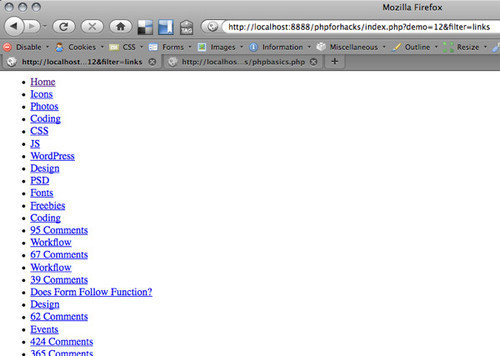
Smashing magazine links

Nowadays, though, we are more likely to use APIs than to load websites this way, which is why we need a way to convert the XML and JSON that are returned from Web services into PHP-friendly data.

Displaying XML Content

The easiest way to deal with XML content in PHP is to use the SimpleXML functions of PHP. Using these, we can turn a bunch of XML into a PHP object and loop over it. To show Smashing Magazine's RSS feed, we can do the following:

<?php
  $url = 'http://rss1.smashingmagazine.com/feed/';
  $ch = curl_init();
  curl_setopt($ch, CURLOPT_URL, $url);
  curl_setopt($ch, CURLOPT_RETURNTRANSFER, 1);
  $output = curl_exec($ch);
  curl_close($ch);
  $data = simplexml_load_string($output);
  echo '<ul>';
  foreach($data->entry as $e){
    echo '<li><a href="' . $e->link[0]['href'] .
         '">'.$e->title.'</a></li>';
  }
  echo '</ul>';
?>

The simplexml_load_string() function turns the XML document into a PHP object with arrays. How did I figure out to loop over data->entry and get the href via link[0]['href']? Simple. I did a print_r($output) and checked the source of the document by hitting Cmd + U in Firefox on my Mac. That showed me that this entry is an array. I then did a print_r($e) in the loop to see all the properties of every entry. If it is part of the @attributes array, then you need to use the [] notation.

That's all. The only stumbling block you will encounter is CDATA blocks and namespaces in SimpleXML. Stuart Herbert has a good introduction to these two issues in this article.

Displaying JSON Content

The data format JSON is the low-fat alternative to XML. It is far less complex (e.g. no namespaces), and if you work in a JavaScript environment, it is native to the browser. This makes it very fast and easy to use, and for this reason it has started to become a popular data format for APIs. In essence, JSON is a JavaScript object. For example, I could write the LAMP stack example as follows:

{"lampstack":
  {
    "operatingsystem" : "Linux",
    "server" : "Apache",
    "database" : "MySQL",
    "language" : "PHP"
  }
}

You can convert this to PHP using the json_decode() method, and get it back as a PHP object:

<?php
  $json = '{
  "lampstack":
  {
    "operatingsystem":"Linux",
    "server":"Apache",
    "database":"MySQL",
    "language":"PHP"
    }
  }';
  print_r(json_decode($json));
?>

One API that returns JSON is the Twitter trends API. If you load the API's URL with cURL and do a print_r() after json_decode(), you get the following back:

<?php
  $url = 'http://search.twitter.com/trends.json';
  $ch = curl_init();
  curl_setopt($ch, CURLOPT_URL, $url);
  curl_setopt($ch, CURLOPT_RETURNTRANSFER, 1);
  $output = curl_exec($ch);
  curl_close($ch);
  $data = json_decode($output);
  print_r($data);
?>
stdClass Object
(
[trends] => Array
  (
    [0] => stdClass Object
    (
      [name] => #nowplaying
      [url] => http://search.twitter.com/search?q=%23nowplaying
    )

    [1] => stdClass Object
    (
      [name] => #Didntwannatellyou
      [url] => http://search.twitter.com/search?q=%23Didntwannatellyou
    )

    [2] => stdClass Object
    (
      [name] => #HappyBirthdayGagaBR
      [url] => http://search.twitter.com/search?q=%23HappyBirthdayGagaBR
    )

    [3] => stdClass Object
    (
      [name] => Justin Bieber
      [url] => http://search.twitter.com/search?q=%22Justin+Bieber%22
    )

    [4] => stdClass Object
    (
      [name] => #FreakyFactSays
      [url] => http://search.twitter.com/search?q=%23FreakyFactSays
    )

    [5] => stdClass Object
    (
      [name] => #YouSoGangsta
      [url] => http://search.twitter.com/search?q=%23YouSoGangsta
    )

    [6] => stdClass Object
    (
      [name] => I ?
      [url] => http://search.twitter.com/search?q=%22I+%E2%99%A5%22
    )

    [7] => stdClass Object
    (
      [name] => #MeMyselfandTime
      [url] => http://search.twitter.com/search?q=%23MeMyselfandTime
    )

    [8] => stdClass Object
    (
      [name] => #2010yearofJonas
      [url] => http://search.twitter.com/search?q=%232010yearofJonas
    )

    [9] => stdClass Object
    (
      [name] => Easter
      [url] => http://search.twitter.com/search?q=Easter
    )
  )
  [as_of] => Sun, 28 Mar 2010 19:31:30 +0000
)

You can then use a simple loop to render the current trends as an unordered list:

<?php
  $url = 'http://search.twitter.com/trends.json';
  $ch = curl_init();
  curl_setopt($ch, CURLOPT_URL, $url);
  curl_setopt($ch, CURLOPT_RETURNTRANSFER, 1);
  $output = curl_exec($ch);
  curl_close($ch);
  $data = json_decode($output);
  echo '<h2>Twitter trending topics ('.$data->as_of.')</h2>';
  echo '<ul>';
  foreach ($data->trends as $t){
    echo '<li><a href="'.$t->url.'">'.$t->name.'</a></li>';
  }
  echo '</ul>';
?>

Putting It All Together

Let's do a quick example using all of the things we've learned so far: a simple search interface for the Web.

Using Yahoo's YQL, it is pretty easy to do a Web search for "cat" with the command select * from search.web where query="cat" sent to the YQL endpoint. You can define JSON as the return format, and the rest means you simply enhance the earlier form example:

<?php
  $search_html = filter_input(INPUT_GET, 's', FILTER_SANITIZE_SPECIAL_CHARS);
  $search_url = filter_input(INPUT_GET, 's', FILTER_SANITIZE_ENCODED);
?>
<form action="index.php" method="get">
  <div>
    <label for="search">Search:</label>
    <input type="text" name="s" id="search"
           value="<?php echo $search_html;?>">
   <input type="hidden" name="demo" value="17">
   <input type="submit" value="Make it so">
  </div>
</form>
<?php
if(isset($_GET['s'])){
  echo '<h2>You searched for '.$search_html.'</h2>';
  $yql = 'select * from search.web where query="'.$search_url.'"';
  $url = 'http://query.yahooapis.com/v1/public/yql?q='.
          urlencode($yql).'&format=json&diagnostics=false';
  $ch = curl_init();
  curl_setopt($ch, CURLOPT_URL, $url);
  curl_setopt($ch, CURLOPT_RETURNTRANSFER, 1);
  $output = curl_exec($ch);
  curl_close($ch);
  $data = json_decode($output);
  echo '<ul>';
  foreach ($data->query->results->result as $r){
    echo '<li><h3><a href="'.$r->clickurl.'">'.$r->title.'</a></h3>'.
         '<p>'.$r->abstract.' <span>('.$r->dispurl.')</span></p></li>';
  }
  echo '</ul>';

  echo '<p><a href="index.php?search='.$search_url.'&demo=17">Search again.</a></p>';
}
?>

Interaction With JavaScript

One thing people keep asking about is how to send information from PHP to JavaScript and back. This can be done in a few ways.

  • To send information from JavaScript to PHP, you need to either alter the href of a link or populate a hidden form field. The other solution of course is to use AJAX.
  • To send information from PHP to JavaScript, simply render a script element and write out the PHP information with an echo statement.
  • Using PHP's header() function and json_encode(), you can send data back to the browser as JavaScript, which allows us to use it as a src attribute of a script node.

For example, to get Smashing Magazine's RSS feed as a JavaScript object, you could do the following:

<?php
  header('Content-type: text/javascript');
  $url = 'http://rss1.smashingmagazine.com/feed/';
  $ch = curl_init();
  curl_setopt($ch, CURLOPT_URL, $url);
  curl_setopt($ch, CURLOPT_RETURNTRANSFER, 1);
  $output = curl_exec($ch);
  curl_close($ch);
  $data = simplexml_load_string($output);
  $data = json_encode($data);
  echo 'var smashingrss='.$data;
?>

You could then use this in a JavaScript block:

<script src="http://icant.co.uk/articles/phpforhacks/index.php?demo=18"></script>
<script>alert(smashingrss.title);</script>

Using header() and json_encode(), you could do any complex conversion and filtering in PHP and re-use it in JavaScript.

Summary

I hope this gives you an idea of what PHP is and how you can use it to access Web services and to build your own APIs to re-use in JavaScript. Using PHP for the Web boils down to a few tricks:

  • Use cURL to load data from Web resources;
  • Convert information with simplexml_load_string() and json_decode();
  • Check the structure of returned information with print_r();
  • Loop over information with foreach();
  • Use the $_GET[] and $_POST[] arrays to re-use form data and URL parameters;
  • Filter information from the user and from URLs using the built-in PHP filtering methods.

A lot of documentation is out there, and your best bet is to go directly to the PHP home page to read or download the documentation. Check out the user comments in particular, because that is where the real gems and examples of implementation appear.

(al)

An international Developer Evangelist working for Mozilla in the lovely town of London, England.

  1. 1

    Andrew

    April 15th, 2010 6:31 am

    Looks like someting is broken with the article…

    0
  2. 2

    Scott

    April 15th, 2010 6:48 am

    Programming and SM? Isn`t this basic stuff already learned at school?

    -8
    • 3

      Heiden

      April 15th, 2010 7:53 am

      Maybe its basic for you, not for me, and probably a lot of other people. I’ve learned some HTML in some simple ICT classes at school. I learned more through the web, and now know HTML & CSS, but I’ve never started PHP, so this is a great article to begin with. And why is such an article wrong for Smashing Magazine?
      I think its great, it only shows that its good as it gets good reactions, and sure, there will be people like you who already know this stuff. But does that matter? No. It wasn’t intended for you, but for beginning PHP-coders. Don’t immediately think something is bad, if its not handy for you.

      Great article, thanks!

      +6
      • 4

        Sisko

        April 15th, 2010 1:03 pm

        word bro!

        when i went to school, i learned turbo pascal…no wait, i had to teach my teacher turbo pascal….
        never learned php – until now

        great article, thx for it!

        +3
        • 5

          Mark.

          April 18th, 2010 5:30 pm

          I haven’t seen Turbo Pascal mentioned in YEARS. That was back when signing on to a BBS was more commonplace than dialing an ISP… and Delphi… Delphi was slick.

          Ahh I’m old.

          0
          • 6

            Christian Sciberras

            April 19th, 2010 5:29 am

            Was? Delphi still exists today (fact: Skype was made in Delphi).
            Also, for your information, there’s a free project like Delphi called Lazarus. It is also cross-platform (linux and even embedded devices such as for gumstix).

            As to the article, it does look great, however, if you want to style array elements, there’s a faster way:

            echo ”;
            print_r($array);
            echo ”;

            Or in short:

            echo ”.print_r($array,true).”;

            0
        • 7

          Diego Ruiz

          April 19th, 2010 6:07 am

          “no wait, i had to teach my teacher turbo pascal” hehehe, same here.

          0
      • 8

        Daniel N

        April 15th, 2010 3:51 pm

        I am one of those! I have learned some HTML & CSS but I’ve been considering to support my knowledge with some php and even javascript. Bookmarked.

        +1
        • 9

          cryptonit

          April 15th, 2010 10:23 pm

          I’d say PHP is basic. But this cUrl- thing is new to me and I really enjoyed reading this part of the article!
          And why shouldn’t we read something about scripting (php is not a programming language!) on SM?

          0
          • 10

            AB

            April 17th, 2010 4:15 pm

            “php is not a programming language” !! it depends what you call a programming language! PHP has suffer for a long time from the reputation of a non-professional language. A language that we don’t use to achieve real projects. But I think that this vision dating back to mid 2000s. Today PHP is a language that has nothing to prove (even if it still has its detractors). PHP has today many framworks, a comprehensive object model, and a very active community. Besides the many extensions like GTK just waiting to be exploited at their fair value. Anyway, I think that PHP is today the perfect example of compromise between flexibility, discipline and social development.

            Those who still think that PHP is not a good language, still have not understood. PHP is often criticized for weaknesses that have nothing to do with PHP itself but rather with the methods and development processes.
            I mean the same project, with the same people and another language, would give the same result. the project management is a profession, and programming is another. Remember that the programming language is a means and not an end in itself.

            0
          • 11

            George Egonut

            April 27th, 2010 4:35 pm

            Saying that PHP is a scripting language as opposed to a programming language is no more detracting from it than saying that a Porsche is a sports car, not a minivan. It is what it is. Nobody is bombing on XHTML for being a markup language, because when you need a markup language, that’s what you need. The same goes for scripting languages.

            +1
    • 12

      Steve

      April 15th, 2010 8:40 am

      I certainly didn’t learn PHP in school.

      0
    • 13

      Tom Arnfeld

      April 15th, 2010 9:12 am

      I don’t learn PHP at school. We don’t even learn HTML. Shit school.

      0
      • 14

        Jack

        April 15th, 2010 10:54 am

        Oh yeah? Last year at school we had to make a website. They made us do it… in… Powerpoint… *kills self*

        +1
        • 15

          Emiel

          April 15th, 2010 2:16 pm

          Legendary!

          0
        • 16

          Martin

          April 16th, 2010 2:11 am

          Legen – wait for it – dary!

          +1
        • 17

          An Alien

          March 9th, 2011 6:37 pm

          You don’t learn shit in HS about computers. The teachers don’t know what they’re talking about and need students to help research and find out the info themselves to study and pass exams.

          0
      • 18

        rod

        April 15th, 2010 3:36 pm

        I don’t know what kind of school teach PHP & HTML but my school will teach that when I’m 50 years old! no way! thanks mate!

        0
      • 19

        piyashit

        April 15th, 2010 7:15 pm

        same here my school was also shit.
        i learned wordperfect that time

        0
    • 20

      aurel

      April 15th, 2010 10:50 am

      i remember i it took about 3 months of classes in uni to get through these useful stuff, and now you can learn them within a week, depending on personal working speed.
      so this is a really good post ( and is free, not £3000+ as in uni )

      0
    • 21

      hateasaurus

      April 15th, 2010 1:25 pm

      predictable comment about how post is too basic! roar!

      0
    • 22

      circus

      April 15th, 2010 2:10 pm

      screw you prick.

      GREAT ARTICLE.

      +1
    • 23

      James

      April 15th, 2010 3:17 pm

      Great article… this will help designers who know how to design but thought PHP is beyond their limits.

      +1
  3. 24

    Aki

    April 15th, 2010 6:57 am

    Great post for people who already use other languages like asp or asp.net and want to explore php. Kudos!!

    +1
  4. 25

    Floris

    April 15th, 2010 6:58 am

    Great article, and awesome reference point to those friends of mine who poke me once in a while on how to get started. I am glad SM is also including these sorts of articles. Web design is going beyond just static html, and I believe it’s important that designers understand how the dynamic flexible pages work, and aren’t just converting psd into html pages and leaving the complexity to the developers.

    +1
  5. 26

    Sabek

    April 15th, 2010 7:00 am

    For those who are going to say bad comments, Smashing magazine is mainly a design community, but somewhere in the world, there is a designer who wants to learn how to code. I don’t see a programming article that negative, instead it helps to clear some scratches that a programmer could have.

    Thanks Christian

    +1
    • 27

      Linda

      April 20th, 2010 10:03 pm

      Thank you, yes. I am one of them!

      +1
  6. 28

    Leah

    April 15th, 2010 7:06 am

    thanks for sharing this. i’ve been trying to learn a little php. will give this a try.

    0
  7. 29

    Bassem

    April 15th, 2010 7:12 am

    I’m sorry but this is not the right way to guide someone to start learning php. It’s good to show him\her some of it’s potential benefits but it’s worthless as a guide to start learning a scripting language. One should first start by learning the concepts of any language (variables, arrays, data types, classes, objects, etc…) then he could start learning more about the libraries and other facilities (cURL, GD, HTML_Template, PEAR packages etc…).

    This is probably why we find so many vulnerable websites! People read one article, they think they know it all and they engage in creating messy and unprotected websites.

    If you want to learn php, go to php.net and download the manual, then do your own local server configuration (Apache for example) instead of using WAMP or XAMP or MAMP or whatever, and learn how to configure a database, MySQL or LiteSQL etc… This is the only and correct way to learn.

    0
    • 30

      Rob

      April 15th, 2010 8:03 am

      Rarely in life is there only one way to accomplish something, and this is doubly true when it comes to the learning process. No two people learn the same way. If they did, we’d be a pretty homogeneous species. I, for one, could never learn a programming language from reading a manual. If that works for you, that’s great, and I hope it makes you a stronger programmer than me in the end.

      I know many people are like me, in that they need to be able to see how something ties into the big picture before they can begin to learn the details. PHP is an easy language to pick up this way, and I’m grateful for Smashing Magazine giving an introdution to the language is such a manner.

      +1
    • 31

      Chris Heilmann

      April 15th, 2010 9:04 am

      I totally agree with you, but… If you for example read my JavaScript book you see that I exactly followed that process. The most sold JavaScript book at that time however was Dom Scripting which doesn’t follow this approach but instead concentrates on implementations. People learn differently and the idea of this was to show people quickly how to get data of the web and display it – not to learn PHP. If you read the second parapgraph this should be obvious.

      You can only teach people things when you have a foot in the door. Waving a massive manual around deters people, no matter how right we are…

      +2
      • 32

        Clarke Isackson

        April 15th, 2010 5:13 pm

        Right on, Chris! This is a great article and summarizes a lot of important php issues that I forgot because of my one-sided programming life with C#. It is amazing how one-sided some of the responses seem be toward what should go to print, but that’s what make life interesting. My neighbor is interested in server-side programming. Do you think I would throw php.com at him? No, he gets a link to this article!

        0
    • 33

      hollsk

      April 15th, 2010 11:36 am

      “If you want to learn php, go to php.net and download the manual”

      You have got to be kidding me.

      Time is far too precious a commodity to be spending on reading manuals back-to-back when what you need is a short primer. The PHP manual is even worse because the bulk of the usefulness of the PHP manual comes in the comments, and the code posted in the comments is going to be way over the head of a noob.

      I say, primers first, learn the why’s and the what else’s as you go along. One’s craft should be at least a bit enjoyable. :)

      +1
    • 34

      SeanJA

      April 16th, 2010 3:48 am

      There is nothing wrong with using xampp for local development.

      +1
    • 35

      alex

      May 17th, 2010 2:15 am

      Completely agree. There aren’t enough websites out there that stress the importance of security whilst explaining the basics of PHP through tutorials. I’m not saying that they should jump in with the paranoia from step 1 explaining about encryption / decryption, SSL, security, not using globals etc – but it would be nice to state it somewhere in the article.

      I know this from personal experience. I built a fairly big sports website averaging 2,500 hits a month for the past 3 years, and only after 18 months of doing tutorials and constantly improving my own code did somebody point out that a massive flaw that I hadn’t come across. Using global variables.

      Only because that was the way the server was setup and none of the tutorials I’d read had ever covered security – I just assumed it would all be taken care of. Now though I’ve done a full 180, and I’m on constant lookout for any security flaws in my code. This really is an issue of massive importance and should be highlighted more.

      0
  8. 36

    Adam S

    April 15th, 2010 7:21 am

    Don’t check the existence of an array using sizeof(), use is_array().

    And since is_array() is slow if it’s not an array, the fastest benchmarks say to use this:

    if(isset($array) AND is_array($array)) { /* do something */ }}

    0
  9. 37

    nacho279

    April 15th, 2010 7:21 am

    Nice article!

    0
  10. 38

    Chris

    April 15th, 2010 7:33 am

    Too basic. If you don’t use a php framework you can’t be competitive.

    -3
    • 39

      O'Ryan

      April 15th, 2010 7:49 am

      Ha! maybe you can’t.

      You can be competitive if you don’t rely on only using frameworks to get stuff done, and instead actually learn the ins and outs of your language of choice.

      don’t get me wrong i love frameworks, but with a mind set like that, you will never be competitive only handicapped. What happens when your framework doesn’t have something you need?

      knowing the basics along with the more complex would allow you to compensate for any incompleteness in any particular framework. Learn PHP, then learn a PHP framework.

      +2
      • 40

        SeanJA

        April 16th, 2010 3:50 am

        You… :O… write a plugin for the framework of your choice! Inconceivable!

        0
      • 41

        anthony

        April 16th, 2010 4:51 am

        Using frameworks is the most effective way to build websites, without a doubt. Developing with frameworks right from the gate is not smart though. Beginner’s should absolutely learn how to write sql queries and regular php first, then move on to OOP PHP and frameworks.

        0
    • 42

      Rob

      April 15th, 2010 8:07 am

      That’s absurd, like saying you can’t use vanilla JavaScript because jQuery exists. Sure, jQuery makes it easier, but knowing how it works beneath the scenes allows you to leverage its power. Frameworks are an accessory, not a means to an end.

      0
      • 43

        Andrew

        April 15th, 2010 8:41 am

        Plus you’ll save loads of time by combining plain old JavaScript with parts of the jQuery framework. I see people ask questions all the time that look something like “How do I do in jQuery?”, and the solution to their problem is basic JavaScript. The same goes with PHP and cakePHP, zend, Symfony, Codeignitor, or whichever your framework of choice is. It doesn’t make sense to try and learn how to use a framework without knowing what the framework is based upon.

        0
        • 44

          Christian Sciberras

          April 19th, 2010 5:32 am

          Yeah, how do I show a messagebox in jquery, eh?!!

          (I was just alerting you about my sarcasm)

          0
      • 45

        Brian

        April 15th, 2010 8:43 am

        I agree. I use frameworks and then build my own PHP functions on top of that.

        0
    • 46

      Chris Heilmann

      April 15th, 2010 9:07 am

      I work for Yahoo, we don’t use frameworks for PHP (well, now we started using Symfony) – again, this is *not* about building PHP solutions of fully fledged CMS – this is about using web services.

      +1
  11. 47

    cooljaz124

    April 15th, 2010 7:34 am

    Nice article on PHP :)

    0
  12. 48

    Me

    April 15th, 2010 7:44 am

    Bassem is right, you should not mix the basics of php with stuff like json, curl etc. Instead you could give some examples of basic interactions with databases and working with forms. Also, at the end of the article i expected to see a refference to w3schools and/or articles about the way pages should be coded.

    Anyone who will run through this “tutorial” and create a webpage afterwards will think, that he is a programmer, despite the fact that everything you shown here is wrong :)

    p.s. codeigniter FTW !

    0
    • 49

      Andrew

      April 15th, 2010 8:43 am

      That’s just ridiculous. It’s a myth that people really just read something and then convince themselves they’re an expert.

      +1
    • 50

      Chris Heilmann

      April 15th, 2010 8:59 am

      Telling people in the first article how to connect to a database is probably the main cause for the SQL injection vulnerabilities we have on the web. See, I can do blanket statements, too :)

      And if you go to w3schools to learn PHP then I weep for the quality of your code. The PHP docs themselves are the main source of truth, w3schools is great for quick lookups but fails to mention any shortcomings or implementation details.

      0
      • 51

        Bassem

        April 15th, 2010 10:36 am

        @Chris: Thank you for replying to my first comment. It’s very true, I sometimes read the code of some language before digging into the syntax details. However this only works because I acquired the basics of programming. Ask any non-programmer who have read your article today to modify the script or to upgrade it, and they will not be able too.

        I only talk about myself when I say that I picked up javascript from reading other people’s code and until today it feels like I haven’t mastered it yet, for the simple reason that there’s no fully documented reference I can go to when I face a syntax problem! PHP on the other hand have one, and because of this I can always find better solutions and optimize my code.

        Oh and sorry “Me” w3schools is a bad reference for beginners.

        @Tom: We are upset of the unqualified freelancers who provide low standard solutions for technically illiterate customers, who, on the other hand think they have landed a bargain by hiring those cheap programmers. Thus, denying us many good projects, and we’re hired afterward to clean after those amateurs. (Applies at in my country…)

        0
      • 52

        AB

        April 17th, 2010 5:00 pm

        “Telling people in the first article how to connect to a database is probably the main cause for the SQL injection vulnerabilities” I completely agree. Even if if I found the article very informative, I noticed that you also neglects some safety rules (to stay on the same subject). You introduced the URL parameters very well, but you displays your variables directly … what about the XSS attacks ?

        I know it’s not easy to reach all kind of topics in the same article, this is why I think that we need to have a comprehensive approach of the subject (PHP for example) without forgetting important details. For example if we introduce database, we have to speak about SQL injection and how to avoid them.for the URL parameters do not forget to speak about XSS. similarly, if we look with AJAX based asynchronous data base calls, do not forget to talk about performance … here is my approach, but unfortunately today we have a too microscopic approach and not a rmacroscopic enough. Anyway, the article is good and the topics are very interesting. Although very rarely, hosts allowed the cURL (and rightly), perhaps the next time you will give us an alternative using web services :))

        0
    • 53

      Tom

      April 15th, 2010 9:11 am

      Sounds like some people are upset by anyone having an easier start than they did. Don’t worry, not too many people will read this and be as masterful as you in a day or two.

      +1
  13. 54

    somebody

    April 15th, 2010 7:45 am

    this is helpful

    0
  14. 55

    Jack

    April 15th, 2010 7:46 am

    Average 2.26? That’s ridiculous. If you downvoted it because it’s not the sort of thing that interests you, then maybe just don’t bother.

    Chris, it was a very well written article and I hope to see more of your writing on SM!

    0
  15. 56

    Kevin Chapelier

    April 15th, 2010 8:14 am

    Explaining how to access remote webservices to beginners without telling them anything about how to cache the webservices’ output is irresponsible.

    0
    • 57

      Chris Heilmann

      April 15th, 2010 8:57 am

      So is telling people to cache by making writable files which you sadly see a lot out there. Write a post, we can link it here :)

      0
      • 58

        Kevin Chapelier

        April 15th, 2010 2:04 pm

        Just telling you should at the very least warn your readers that cURL calls and similars access to remote data sources takes a considerable amount of time and that most APIs limit the number of calls you may do in a day ou an hour.

        Rather than querying webservices and caching results at user request, I’d ideally make a daemon which would periodically make the webservices requests and store whatever I need in a database. This would be totally out of the scope of this article though.

        And I’m a poor writer :)

        0
        • 59

          Chris Heilmann

          April 15th, 2010 3:09 pm

          Have you looked at YQL? http://developer.yahoo.com/yql – it does a lot of caching for you and makes it dead easy to access web services.

          0
          • 60

            50m30n3

            April 17th, 2010 9:24 pm

            Using curl is hardly worthy of “What You Need To Know To Play With The Web.”

            And f**k Twitter. Who wants to hear more about Twitter.

            0
  16. 61

    Adrian

    April 15th, 2010 8:18 am

    great article, helped me a lot.
    keep on the great work

    0
  17. 62

    saidPeter

    April 15th, 2010 8:22 am

    exactly what ive searched for
    thanks

    0
  18. 63

    Matt

    April 15th, 2010 8:22 am

    As a self taught programmer, I appreciate the occasional code based post. I’m currently studying PHP to create a more dynamic web experience and this helps expand what I’m learning and guide me in what I need to read more into… especially XSS. Thanks a bunch.

    0
  19. 64

    nlahaise

    April 15th, 2010 8:25 am

    I’m a self-taught programmer and designer. I started out on ASP and have forced myself to transfer over to PHP. I think this is a great article and is very relevant. I would recommend it to anyone I know who is learning PHP. My only critique would be that some of the code could have used some better explanations as to what is going on. (the curl functions for example) This is not that big of a deal as someone who is self-taught I am used to using the web to learn. Hope to see more articles on PHP!!!

    0
  20. 65

    Aziz

    April 15th, 2010 8:34 am

    for Russian-speaking developers, there is a perfect tool for local webserver denwer. it does everything by itself. I forgot what is editing vhost, and other config files on any changes. denwer does it by itself….

    0
  21. 66

    ed

    April 15th, 2010 8:38 am

    I’m afraid you’re mistaken, Schwarzenegger’s performance on batman & robin was oscar worthy

    0
  22. 67

    logudotcom

    April 15th, 2010 8:41 am

    It is very nice for those are very beginners

    0
  23. 68

    Andrew

    April 15th, 2010 8:44 am

    Good article, and I’d love to see more web programming based articles. I just can’t seem to find a good blog for web programming, so it’d be cool to see some more here. :-p.

    0
  24. 69

    Ferdy

    April 15th, 2010 8:50 am

    Good introductionary article. I just wanted to point out that in real life / professional development most people hardly ever use “echo” to output variables. A particular bad practice is to include actual HTML in the echo string. The reason is that things then get messy and it will be really hard to seperate content from code, especially if you work with designers.

    Instead, most of the time a template engine like Smarty is used. A lighter alternative is to use the inline syntax. Sorry, this comment form wont let me post that syntax. Again, you do not include actual HTML in those brackets, only PHP.

    I can imagine that this goes too far for a beginner’s article, but I think it is important to avoid bad practices from the start.

    0
    • 70

      Chris Heilmann

      April 15th, 2010 9:09 am

      Again, blanket statements. I work for Yahoo and we use echo in our templates all the time. Granted, we echo strings that went through a localisation engine. This is like writing a JavaScript article and people claiming that if you want to be professional you need to use jQuery – horses for courses.

      0
      • 71

        Ferdy

        April 15th, 2010 12:25 pm

        Equally blank as mentioning that you work for Yahoo in every comment you make. As if that means you have the moral right to decide on what is right or wrong. The analogy with jQuery is ridiculous, all I was saying is that mixing markup in PHP is fine for a simple example, but quickly becomes an unmaintainable mess. Smarty could be an answer, native PHP with a controller up front can be an answer too. Either way, I would not have this opinion if I would not have seen the actual mess in the last 10 years or so at various companies. But hey, what do I know. I don’t work for Yahoo.

        0
        • 72

          Chris Heilmann

          April 15th, 2010 5:41 pm

          The point is that I *thought* I know PHP well before I started working in a really large and performance-orientated environment. I’ve always advocated for templating systems before but for an article like this it would be simply overkill and actually detrimental to the cause.

          A great example of the same folly is Stuart Langridges’ DHTML Utopia book, which was the first one to mention Ajax but it used a library called Sarissa for all the examples. Nobody ever heard about that thing ever again – if he had just explained Ajax his book would have sold like hotcakes and people would have had a first hand experience how to write Ajax solutions.

          That you came across unmaintainable code is sad but also the norm out there. I have seen terrible markup in Smarty templates, too – nothing is a perfect solution that makes sure that people write clean code. This is an introductory article and its job is to allow people to use web services without resorting to JavaScript-only solutions – if you want to write a great PHP article, please do. This has nothing to do with who you work for but how you understand the aim of a certain publication. It is easy to criticise – much harder to do.

          0
          • 73

            Ferdy

            April 15th, 2010 10:27 pm

            Fair enough. But I’m sure web development in Yahoo context is not the norm. I can imagine the performance requirements are much different, and that things like template engines, ORM and other framework technologies cannot be used there.

            By the way, I did state in my original comment that my suggestion was probably too much for a beginner’s article.

            Finally, you are right that unmaintainable code occurs in both template engines and native PHP. Partly the problem cannot be solved. If you have complex view logic that you need to intertwine with markup, I still have not found a way to keep a clean, simple seperation.

            0
    • 74

      Tom

      April 15th, 2010 9:22 am

      The mistake here is “MY practices == good practices”.

      Smarty and other template engines serve a perfectly decent purpose. So, however, does PHP, which does a pretty good job of being a template engine in it’s own right by being embeddable within HTML.

      And there’s a clear difference between what you’re talking about, echoing markup with variables, and, as a rough example:

      <a href="<?php echo $link->href; ?>"><?php echo $link->text; ?></a>

      Where you’re just using PHP as the template engine, filling in the gaps in the markup, no echoing any markup. And it’s markup which could be edited by a designer very quickly trained not to fiddle with the bits between the <?php ?>. And it avoids adding another layer of abstraction of a 3rd party template engine.

      But then it all comes down to how YOU develop fastest, and what level of performance is important to you.

      0
      • 75

        Ferdy

        April 15th, 2010 12:18 pm

        What I am saying is that including echos throughout your PHP is fine for a simple example like this, but too often I have seen pages with a lot of view logic that are extremely hard to maintain because the markup is a mix of standalone markup and markup inside php scripts. I know it is a delicate balance and partly up to preference, but maintainability is much more important than preference.

        0
  25. 76

    Massimiliano

    April 15th, 2010 9:02 am

    What’s the macosx editor in the screenshots? Thanks :)

    0
    • 77

      Chris Heilmann

      April 15th, 2010 9:11 am

      TextMate – the one and only.

      0
      • 78

        thewatcher

        April 15th, 2010 3:27 pm

        Do you use TextMate at Yahoo? Since you work at Yahoo?

        0
        • 79

          Chris Heilmann

          April 16th, 2010 1:13 am

          Since I shifted to Mac – so about 2 years ago. Before that I used Notepad++ and before that Homesite.

          0
  26. 80

    Sergio

    April 15th, 2010 9:09 am

    Superb work. From the very beginning to use of web services and AJAX. Will use it as a quick reference. There s no need to dive too deep in PHP if you don’t want to. A versatile coder can just pick what they need for a particular scenario and this is a great example of it.
    Looking forward to see more articles like this, I addition to those which inspire, these help bringing life to a site.

    0
  27. 81

    Sam

    April 15th, 2010 9:13 am

    I’m sure this would have been a great article if I was already a javascript coder. Right now I’m a designer who has just begun the road toward learning development. I was only able to follow you somewhat because of my limited experience with QBasic from, like, 15 years ago.

    I see what you were going for: an intro to php for those who already get coding but just haven’t worked in php. I think you met that goal just fine. But since there are probably a lot of designers out there who need to learn coding from square 1, it would be nice to see an article like that some time as well.

    0
  28. 82

    babaya

    April 15th, 2010 9:15 am

    Great article. Thank you for the info. Haters gonna hate.

    0
  29. 83

    Amos Vryhof

    April 15th, 2010 9:26 am

    The article seems OK…. but it seems to go from nice and basic to pretty advanced real quick. It’s much better than a lot of articles I have seen out there though.

    Either way, it’s probably a good idea to get familiar with some of the basic fundamentals of programming before just reading an article and starting to run code on any server that is accessible outside of your own network. (and MAMPP/XAMPP (or any default W/M/LAMP configuration) probably shouldn’t be accessed by the public either)

    Thanks for providing what will probably be a good building block to get people who might be interested going down the right path.

    0
  30. 84

    Jorgen

    April 15th, 2010 9:28 am

    Good to see more programming articles on SM :)

    0
  31. 85

    chris

    April 15th, 2010 9:28 am

    Good presentation of PHP…

    But who’s the coder that mix PHP, Js and HTML ?
    Embedding both php (or any other language) with HTML is like to mix all the menu at the restauran : it could be the same, but it could be risky….

    A refresh about templates could be a good thing …

    0
  32. 86

    Mikhail

    April 15th, 2010 9:31 am

    This has to be moved to php.net into section “Start programming 5 min or less”.

    If php had this kind of tutorials, I would never bothered with any other language.
    Good article.

    0
  33. 87

    zeejah

    April 15th, 2010 10:26 am

    A must read for all beginers (in web development). not for those who already know much that they just browse web for something new. Article is simple, easy and highly effective for starters. great job done Chris.

    0
  34. 88

    Gert Hengeveld

    April 15th, 2010 10:46 am

    Great so see SM writing articles on programming too. PHP is a good place to start since its the easiest one to pick up. Sure the code discussed isn’t that great, or makes for the perfect starting point, but there’s some good stuff in it. I didn’t expect to see JSON or XML discussed in a first article.

    What does strike me is the usage or curl. Although its a must for connecting to APIs, it’s not needed in the examples. For example, simplexml_load_file() can take an external URL just fine, and file_get_contents() will hand you the Twitter Trends JSON as a string. I understand using curl to connect to Twitter (curl can do authentication as well, if required), a more elaborate example utilizing more curl features would be better.

    Maybe discussing web services is something for another article?

    0
    • 89

      Chris Heilmann

      April 15th, 2010 5:48 pm

      Actually I found that a lot of virtual servers you get on the web have simplexml_load_file turned off for external URLs as a lot of PHP backdoors use it – this is why I am using cURL.

      0
  35. 90

    Sun Pietro

    April 15th, 2010 10:54 am

    Hi, great article. But I have a question. What if in the decoded json doesn’t exist something like [trends], but json starts from the Array(… ?? How to display data then?
    It looks like this:
    “Array ( [0] => stdClass Object (”
    but not like
    “stdClass Object
    (
    [trends] => Array
    (
    [0] => stdClass Object
    (“

    0
  36. 91

    Rick

    April 15th, 2010 11:22 am

    Please remember folks, being able to use a little basic PHP makes you a programmer as much as being able to draw some rounded corners in Photoshop makes you a webdesigner…

    0
    • 92

      Chris Heilmann

      April 15th, 2010 5:49 pm

      Please remember to read the article – especially the second paragraph.

      0
  37. 93

    ATGP

    April 15th, 2010 11:28 am

    Good article for beginners.
    Would also like to see more PHP articles!

    0
  38. 94

    Ben Moll

    April 15th, 2010 11:39 am

    Thank you very much for that article.
    It is exactly what I was searching for.
    Do you know any good PHP frameworks for building a template based website?

    0
  39. 95

    Kharismatic

    April 15th, 2010 11:53 am

    Very good overview and it is good to see the new coding etiquette of PHP. If you have done any work dealing with OOP (Object-Oriented Programming), you won’t have a problem learning PHP.

    Another good resource to learning more about PHP is W3Schools:
    http://w3schools.com/php/default.asp

    0
  40. 96

    Aaron Martone

    April 15th, 2010 12:59 pm

    ColdFusion has always been my preferred language. To each his own, we had a guy who came in and knew only PHP, but we converted him over to CF, and though he still loves PHP (hard to get programmers to change their first ‘love’, he really likes how ‘to the task’ CF is, and how little code it takes to do things.

    0
  41. 97

    Corbin

    April 15th, 2010 1:09 pm

    Superb refresher on PHP! You guys rock harder than volcanos

    0
  42. 98

    Mahmoud Tantawy

    April 15th, 2010 1:49 pm

    Well, not for someone who *never* read about PHP, but helpful for those who know the basics and need to step up with their knowledge

    Thanks though for the efforts, i’ll certainly learn many things :)

    0
  43. 99

    David Adorno

    April 15th, 2010 2:40 pm

    Most of my experience in the industry has been in graphical design, however recently I have been learning much more about programming. I know enough to get me in trouble. I find this article not really breaking down the nuts and bolts. I found this article on Zend to be very helpful actually explaining more in detail what makes it all tick.

    http://devzone.zend.com/article/627

    It is longer but it is thorough. I take a few minutes a day to read some more and practice at the end of my day.

    0
  44. 100

    richard

    April 15th, 2010 3:42 pm

    I don’t work for Yahoo.

    0
    • 101

      Chris Heilmann

      April 15th, 2010 5:48 pm

      Want to? We’re hiring!

      0
      • 102

        Martin Chaov

        April 15th, 2010 6:44 pm

        I would like to :) Do you want me to sent my CV :) :) :) :) :) :) :) :)

        0
  45. 103

    Rafi

    April 15th, 2010 4:40 pm

    Great article,
    It is really useful to those people whos having little bit programing knowledge and to the freshers.

    0
  46. 104

    Jestep

    April 15th, 2010 5:51 pm

    While I don’t think that this is inherently a bad article, I think that security should be stressed or at least mentioned… If someone were to start developing with just this amount of knowledge, there’s a good chance that their site or server would end up getting hacked, or become susceptible to XSS or injection attacks. While your code has none, all it takes is a new php user creating 1 unsanitized variable and the server is as good as gone…

    For those who don’t want to read php.net, which is just ridiculous, or anyone who wants a great php learning resource, check out: http://www.tuxradar.com/practicalphp

    Realistically, if you have any interest in using php, or have actually ever tried to develop using it, php.net is probably the most visited site in your bookmarks. If you’re not willing to do research on that site, you probably have no reason to be using php.

    0
  47. 105

    Martin Chaov

    April 15th, 2010 6:41 pm

    Nice shot, a bit surprising thou – this is still a design magazine – isn’t it?

    Anyway it is good for all unknowing and ignoring designers out there to see a piece of what the development progress involves, besides using CMSes and other ready solutions.

    0
  48. 106

    Sean

    April 15th, 2010 7:13 pm

    Great article! I wish I could have found something like this when I was beginning PHP. The next best thing for people getting their toes wet is http://devzone.zend.com/article/627 – maybe put it in as a further reading link for this article?

    0
  49. 107

    Lokesh Yadav aka. Lucky

    April 15th, 2010 8:31 pm

    Hey! i am lucky to have this article today. This is of great help for people like me who are intermediate in HTML, CSS & Javascript.

    Last day, i was trying to search articles on “How to use WordPress Templates”. One of my friend told me that i need to learn PHP basics first prior start working on wordpress. Your article gave me that first step.

    Really appreciate if you can come up with more articles on PHP.

    Can you please advice me few very good sites where i can get my php basics done ?

    0
  50. 108

    Jack Griffiths

    April 15th, 2010 9:40 pm

    Probably one of the very few articles I’ve read all the way through.

    It’s good for even a (sort of) experienced PHP developer myself.

    0
  51. 109

    Sven den Otter

    April 15th, 2010 10:31 pm

    PHP on Smshing Magazine! =D

    0
  52. 110

    Sven den Otter

    April 15th, 2010 10:32 pm

    PHP on Smashing Magazine! =D

    0
  53. 111

    Jim Westergren

    April 15th, 2010 10:44 pm

    Thanks a lot for this article – just what I needed. cURL is something new for me and I would love to play around with it.

    0
  54. 112

    Thai

    April 15th, 2010 11:14 pm

    It’s the elegance of the basic stuff that gets my imagination going. Hey, I’m pretty stupid so you need to dummy it down for me. This is going in my collection of PHP bookmarks.

    0
  55. 113

    StoyanDelev

    April 15th, 2010 11:22 pm

    it’s nice for beginners

    0
  56. 114

    fpiat

    April 16th, 2010 12:08 am

    I’m always surprised how people can write so ugly PHP code and in the same time promote good javascript pratice

    0
    • 115

      Chris Heilmann

      April 16th, 2010 1:18 am

      So how would you do the same? Write it put it on github. Please quantify your statements.

      0
      • 116

        fpiat

        April 16th, 2010 2:01 am

        One example : echo.
        Why not use comma instead of concatenation (less operation, less memory, etc) :
        echo ” . $key . ‘:’ . $stackelm . ”;
        ==> echo ”, $key; ‘:’, $stackelm, ”;
        Even more readable with double quote:
        echo ” $key : $stackelm “;
        Specially with HTML code like this :
        echo ‘clickurl.’”>’.$r->title.’‘.
        ”.$r->abstract.’ (‘.$r->dispurl.’)';
        ==> echo “clickurl’> $r->title “,
        “$r->abstract ( $r->dispurl )”;

        Mixing PHP with HTML : a construct like
        <input type="text" name="s" id="search" value="”>
        is absolutely unmaintenable. It just 1997 ASP code!

        Why saying “you must separate JS, CSS and HTML”, “JS has been completely depreciated by bad example on the web” and showing this kind of stuff.

        0
        • 117

          Serkan Yılmaz

          April 16th, 2010 6:30 am

          If you use double quotes (” “) for strings, php makes an extra process of searching for a variable in that string. When you use single quotes (‘ ‘) it skips that step knowing you don’t have any variables to replace with the actual value. So using single quotes saves process time and resources.

          By the way I haven’t seen anyone talking about the tag <?=$variable?>. It is the same as <?php echo $variable; ?> but more readable and space saving.

          Instead of writing
          <?php echo “<input type=”text” name=”q” value=”$search” />”; ?>
          or
          <input type=”text” name=”q” value=”<?php echo $search; ?>” />
          you just write
          <input type=”text” name=”q” value=”<?=$search?>” />

          You can even use ternary operator with it easily like;
          <input type=”text” name=”q” value=”<?=isset($search) ? $search : ‘search statement here’?>” />

          0
          • 118

            Djkanna

            April 17th, 2010 5:11 am

            That’s because the prefered method is using the full php tag with an echo (couldn’t give example for some reason it deletes it out.)

            As for the double quotes vs singular quotes well that’s for another time there is a lot more factors involved than “php makes an extra process of searching for a variable in that string.”.

            0
          • 119

            David

            April 17th, 2010 8:00 am

            About fpiat’s and Serkan Yilmaz’s suggestions – I’m not sure these are best suited for the complete noob that this article is aimed at.

            My sense is that Christian Heilmann judged it pretty well spot on. Whatever merits your suggestions here have are best taken on board at a later stage in the learning process.

            IMO, of course! ;)

            0
  57. 120

    swape

    April 16th, 2010 12:23 am

    Nice article. here is an article for all new PHP user.
    Here is a tutorial on how to write a nice and clean PHP code.

    http://www.swape.net/w/2009/11/my-php-code-standards-part-1/

    +1
  58. 121

    Vijay Negi

    April 16th, 2010 12:27 am

    Hi Christian,
    I was thinking to learn PHP because of its so many good features… But i could not find any resource to start with…

    thanks for such a great article..

    I am loving it!!! -;)

    0
  59. 122

    jhoney

    April 16th, 2010 1:26 am

    Very Interesting,

    0
  60. 123

    Tajhum

    April 16th, 2010 1:34 am

    Coming from the design world, a smashing-sized article on PHP basics doesn’t seem that scary :) Thank you!

    0
  61. 124

    Richard Chivers

    April 16th, 2010 1:44 am

    Very Interesting

    0
  62. 125

    Stu

    April 16th, 2010 3:05 am

    This article is playing havoc with my RSS feed on iGoogle

    0
  63. 126

    Adam

    April 16th, 2010 3:18 am

    Very helpful. Thanks!

    0
  64. 127

    clea walford

    April 16th, 2010 3:24 am

    thanks for a great article!

    0
  65. 128

    Andromeda

    April 16th, 2010 3:58 am

    Yeah.. although it’s good, but it’s not suitable for this Smashing Magazine… Dude, it’s too techie..

    0
  66. 129

    Nina Paul

    April 16th, 2010 3:59 am

    The MOST crisp tutorial on PHP for a newbie like me!…. I really love such articles. Keep up the good your work!!

    0
  67. 130

    Podveg Razvedcheka

    April 16th, 2010 4:08 am

    Ah.. I wish to know PHP, but have no time to learn it unfortunately now

    0
  68. 131

    Dave

    April 16th, 2010 4:17 am

    Getting the “big picture” (Rob’s comment) is definitely important.

    There are two words associated with PHP that I do not find to be helpful: EASY and SIMPLE. It is not easy for me, nor is it simple…although I love it!

    PHP can be written as beautifully and as competently as any computer language. I’d say that it is the “Rorschach language.” It is what you want it to be, or what you are capable of making it.

    0
  69. 132

    John Faulds

    April 16th, 2010 4:19 am

    I can’t believe you called out Natalie Portman for awful acting in Star Wars. Alongside Hayden Christensen, anyone would look like an Oscar winner. :O

    0
  70. 133

    anthony

    April 16th, 2010 4:34 am

    I don’t know if the statement “php is a very easy and forgiving language” is correct. If your are a C++ or Java developer already, it is easier to write in comparison. However, compared to html/css it is MUCH more difficult to learn. I think most people here are coming from the html background as designers.

    I started writing php about 7 years ago and it took a lot of work to get to the level I’m at now. There were many nights of beating my head off of the table over a script. I can’t say that there was anything “easy” about any of it.

    That said, I am very glad I took the journey to learn php. It’s gave me many more opportunities for work as I can build an e-commerce site 100% myself. I couldn’t do that at first mind you. It took years of php programming (and security knowledge) to that. In fact, I’m doing more php programming then designing these days.

    0
  71. 134

    Kristian

    April 16th, 2010 6:01 am

    Nice article.

    This is a bit knit picking but there is a possible XSS vector in “Interacting With The Web: URL Parameters”. If register_globals is on, you could give any value you want for $welcome.

    My point is you should always initialize variables.

    Given this is an article for beginners…

    0
    • 135

      Chris Heilmann

      April 17th, 2010 2:15 am

      Very good point! Agreed.

      Then again a PHP server with register_globals on should not be on the web – it is almost criminal.

      0
  72. 136

    JorgeRB

    April 16th, 2010 7:40 am

    Great article! You must have read my mind! Definitely a great start to what should be a PHP filled weekend.

    0
  73. 137

    Matthias

    April 16th, 2010 8:38 am

    I really liked your article!
    If anyone starts programming PHP scripts and asks me how to start I’ll show him this article!

    0
  74. 138

    shovelnose

    April 16th, 2010 2:45 pm

    I think smashing mag needs to do more on the development and back-end side. This includes asp.net, ROR, more php and coldfusion.

    0
  75. 139

    Mark @ AlchemyUnited.com

    April 16th, 2010 3:32 pm

    Thanks Chris. I think you did well at hitting the target you were shooting at. Given the goal more links to reference – basic and intermediate – might have been in order.

    0
  76. 140

    smc

    April 16th, 2010 4:53 pm

    Telling inexperience programmers that every line must end in a semicolon can lead to results like this:
    if (false);
    {
    echo “Hey!”;
    }

    (semicolons left off the bracket lines)

    Until today, I had never heard of this error, but at least one blogger felt it worth mentioning: http://developers-arena.blogspot.com/2010/04/5-php-mistakes.html

    How about every statement must end with a semicolon

    0
    • 141

      Chris Heilmann

      April 18th, 2010 4:14 am

      That is the more accurate description, yes. However, I have never seen code like the one you showed. If someone is trained to put the curly brace on a newline then they normally also understand that there is no semicolon there. I don’t like newline curly braces – I am too much of a JS guy :)

      0
  77. 142

    Amy

    April 16th, 2010 5:01 pm

    What a great intro article on PHP. I’m a designer, not a programmer, but I have to muck around in WordPress PHP files quite a bit. This article sort of codifies things I’ve learned through trial and error — “Oh yeah, I figured the missing semicolon was what broke it, cool,” so it’s a wonderful basic floor for me, as it were. GIves us newbies something to stand on so that we could learn more if we wanted to.

    Unlike the experts here who haven’t realized that an introductory article isn’t geared toward them, I welcome more pieces in this vein. Thanks a lot.

    0
  78. 143

    Jasper

    April 17th, 2010 3:31 am

    I only have a couple of criticisms of this article:

    1. Curl and the way PHP interacts with it is quite an old methodology, which is being superseded by object oriented practices. It’s also unnecessarily complex for this introduction, when functions like file_get_contents exist and perform the same task as your example.

    2. Using regular expressions to parse content of an unknown size is extremely bad practice, due to the buffer size limits of regular expressions. If you’re trying to extract HTML, you’re far better off looking into DOM parsing, which would be quite familiar with people who have used Javascript (this article seems loosely aimed at those people?) as it’s much more reliable when dealing with unknown source sizes.

    Other than that, great introduction.

    I’m also pleased to see a lack of database element to this tutorial – it’s particularly dangerous teaching people who don’t know what they’re doing about connecting to data sources without learning about the potential damage they can cause!

    0
    • 144

      Chris Heilmann

      April 18th, 2010 4:12 am

      Thanks, you are quite right. The reason I am using curl is – as I explained earlier in the comments here – that *every* virtual server I have used so far – Dreamhost, MediaTemple, 1and1… have file_get_contents turned off for external URLs as it is part of a “safe” setting of servers. cURL will always work – strangely enough.

      As for DOM parsing of HTML content – that assumes that the content is valid HTML which sadly enough is more than often not the case. You’d have to explain how to run the results through Tidy beforehand or does the DOM parser by now do that automatically? Personally I use YQL for HTML parsing and leave it to that server to do the dirty work for me.

      0
      • 145

        Kristian

        April 19th, 2010 1:46 am

        Just a side note for interested…

        allow_url_fopen = off

        is the reason for file_get_content() not working with URLs.

        It is used for preventing inclusion of remote files (though allow_url_include exists).

        IMO, using and teaching usage of cURL is more useful :D

        0
      • 146

        Jasper

        April 19th, 2010 7:35 am

        Great points – however, crawling the DOM usually works (even on invalid HTML – I’ve never had it actually break) if you use the error suppression operator. All it’s suppressing (usually, in my experience) is a warning that the HTML doesn’t validate. It should still work. Not exactly ideal, but definitely advisable on production code.

        0
  79. 147

    David

    April 17th, 2010 4:20 am

    As a commenter already said above (in slightly different terms!), given the target, this article is a bullseye!

    This will be of particular interest for users of Wolf CMS, one I do a lot of work with. It makes PHP directly available in the backend. Many of its users come from the design side (since “templating” is simple CSS + (X)HTML), but get a bit flustered by the PHP. This article *instantly* becomes the reference point for such folks!

    Many thanks!

    0
  80. 148

    Patrick Dubinski

    April 17th, 2010 5:25 am

    Good Introduction to PHP programming.

    This may be out of the scope of the article, but… is there anyway to disable the error message in PHP so it doesn’t take down the whole site? Like in the *.htaccess file ?

    0
  81. 150

    Arun Krishnan

    April 17th, 2010 6:26 am

    Thanks, i am a designer. Now am studying php. This article is very helpful to me for my better improvement in php. :)

    0
  82. 151

    Alpesh Darji

    April 17th, 2010 10:58 am

    Awsome article !! Keep pushing.

    0
  83. 152

    Vishal Goyal

    April 18th, 2010 4:13 am

    This is :) not for me….. really don’t understand open source

    -1
  84. 153

    Greg Babula

    April 18th, 2010 6:32 am

    Thanks for this, I need to step my PHP game up, been stuck doing classic ASP for a while!

    0
  85. 154

    Jerome Bohg

    April 18th, 2010 6:49 am

    Because this article covers some basics of PHP doesn’t make it a bad or weak article. If you think it’s to basic … well .. skip to the next article. I’m an advanced PHP user and never had used cUrl before so I definitely learned something from this.

    0
  86. 155

    abanas

    April 18th, 2010 7:20 am

    Thank you for sharing.

    It helps me a lot. I’ll make link to this article.

    0
  87. 156

    Paula

    April 19th, 2010 12:01 am

    I’ll be sure to bookmark this. Thanks! Also glad to see some coding stuff posted here. In great web apps designing and coding go hand in hand.

    0
  88. 157

    Kwing

    April 19th, 2010 3:57 am

    Very cute PHP tutorial. It consists of all the necessary info to begin with PHP.

    Cool :)

    0
  89. 158

    Marcel Havenith

    April 19th, 2010 4:02 am

    Thanks for this article!
    I’m sure this guide is too basic for many people but for me, it’s perfect.
    It’s the first guide for PHP where I understand the single steps and get a feeling how PHP works.
    Thanks again!

    0
  90. 159

    Teo

    April 19th, 2010 7:09 am

    Thanks for this nice intro in php!
    bookmarked!

    0
  91. 160

    Edward Wright

    April 19th, 2010 7:38 am

    Thumbs up for an excellent introduction to PHP. I’m now enjoying my 39th year as a developer, have used many languages, and found it informative. I’ve had little exposure to PHP and found the sections on displaying XML and JSON content interesting. Interesting enough that I’ll probably dive a little deeper.

    As an aside, since the article is an introduction it can’t be expected to teach web application security and database concepts. But “Big ups” for including sanitizing URL content.

    0
  92. 161

    J.Z.

    April 19th, 2010 1:03 pm

    Nice job. I thought this article was specific to the desired topic and the right length. Your use of simple examples that offer re-enforcment of the subject material was perfect.

    I often find interesting topics with no working examples, or examples that don’t produce a truly functional model – this article did not fall pray to either of these pitfalls.

    Thanks for the time and effort for an informative subject. :-)

    0
  93. 162

    Neth

    April 19th, 2010 6:43 pm

    Great we’re going to have designers tell clients and others now.. ‘ Oh hey I know PHP ..’ an erroneous statement……

    This is why Smashing Magazine should just stick to posting about Design in general. First off, even the author of this article in the posts tells you this isn’t even an introduction to PHP itself. If designers want to get into development and think they can handle learning PHP… well you’re in way over your head. You have to understand that there are two ends to the web, front and back, and if you don’t already understand this ….. .. just stick to designing and I guess WordPress…

    Leave the real development to the Web Developers of the world and we’ll leave the designing to you the designers.

    If you’re a designer and you want to learn about development, I suggest you understand the full capacity of a front-end developer… ( A REAL ONE THAT DOESN’T WORK IN TRANSITIONAL DOCTYPES!!!! )

    This article proves.. that there is a design community and a developer community. You can not have a mixture of both.. it goes against the logic of the way the web is made to function anyway.

    0
    • 163

      Chris Heilmann

      April 20th, 2010 2:25 am

      Yeah, people who do not read articles (paragraph #2) might come up with this conclusion.

      Actually after almost 14 years of development I can say that good development is designers and engineers working together. If you can’t accept that you will have a bad time.

      0
  94. 164

    Andrei C

    April 20th, 2010 1:22 am

    Never learned in school something like this. I’ve learned PHP a few years ago from a series of video tutorials (made in 1992 or so, by some guys.. great stuff..), and also practicing and practicing.
    I also learned javascript, CSS, and SQL…. all you need for web development.

    Great article, Thanks,
    Andrei, from Romania

    0
  95. 165

    TechiePark

    April 20th, 2010 3:21 am

    Its a gr8 tutorial..Thanks a lot mate..

    0
  96. 166

    Andrew

    April 20th, 2010 5:48 am

    Great, now translate it to RoR :)

    0
  97. 167

    qqqq

    April 21st, 2010 3:50 am

    What You Need To Know To Play With The Web

    0
  98. 168

    qqqq

    April 21st, 2010 4:19 am

    We can see here the first few important features of PHP:

    0
  99. 169

    noob_soup

    April 21st, 2010 10:41 am

    Rails FTW!!

    0
  100. 170

    Erik

    April 25th, 2010 9:27 am

    I’d love to see articles like this for helping people get started with other languages, especially those that seem more daunting like Java. Good stuff!

    0
  101. 171

    Allen

    April 27th, 2010 11:23 am

    For those of you who despised reading the article because of it’s basic-ness. Please be sure to start with the first sentence of an article in the future. Fundamentals of PHP doesn’t mean they’re going to show us how to build the next operating system…just give a start to those of us who haven’t gotten it. i also learned Turbo Pascal programming in school. Thanks again SM.

    0
  102. 172

    George Egonut

    April 27th, 2010 4:51 pm

    I just wanted to say thanks for an informative article. Coming from a web design background but knowing C# quite extensively, your examples helped me jump in quickly. Also, I’d like to point out to the detractors … just look at the title, realize the intent of the article, and form an opinion based on that.

    0
  103. 173

    tarakbr

    May 2nd, 2010 3:08 pm

    Just amazing the number of responses this article has generated so far! One has to spend more time reading the comments than reading the article itself…
    Anyway, i think that Heilmann did a great job writing this article: i like the way he proceeds and for me it makes perfect sense. I am sure this is far from being complete and i will be surprised if any one-or-more-pages tutorial would claim to be a complete ref. It is just an initiation into PHP. For those who want to delve into more “specilaised” stuff, they can pick some books from any bookshop and here they go. I think it is always about the beginnings: I might read an advanced book and I will just immediately think: PHP is not for me and I will try something else instead. This article does the opposite: After reading this, I am sure many of us newbies will get a flavour of what it is without being led to the “forceful” conclusion that it is only for those “High IQs” out there. So, for me, reading this is really worth it and i will try to “polish” my skills gradually. i promise i will not pretend to be an expert until I read all the manuals i can find.. Bottom of the line: we know you know a lot of things but only “nice” articles like this one will entice us to learn more PHP.

    +1
  104. 174

    Amjad Iqbal Khan

    May 4th, 2010 12:58 am

    I think this tutorial is also useful even for the experienced programmers. This kind of tutorials should be encoureged.

    0
  105. 175

    lidya

    May 10th, 2010 11:06 pm

    thanks for your information,,,
    its very usefull

    0
  106. 176

    Osmar Sexto

    May 14th, 2010 5:01 am

    Nice article, nice information…

    0
  107. 177

    Tahsin Hasan

    June 30th, 2010 5:30 am

    Hello,

    nice article, see how to submit a form using curl http://newdailyblog.blogspot.com/2010/06/submitting-form-remotely-using-curl.html.

    0
  108. 178

    Kartik

    July 2nd, 2010 2:47 am

    Great Tutorial. .

    +1
  109. 179

    barberj

    July 10th, 2010 10:39 am

    Stuck at the cURL functions. Any reason why this wouldn’t do anything locally?
    I have everything installed locally (recent download) php5, apache2, etc. on ubuntu 10.04.
    Can’t find a reference to the curl extension in php.ini?
    To be exact PHP Version 5.3.2-1ubuntu4.2

    Note: Same code works uploaded to a webhost.

    -1
  110. 180

    andrew

    July 15th, 2010 2:59 am

    Why this form in not working
    <?php
    //build mail
    $to="simon@snowflakecreative.co.uk";
    //$to="thapa.nitesh@kreativefingers.com";
    $subject = "Ace Poker Massage";
    // print_r($_POST);
    //exit;
    $Name=$_REQUEST['name'];
    $EmailAddress=$_REQUEST['email'];
    $Comments=$_REQUEST['comments'];
    $url ='';

    $msg= '

    0
  111. 181

    andrew

    July 15th, 2010 3:00 am

    ‘;

    //echo $msg;
    // exit;
    //send mail
    $headers = “MIME-Version: 1.0\n”;
    $headers .= “Content-type: text/html; charset=iso-8859-1\n”;
    $headers .= “X-Priority: 3\n”;
    $headers .= “X-MSMail-Priority: Normal\n”;
    $headers .= “X-Mailer: php\n”;
    $headers .= “From: \”". $to .”\” \n”;

    mail($to, stripslashes($subject), stripslashes($msg), $headers) or die(“Could not send e-mail – Error A46GY7″);
    //send the user to the response page

    $msgmain=’

    ‘;
    $subjectmain=”Forward Email From Admin of Ace Poker Massage”;
    //send mail
    $headersmain = “MIME-Version: 1.0\n”;
    $headersmain .= “Content-type: text/html; charset=iso-8859-1\n”;
    $headersmain .= “X-Priority: 3\n”;
    $headersmain .= “X-MSMail-Priority: Normal\n”;
    $headersmain .= “X-Mailer: php\n”;
    $headersmain .= “From: \”". $to .”\” \n”;

    mail($Email, stripslashes($subjectmain), stripslashes($msgmain), $headersmain) or die(“Could not send e-mail – Error A46GY7″);
    $redirect = “Location:../thanku.html”;
    header($redirect);

    ?>

    0
  112. 182

    barberj

    August 17th, 2010 5:53 am

    cURL issues again, this time with the XML reader.

    +1
  113. 183

    barberj

    August 17th, 2010 6:37 am

    Terrible example
    <?php
    $url = 'http://rss1.smashingmagazine.com/feed/';
    $ch = curl_init();
    curl_setopt($ch, CURLOPT_URL, $url);
    curl_setopt($ch, CURLOPT_RETURNTRANSFER, 1);
    $output = curl_exec($ch);
    curl_close($ch);
    $data = simplexml_load_string($output);
    echo '’;
    foreach($data->entry as $e){
    echo ‘link[0]['href'] .
    ‘”>’.$e->title.’
    ‘;
    }
    echo ”;
    ?>
    Curl does nothing.
    In the foreach loop, what is $data->entry as $e? Specifically *entry*
    What is $e->link[0]['href'] . ? Presumably something to do with the XML file element?
    What is title in ‘”>’.$e->title.’‘; Again I something to do with the XML file?
    In fact, please explain what -> does.
    Tried doing print_f($e); inside the loop but nothing happens.
    Gonna have a look on php.net for some better examples.

    -1
  114. 184

    Brett Widmann

    November 30th, 2010 7:30 am

    This has been very helpful. You have some great sets of code here. Thanks for sharing.

    +1
  115. 185

    hannenz

    December 29th, 2011 11:17 am

    I was just browsing through Smashing a bit and found this one, which I think is great. I am a passionate developer and know PHP quite well (I hope) but there were a few “a-ha’s” for me in this one as well and I think it is very clean and nicely written, so beginners: start here ;)

    0
  116. 186

    David Higginbotham

    February 3rd, 2012 6:29 pm

    Awesome article! I was able to send this to a client and have him grasp some basic functionality. (Rare, I know — Excellent article)

    Cheers

    0
  1. 1

    Heiden

    April 15th, 2010 7:53 am

    Maybe its basic for you, not for me, and probably a lot of other people. I’ve learned some HTML in some simple ICT classes at school. I learned more through the web, and now know HTML & CSS, but I’ve never started PHP, so this is a great article to begin with. And why is such an article wrong for Smashing Magazine?
    I think its great, it only shows that its good as it gets good reactions, and sure, there will be people like you who already know this stuff. But does that matter? No. It wasn’t intended for you, but for beginning PHP-coders. Don’t immediately think something is bad, if its not handy for you.

    Great article, thanks!

    +6
  2. 2

    Sisko

    April 15th, 2010 1:03 pm

    word bro!

    when i went to school, i learned turbo pascal…no wait, i had to teach my teacher turbo pascal….
    never learned php – until now

    great article, thx for it!

    +3
  3. 3

    Chris Heilmann

    April 15th, 2010 9:04 am

    I totally agree with you, but… If you for example read my JavaScript book you see that I exactly followed that process. The most sold JavaScript book at that time however was Dom Scripting which doesn’t follow this approach but instead concentrates on implementations. People learn differently and the idea of this was to show people quickly how to get data of the web and display it – not to learn PHP. If you read the second parapgraph this should be obvious.

    You can only teach people things when you have a foot in the door. Waving a massive manual around deters people, no matter how right we are…

    +2
  4. 4

    O'Ryan

    April 15th, 2010 7:49 am

    Ha! maybe you can’t.

    You can be competitive if you don’t rely on only using frameworks to get stuff done, and instead actually learn the ins and outs of your language of choice.

    don’t get me wrong i love frameworks, but with a mind set like that, you will never be competitive only handicapped. What happens when your framework doesn’t have something you need?

    knowing the basics along with the more complex would allow you to compensate for any incompleteness in any particular framework. Learn PHP, then learn a PHP framework.

    +2
  5. 5

    hollsk

    April 15th, 2010 11:36 am

    “If you want to learn php, go to php.net and download the manual”

    You have got to be kidding me.

    Time is far too precious a commodity to be spending on reading manuals back-to-back when what you need is a short primer. The PHP manual is even worse because the bulk of the usefulness of the PHP manual comes in the comments, and the code posted in the comments is going to be way over the head of a noob.

    I say, primers first, learn the why’s and the what else’s as you go along. One’s craft should be at least a bit enjoyable. :)

    +1
  6. 6

    circus

    April 15th, 2010 2:10 pm

    screw you prick.

    GREAT ARTICLE.

    +1
  7. 7

    Martin

    April 16th, 2010 2:11 am

    Legen – wait for it – dary!

    +1
  8. 8

    Linda

    April 20th, 2010 10:03 pm

    Thank you, yes. I am one of them!

    +1
  9. 9

    tarakbr

    May 2nd, 2010 3:08 pm

    Just amazing the number of responses this article has generated so far! One has to spend more time reading the comments than reading the article itself…
    Anyway, i think that Heilmann did a great job writing this article: i like the way he proceeds and for me it makes perfect sense. I am sure this is far from being complete and i will be surprised if any one-or-more-pages tutorial would claim to be a complete ref. It is just an initiation into PHP. For those who want to delve into more “specilaised” stuff, they can pick some books from any bookshop and here they go. I think it is always about the beginnings: I might read an advanced book and I will just immediately think: PHP is not for me and I will try something else instead. This article does the opposite: After reading this, I am sure many of us newbies will get a flavour of what it is without being led to the “forceful” conclusion that it is only for those “High IQs” out there. So, for me, reading this is really worth it and i will try to “polish” my skills gradually. i promise i will not pretend to be an expert until I read all the manuals i can find.. Bottom of the line: we know you know a lot of things but only “nice” articles like this one will entice us to learn more PHP.

    +1
  10. 10

    George Egonut

    April 27th, 2010 4:35 pm

    Saying that PHP is a scripting language as opposed to a programming language is no more detracting from it than saying that a Porsche is a sports car, not a minivan. It is what it is. Nobody is bombing on XHTML for being a markup language, because when you need a markup language, that’s what you need. The same goes for scripting languages.

    +1
  11. 11

    Aki

    April 15th, 2010 6:57 am

    Great post for people who already use other languages like asp or asp.net and want to explore php. Kudos!!

    +1
  12. 12

    Floris

    April 15th, 2010 6:58 am

    Great article, and awesome reference point to those friends of mine who poke me once in a while on how to get started. I am glad SM is also including these sorts of articles. Web design is going beyond just static html, and I believe it’s important that designers understand how the dynamic flexible pages work, and aren’t just converting psd into html pages and leaving the complexity to the developers.

    +1
  13. 13

    Sabek

    April 15th, 2010 7:00 am

    For those who are going to say bad comments, Smashing magazine is mainly a design community, but somewhere in the world, there is a designer who wants to learn how to code. I don’t see a programming article that negative, instead it helps to clear some scratches that a programmer could have.

    Thanks Christian

    +1
  14. 14

    Rob

    April 15th, 2010 8:03 am

    Rarely in life is there only one way to accomplish something, and this is doubly true when it comes to the learning process. No two people learn the same way. If they did, we’d be a pretty homogeneous species. I, for one, could never learn a programming language from reading a manual. If that works for you, that’s great, and I hope it makes you a stronger programmer than me in the end.

    I know many people are like me, in that they need to be able to see how something ties into the big picture before they can begin to learn the details. PHP is an easy language to pick up this way, and I’m grateful for Smashing Magazine giving an introdution to the language is such a manner.

    +1
  15. 15

    Andrew

    April 15th, 2010 8:43 am

    That’s just ridiculous. It’s a myth that people really just read something and then convince themselves they’re an expert.

    +1
  16. 16

    Chris Heilmann

    April 15th, 2010 9:07 am

    I work for Yahoo, we don’t use frameworks for PHP (well, now we started using Symfony) – again, this is *not* about building PHP solutions of fully fledged CMS – this is about using web services.

    +1
  17. 17

    Tom

    April 15th, 2010 9:11 am

    Sounds like some people are upset by anyone having an easier start than they did. Don’t worry, not too many people will read this and be as masterful as you in a day or two.

    +1
  18. 18

    Jack

    April 15th, 2010 10:54 am

    Oh yeah? Last year at school we had to make a website. They made us do it… in… Powerpoint… *kills self*

    +1
  19. 19

    James

    April 15th, 2010 3:17 pm

    Great article… this will help designers who know how to design but thought PHP is beyond their limits.

    +1
  20. 20

    Daniel N

    April 15th, 2010 3:51 pm

    I am one of those! I have learned some HTML & CSS but I’ve been considering to support my knowledge with some php and even javascript. Bookmarked.

    +1
  21. 21

    swape

    April 16th, 2010 12:23 am

    Nice article. here is an article for all new PHP user.
    Here is a tutorial on how to write a nice and clean PHP code.

    http://www.swape.net/w/2009/11/my-php-code-standards-part-1/

    +1
  22. 22

    SeanJA

    April 16th, 2010 3:48 am

    There is nothing wrong with using xampp for local development.

    +1
  23. 23

    Kartik

    July 2nd, 2010 2:47 am

    Great Tutorial. .

    +1
  24. 24

    barberj

    August 17th, 2010 5:53 am

    cURL issues again, this time with the XML reader.

    +1
  25. 25

    Brett Widmann

    November 30th, 2010 7:30 am

    This has been very helpful. You have some great sets of code here. Thanks for sharing.

    +1

Leave a Comment

Yay! You've decided to leave a comment. That's fantastic! Please keep in mind that comments are moderated and rel="nofollow" is in use. So, please do not use a spammy keyword or a domain as your name, or it will be deleted. Let's have a personal and meaningful conversation instead. Thanks for dropping by!

↑ Back to top