
Entering The Wonderful World of Geo Location

Email Newsletter
Weekly tips on front-end & UX.
Trusted by 200,000+ folks.


 Flexible CMS. Headless & API 1st
 Register!
Then I went to my first WhereCamp, an unconference dealing with geographical issues and how they relate to the world of Web development. Even my A-Levels in Astronomy did not help me there. I was out-geeked by the people who drive and tweak the things that we now consider normal about geo-location on the Web.
Pulling out your phone, find your location and getting directions to the nearest bar is easy, but a lot of work has gone into making that possible. The good news is that because of that effort, mere geo-mortals like you and me can now create geographically aware products using a few lines of code. So, let’s give the geo-community a big hand.
Be sure to check out the following articles:
- Legal Guidelines For The Use Of Location Data On The Web
- Should You Ask The User Or Their Browser?
- Improve User Experience With Real-Time Features
- Redesigning The Country Selector
Why Geo Matters
First of all, why is it important to consider physical location on this planet (at this moment) when we develop Web products? There are a few answers to this.
The first answer is mobility. The days of people sitting in front of desktop machines at home are over. Sales of mobile devices, laptops and netbooks have overtaken those of bulky stationary computers in the last few years. The power of processors now allows us to use smaller, more mobile hardware to perform the same tasks. So, if people use their hardware on the go, we should bring our systems to them. Which brings us to the second—very important—point: relevance.
Giving the user content that is relevant to the physical space they are in at the moment makes a lot of sense. We are creatures of habit. While we love the reach of the Internet, we also want to be able to find things in our local area easily: people to meet, cafes to frequent, interesting buildings and museums to learn about. The advertising industry—especially of the adult and dating variety—realized this years ago. I am sure you have come across one of the following before:

I am sure these ads are more successful than the ones that show only user names. That the photos and names are the same for every location doesn’t seem to be a problem (but yes, I noticed it). So how does it all work?
Getting The User’s Location Via IP
Every computer on a network has a number that identifies it: its IP address. The Internet is nothing but a massive network, and your IP number is assigned to you by the service provider that you have used to connect to that network. Because the numbers that service providers assign change from one geographical location to the next (much like telephone numbers), you can make quite a good estimate of where your visitors are from.
To find out where a certain phone number is from, you use a phone book. To find out where an IP is from, you can use the Maxmind GeoIP database. Maxmind also provides a JavaScript solution that you can use on websites:
<script type="text/javascript" src="https://j.maxmind.com/app/geoip.js"></script>
<script>
  var info = document.getElementById('info');
  var lat = geoip_latitude();
  var lon = geoip_longitude();
  var city = geoip_city();
  var out = '<h3>Information from your IP</h3>'+
            '<ul>'+
            '<li>Latitude: ' + lat + '</li>'+
            '<li>Longitude: ' + lon + '</li>'+
            '<li>City: ' + city + '</li>'+
            '<li>Region: ' + geoip_region() + '</li>'+
            '<li>Region Name: ' + geoip_region_name() + '</li>'+
            '<li>Postal Code: ' + geoip_postal_code() + '</li>'+
            '<li>Country Code: ' + geoip_country_code() + '</li>'+
            '<li>Country Name: ' + geoip_country_name() + '</li>'+
            '</ul>'
  info.innerHTML = out;
</script>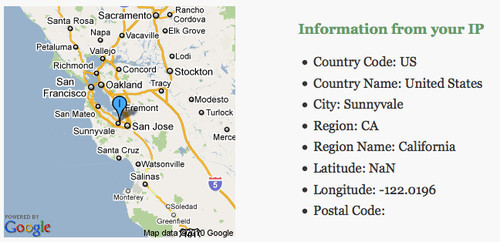
This gives you some information on the user (try it out for yourself). The challenge, though, is relevance. Your IP location is the location of the IP that your provider has assigned to you. Depending on your provider, this could be quite a ways off (in my case, I live in London, but my provider used to show me as living in Rochester). Another problem is if you work for a company that uses a VPN. At Yahoo, for example, I have to connect to the VPN to read my company email, and I have to choose a location to connect to:
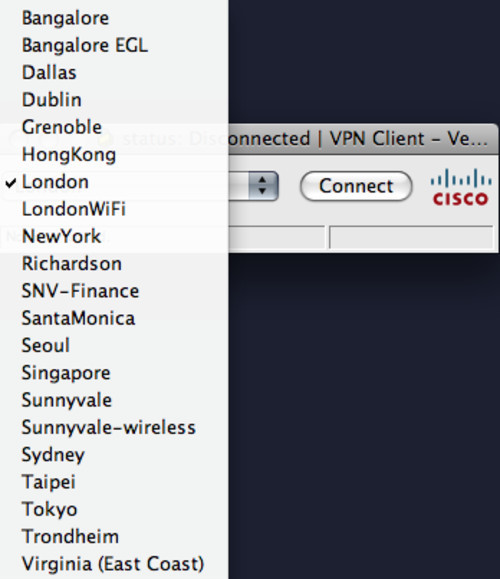
So, for a solution like the one highlighted above, I would show up as being in a totally different part of the world (which might be useful for watching Internet TV in the UK while I am in the US). IP geo-location, then, is an approximation, not a dead-on science.
Getting The User’s Location Via The W3C Geo API
Guessing geographical location via IP is possible, but it can also be pretty creepy. Being able to take advantage of your location is useful, but security-conscious users and people who are generally suspicious of the Internet are not happy with the idea of their movements being monitored by a computer. This makes sense: if I can monitor your whereabouts day and night, I would know where and when to rob your house without you being there.
There are a lot of solutions to the challenge of having good-quality geo-location and maintaining privacy. Google Gears has a geo-location service; Plazes helps you store your location; and Yahoo’s Fire Eagle is probably the most polished way to securely maintain your location on the Web.
The problem with all of these services is that they require the user to either install a plug-in or visit a Web service to update their location. This is not fun; browsers should do the work for you.
We now have a W3C recommendation for a geo-location API that allows browsers to request the geographical location of the user. This makes it less creepy, and you get real data back.
Firefox 3.5 and above supports the W3C geo-location API. So does Safari on the iPhone if you run OS 3.0 or above. If you use the API, the browser will ask the user whether they want to share their location with your website.
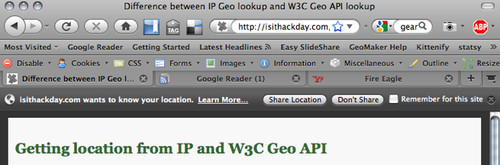
Once the user allows you to get their location, you get much more detailed latitude and longitude values. Using the API is very easy:
// if the browser supports the w3c geo api
if(navigator.geolocation){
  // get the current position navigator.geolocation.getCurrentPosition(

  // if this was successful, get the latitude and longitude function(position){
    var lat = position.coords.latitude;
    var lon = position.coords.longitude;
  },
  // if there was an error function(error){
    alert('ouch');
  });
}
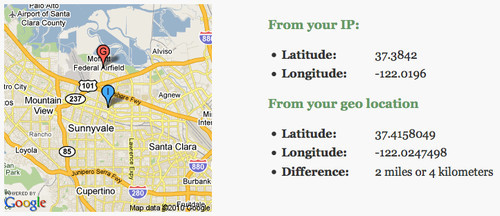
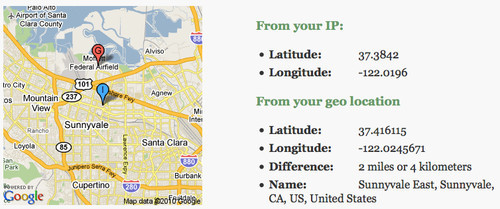
Compare the IP and W3C solutions side by side. As you can see, there can be quite a difference in measuring the visitor’s location. The extent of the difference is shown in the following demo:
Converting Latitude And Longitude Back Into A Name
Having more information is nice, but we have lost the name of the city and all the other nice data that came with the Maxmind database. Because the location has changed, we cannot just grab that old data; we have to find a way to convert latitude and longitude coordinates into a name. This process is called “reverse geo-coding,” and several services on the Web allow you to do it. Probably the most well-known is the geo-names Web service, but it has a few issues. For starters, the results are very US-centric.
One freely available but lesser-known reverse geo-coder that works worldwide comes from a surprising source: Flickr. The flickr.places.findByLatLon service returns a location from a latitude and longitude coordinates. You can try it out in the app explorer, but by far the easiest way to use it is by using the Yahoo Query Language (or YQL). YQL deserves its own article, but let’s just say that, instead of having to authenticate with the Flickr API and read the docs, reverse geo-coding becomes as easy as this:
select * from flickr.places where lat=37.416115 and lon=-122.0245671Using the YQL Web service, you can get the result back as XML or JSON. So, to use the service in JavaScript, all you need is the following:
<script type="text/javascript" charset="utf-8">
 function getPlaceFromFlickr(lat,lon,callback){
   // the YQL statement
   var yql = 'select * from flickr.places where lat='+lat+' and lon='+lon;

   // assembling the YQL webservice API
   var url = 'https://query.yahooapis.com/v1/public/yql?q='+
              encodeURIComponent(yql)+'&format=json&diagnostics='+
              'false&callback='+callback;

   // create a new script node and add it to the document
   var s = document.createElement('script');
   s.setAttribute('src',url);
   document.getElementsByTagName('head')[0].appendChild(s);
 };

 // callback in case there is a place found
 function output(o){
   if(typeof(o.query.results.places.place) != 'undefined'){
     alert(o.query.results.places.place.name);
   }
 }

 // call the function with my current lat/lon
 getPlaceFromFlickr(37.416115,-122.02456,'output');
</script>
Combine that with the other services, and we get a more detailed result and can put a name to the coordinates:
The Trouble With Latitude And Longitude
While latitude and longitude coordinates are a good way to describe a location on Earth, it is also ambiguous. The coordinates could represent either the centre of a city or a point of interest (such as a museum or a pub) in that spot.
WOEID to the Rescue
To work around the problem, Yahoo and Flickr (and soon will Twitter) support another way to pinpoint a location. The Where On Earth Identifier (or WOEID) is a more granular way to describe locations on Earth. Because Flickr supports it, we can easily get get photos from a particular area:
select * from flickr.photos.search where woe_id in (
  select place.woeid from flickr.places where lat=37.416115 and lon=-122.02456
)
Using this and a few lines of JavaScript, showing geo-located photos is pretty easy:
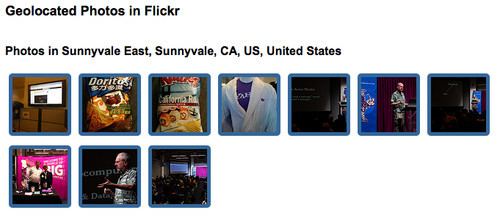
This has also been wrapped in a simple-to-use YQL solution. The following code will display 10 photos of Paris:
<script>
  function photos(o){
    var container = document.getElementById('photos');
    container.innerHTML = o.results;
  }
</script>
<script src="https://query.yahooapis.com/v1/public/yql?q=
select%20*%20from%20flickr.photolist%20where%20location%3D%22paris%2Cfr
%22%20and%20text%3D%22%22%20and%20amount%3D10&format=xml&
env=store%3A%2F%2Fdatatables.org%2Falltableswithkeys&callback=photos">
You can also play with this in the YQL console.
Why Not Search For The Location’s Name?
The main question about implementations such as the one above is why couldn’t we just do a search on Flickr for the city, instead of doing all the complex geo-lookups? The reason is false positives. Take Paris, for example: if you want to show photos of Paris on a travel website, you don’t want Paris Hilton to show up in there. Same goes for Jack London. You may also want to show photos of London, England, not London, Ontario. Geographic data is full of these kinds of gotchas, and the term for finding the right one is “disambiguation.” See the Wikipedia article on “Victoria” to see just how many geographical contexts this term can have.
Turning Text Into Geo-Data
Finding a visitor’s geographic location is all well and good, but it doesn’t mean much if you can’t link it to information for that area. This is where it gets tricky. For Flickr (and soon Twitter), this is easy, because both services are able to attach geographical locations to the content you put in them. This is not so for most of the information on the Web, though, and this is when we resort to clever algorithms, machine-learning, pattern-matching and all the other think-tank stuff that computers and the scientists in front of them do.
Say you want to identify the geographical locations that a particular text or Web page talks about. Yahoo offers a service for that called Placemaker, and it is pretty easy to use. You need to get a developer key and send this as appid, send a text as documentContent, define the type of the text as documentType and define the type of data you want back as outputType. All of this needs to be sent as a POST to https://wherein.yahooapis.com/v1/document:
<form action="https://wherein.yahooapis.com/v1/document" method="post">
  <textarea id="text" name="documentContent">Hi there, I am Chris.
    I live in London, I am currently in Sunnyvale and will soon be in
    Atlanta and Las Vegas.</textarea>
  <div><input type="submit" name="sub" value="get locations"></div>
  <input type="hidden" name="appid" value="{YOUR_APP_ID}">
  <input type="hidden" name="documentType" value="text/plain">
  <input type="hidden" name="outputType" value="xml">
</form>
You can try this out yourself. Using PHP to call the API instead of a simple form, you can even format the output nicely. See it in action here:
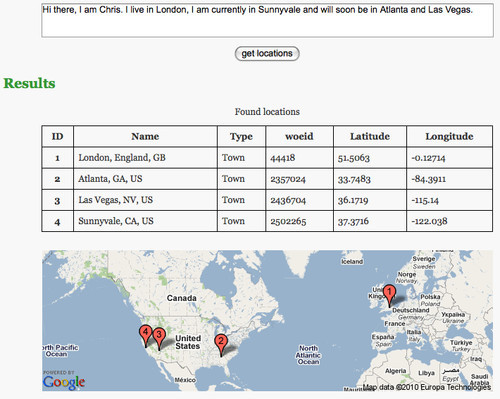
While developers who have played around with Web services won’t find Placemaker hard to use, the service can be daunting for the average developer. That is why I built GeoMaker some time ago. GeoMaker allows you to enter a text or URL, select the locations you want to include in the final outcome, and get the locations either as a map to copy and paste or as micro-formats.
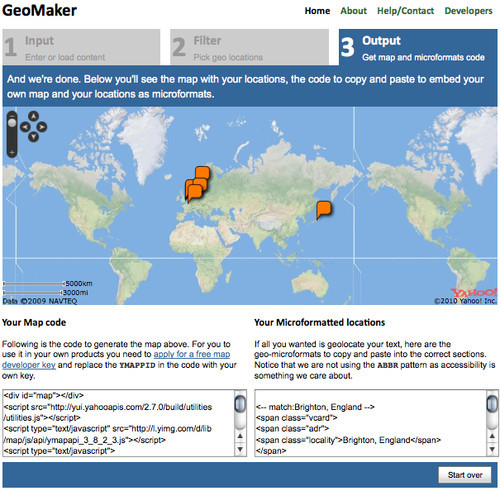
However, because there is also a YQL solution for using PlaceMaker in JavaScript, we can do the same with a few lines of client-side code to enhance an HTML document. Check out the following example:
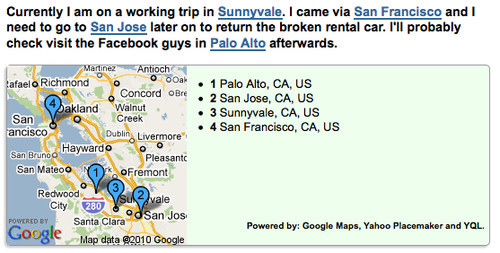
To use this, you need three things: a text with geographical locations in them in an element with an ID, a Google Maps API key (which you can get here) and the following few lines of code:
<script src="https://github.com/codepo8/geotoys/raw/master/addmap.js"></script>
<script>
addmap.config.mapkey = 'COPY YOUR API KEY HERE';
addmap.analyse('content');
</script>
This makes it incredibly easy to give your visitors a sense of what part of the world a text is related to.
Adding Maps To Your Documents
Online maps have been around for a while now (and Google Maps was instrumental in the rise of AJAX), and many providers out there allow you to add maps to your documents. Google is probably the leader, but Yahoo also has maps, as does Microsoft and many more. There is even a fully open map service called Open Street Maps, which has been instrumental in the recent rescue efforts in Haiti.
If you want interactive maps, probably the easiest thing to use is Mapstraction, which is a JavaScript library that does away with the discrepancies between the various map providers and gives you a single interface for all of them. 24ways published a good introduction to it three years ago.
Probably the simplest way to show a map that supports markers and paths in your document without having to dive into JavaScript is the Google static maps API. It creates maps as images, and all you need to do is provide the map information in the src URI of the image. For example, in the script example above, this would be:
https://maps.google.com/maps/api/staticmap?
sensor=false
&size=200x200
&maptype=roadmap
&key=YOUR_MAP_KEY
&markers=color:blue|label:1|37.4447,-122.161
&markers=color:blue|label:2|37.3385,-121.886
&markers=color:blue|label:3|37.3716,-122.038
&markers=color:blue|label:4|37.7792,-122.42
You can define the size and type of the map. If all you provide is the location of markers, the API will automatically find the right zoom level and area to ensure that all markers are visible. Google’s website even offers a detailed tool to create static maps, including markers and paths.
Geo Is A Space To Watch
I hope this has given you some insight into all of the things you can do to bring the earth to your product and to put your product on the map. Geo-location and geo-aware services are already huge, and they’ll be even more important this year. There will be more services—some mobile providers are ready to roll out new hardware and software—and now you can be a part of it.
What the geo-world needs now is a designer’s eye, and this is where you can help the geo-geeks create apps that matter, that look great and that make a difference in our visitors’ lives. For inspiration, check out Mapumental, which allows you to pinpoint a place to live in London, or see how Google Earth and some 3-D Objects allow you to race a milk truck on real map data.
 (al)
(al)

