5 Useful Coding Solutions For Designers And Developers
This post is the the next installment of posts featuring “Useful Coding Solutions for Designers and Developers“, a series of posts focusing on unique and creative CSS/JavaScript-techniques being implemented by talented professionals in our industry. A key talent that any Web designer must acquire is the ability to observe, understand and build on other people’s designs. This is a great way to develop the skills and techniques necessary to produce effective websites.
With that in mind, let’s look at some clever techniques developed and used by top professionals in the Web design industry. We can use their examples to develop our own alternative solutions.
1. Designing a Slick CSS Timeline
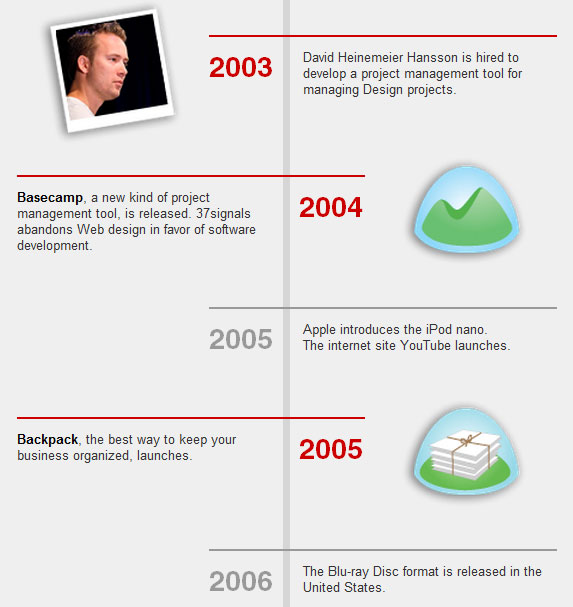
Designing a timeline is one of the tasks that frequently need to be solved when it comes to the design of portfolios. Some designers present the timeline as an image, others use plain text or use a good old table. We found an interesting CSS-based solution of a timeline over at 37Signals.com. While timelines are usually designed horizontally, this one is vertical, zig-zagging down each time slot.
How is this done?
To achieve this zig-zag effect, we will be floating each row. By assigning an “even” class, we are able to specify a different style for the right-aligned time slots, controlling their colors and alignment.
See the demo.
Here is the HTML:
<div class="timeslot">
<span>2009</span>
<p>Duis acsi ullamcorper humo decet, incassum validus, appellatio in qui tation roto, lobortis brevitas epulae. Et ymo eu utrum probo ut, jugis, delenit.
</p>
</div>
<div class="timeslot even">
<span>2008</span>
<p>Duis acsi ullamcorper humo decet, incassum validus, appellatio in qui tation roto, lobortis brevitas epulae. Et ymo eu utrum probo ut, jugis, delenit.
</p>
</div>
And here is the CSS:
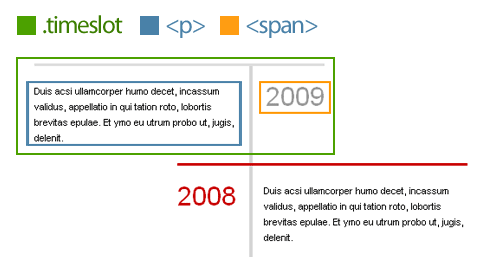
The default timeslot will float left and have a 100-pixel padding to the right. This leaves room for the year (<span>) to sit to its right. I also used absolute positioning for the year so that I could easily switch from left to right without worrying about colliding float issues.
Add a class of even to each even row, so that we get it right-aligned in red and the year positioned to the left.
.timeslot {
width: 235px;
float: left;
margin: 0 0 10px;
padding: 10px 100px 0 0;
border-top: 3px solid #ddd;
position: relative;
}
.timeslot span {
position: absolute;
right: 0;
top: 27px;
font-size: 3em;
color: #999;
}
.even {
float: right;
padding: 10px 0 0 100px;
border-color: #ca0000;
}
.even span {
left: 0;
color: #ca0000;
}
2. Custom Page Styling, CSS Drop Caps and Footnotes
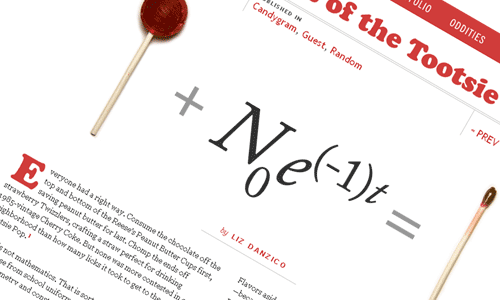
One website that is truly unique is Jason Santa Maria’s. What’s impressive about Jason’s website is that each article and blog post is entirely unique, with its design tailored to the content. Looking at a recent article, “Mathematics of the Tootsie Pop,” we’ll go over a few techniques that stand out for us.
1. Custom Page Styling in WordPress
The first question that came to mind when visiting Jason’s blog was, “How did he give each post a unique design?” You can achieve this simply by referencing a custom style sheet to override the website’s default style. By using a combination of custom fields in WordPress and understanding CSS specificity, you can freely give each post a design of its own. So, how is this done?
Step 1. Customize post with custom style sheet
Start by creating a new style sheet, and name the file to match your post’s title. With a good understanding of CSS specificity, you can customize the look and feel of the post.
Step 2. Create custom field values
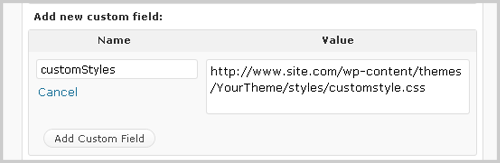
Log in to your WordPress admin area, and go to the edit page for the post. Scroll down to the “Custom Field” area, and enter a new custom field name called “customStyles”. Then, for the value of that custom field, enter the full URL of your custom style sheet.
Step 3. Call the custom style sheet
Open up the header.php file in your custom theme, and above your <title> tag, add the following:
<?php $customStyles = get_post_meta($post->ID, "customStyles", true);
if (!empty($customStyles)) { ?>
<link rel="stylesheet" href="<?php echo $customStyles; ?>" type="text/css" media="screen" />
<?php } ?>
In this step, we’re checking if a custom field of “customStyles” exists. If it does, then it will inject the value within the href of the style sheet reference.
Custom field tutorials:
- Custom Fields Hacks For WordPress
- WordPress Custom Fields, Part I: The Basics
- WordPress Custom Fields, Part II: Tips and Tricks
CSS specificity tutorials:
2. Creating Drop Caps
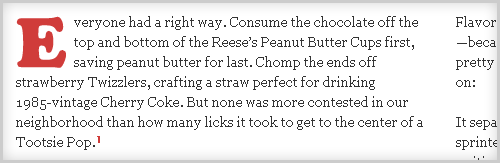
Drop caps are commonly seen in print design, but with the recent rise in popularity of Web typography, this technique seems to be becoming more common. We have various ways of achieving this technique.
Here is the HTML you would use:
<p><span class="dropCap">E</span>ros decet bis eligo jumentum brevitas vel abigo iusto commoveo ex abigo, euismod ulciscor. Bene enim vulputate enim, nisl illum patria. Enim te, verto euismod in nisl lucidus. Capio incassum quadrum nunc ex proprius praesent et quod. Autem in commoveo similis nostrud turpis paulatim quadrum, tristique. </p>
Plain-text drop caps
Plain-text drop caps can be achieved with just a few lines of CSS. Until Web typography advances, and the @font-face standard becomes more widely supported, this is probably the easiest way to achieve drop caps. See demo.

Here is the CSS:
.dropCap {
float: left;
font-size: 5em;
line-height: 0.9em;
padding: 0 5px 0 0;
font-family: Georgia, "Times New Roman", Times, serif;
}
To jazz up your plain text, check out the following tutorials on enhancement:
Text-replacement drop caps
Here, we are simply substituting an image for a letter, using a combination of text-indent and background image. See demo.

Here is the CSS:
.dropCap {
text-indent: -99999px;
background: url(drop_cap_e.gif) no-repeat left 5px;
height: 50px; width: 55px;
float: left;
display: block;
}
While this technique is perfect for Jason’s post (because he uses only one drop cap), if you plan to use multiple drop caps, you should look into using CSS sprites. Mark Boulton offers a great example of this technique.
jQuery-based Drop Caps
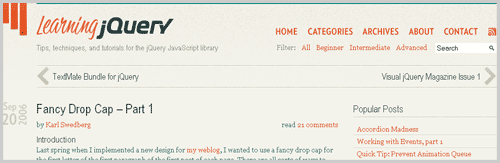
A few years ago, Karl Swedberg of LearningjQuery.com introduced an awesome way to incorporate drop caps using jQuery. Please notice that using jQuery for presentational purposes may be not a good idea and contradicts the strict separation between the presentation and behaviour layers, but it does solve the problem nevertheless. You may want to check out Karl Swedberg’s drop-cap plugin that does a better job of keeping the presentation and behavior layers separate by simply wrapping a span around the first letter (with appropriate classes). That way you can style the letter however you like with CSS. Also check out the tutorials below:
3. Footnotes
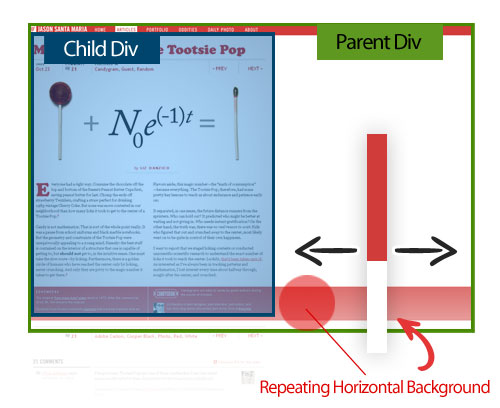
Footnotes are another interesting part of Jason’s post. The red stripe that bleeds across the page really accents the footnotes well here.
That bleeding red stripe can be achieved by nesting two DIV tags: the parent DIV, which contains a repeating background image (positioned at the bottom), and a second DIV, which is the actual fixed container where the content lies. This way, the red stripe follows the end of the content and aligns perfectly with the footnotes.
3. Text Flow
Like Jason Santa Maria, Dustin Curtis has his own way of giving each post a unique style. In the example below, you can see the interesting way in which the text flows down the page beside the pictures of the MRI. This technique is quite simple to do and is a good use of relative positioning.
How is this done? The text flow seen in Dustin’s design can be achieved by giving each text block a relative position, a fixed width and fixed coordinates. His post has a mix of large backgrounds, text replacement and relatively positioned text blocks.
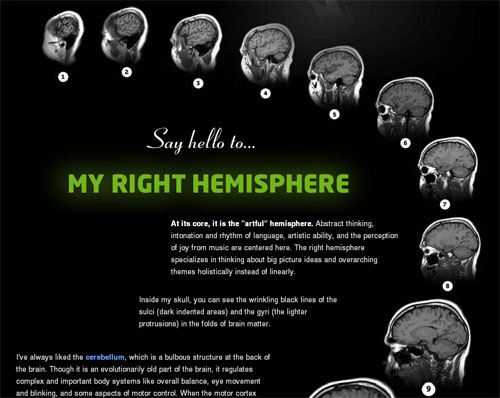
Sample HTML:
<p class="small"
style=" position: relative;top: 260px;width: 430px;left: 290px;">
<strong>At its core, it is the "artful" hemisphere.</strong> Abstract thinking, intonation
and rhythm of language, artistic ability, and the perception of joy from music are centered here.
The right hemisphere specializes in thinking about big picture ideas and overarching themes holistically
instead of linearly.
</p>
Although inline styles are typically not recommended, this would be a rare exception. Create a global class name for the default styling of all text blocks (margin, padding, text size, color, etc.), and use inline styling for the page-specific design (coordinates, width, etc.). See demo.
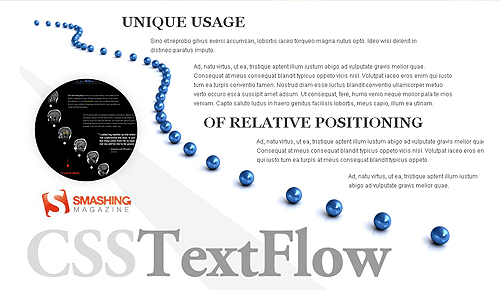
CSS:
.textflow {
font-size: 1.2em;
color: #2d2d2d;
margin: 20px 0;
padding: 5px 0;
position: relative;
}
HTML:
<div class="textflow" style="width:300px; left: 680px;">
<p>Ad, natu virtus, ut ea, tristique aptent illum iustum abigo ad vulputate gravis melior quae.</p>
</div>
CSS positioning tutorials:
- CSS Positioning
- Absolute, Relative, Fixed Positioning: How Do They Differ?
- Stopping the CSS positioning panic (Part 1)
- Mastering CSS Coding: Getting Started
4. Combo Carousel Breakdown
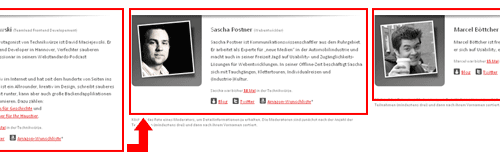
Over at Technikwürze, we have found a carousel with a combination of animation effects. This is no ordinary carousel. For this example, rather than go over specific techniques, we’ll discuss the logic behind this unique carousel.

How is this done? As you can see, when clicking on a member’s thumbnail, three primary animations are triggered:
- The member bio slides in horizontally,
- The profile image slides in vertically,
- The grid of member photos updates, and the height of the container adjusts.
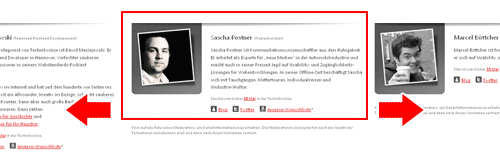
To begin, the full member profiles are floated so that they appear side by side. We use overflow: hidden; to mask the non-active profiles. Here is a visual demo of this carousel’s logic:

1. Horizontal animation
Each time a thumbnail is clicked, jQuery calculates how far the profiles need to slide over. This is the classic horizontal-sliding carousel effect.
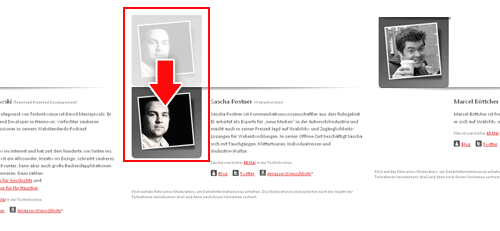
2. Vertical animation
Once the active profile slides into position, the image for the profile slides down. To begin, all profile images are position -190px above the frame. When jQuery detects that the horizontal animation has been triggered, it slides the profile image down.
3. Vertical animation
During the transition to the active profile, its height is calculated and the container is adjusted. This way, the container stays snug and does not leave any excess white space at the bottom.
Carousel tutorials and plug-ins:
- jQuery Infinite Carousel
- Create a Simple Infinite Carousel with jQuery
- Coda-Slider
Graceful Degradation
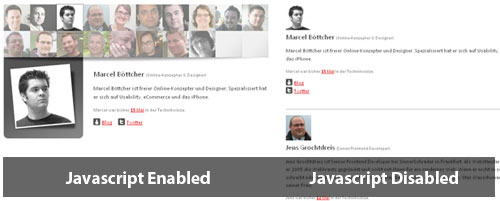
The team at Technikwürze also implemented a fall-back option for this carousel. With a smart use of CSS, it crafted this page so that anything JavaScript-driven is tucked away. The resulting page is clean and accessible to all users.
5. Beautiful Typographic CSS-Based Ratings
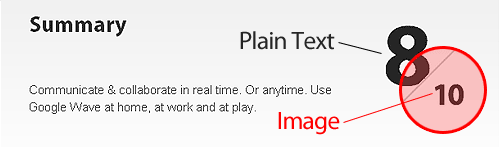
Over at Web Appstorm, we have an interesting way of showing ratings with CSS. This CSS-based system can be achieved using absolute positioning and an image of the maximum rating.
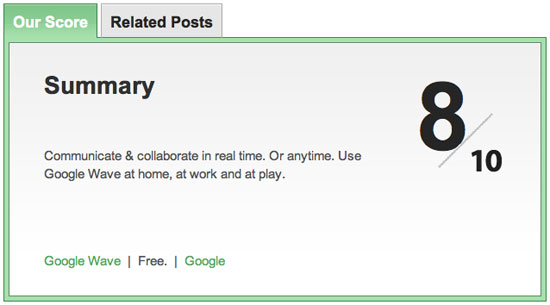
How is this done? Here is the HTML and CSS:
<span class="the_score">8</span>
<img class="ten" src="http://web.appstorm.net/wp-content/themes/appstorm_v2/images/ten.gif" alt="">
.tabdiv .the_score {
font-family: "Myriad Pro", Helvetica, Arial, sans-serif;
font-size: 110px;
line-height: 110px;
font-weight: bold;
position: absolute;
top: 30px;
right: 100px;
color: #262626;
text-align: center;
letter-spacing: -17px;
}
.tabdiv .ten {
position: absolute;
top: 80px;
right: 45px;
}
Alternative Solution
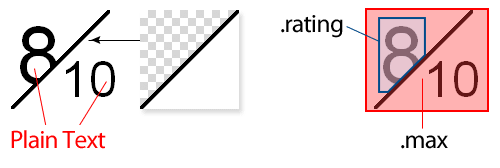
If you would like the maximum rating to vary, you can achieve this effect using the following alternative method.
HTML:
<div class="ratingblock">
<span class="rating">8</span>
<span class="max">10</span>
</div>
CSS:
As you can see, .max is absolute positioned, has a transparent background and is layered above .rating. That way, if you need to adjust the maximum rating, you can do so without modifying any images.
.ratingblock{
position: relative;
height: 100px;
}
.ratingblock .rating {
font-size: 8em;
padding: 0 5px;
}
.ratingblock .max{
display: block;
background: url(rating_bg.gif) no-repeat;
position: absolute;
top: 0; left: 0;
font-size: 5em;
width: 50px;
height: 60px;
padding: 40px 0 0 50px;
}
Final Thoughts
By examining the techniques others have used to achieve unique and inspirational results, we expand our foundation in Web design. It’s a great way to learn and push ourselves to ever-higher levels. Stay hungry and keep learning!
(al)


Baas
November 23rd, 2009 5:03 amNice, but very basic.
Everyone could figure this out with a bit of logical thinking.
Martin Bean
November 23rd, 2009 5:06 amWe’ll leave the advanced and innovative CSS techniques to you then, shall we? This blog’s for every one; not seasoned front-end developers who I’m sure aspire to have your mastery.
Tobias
November 23rd, 2009 6:13 amAgree with Baas.
Mel
November 24th, 2009 6:41 amI agree with Baas as well
JasonG01
November 24th, 2009 11:00 amWell, I *could* have figured most of these things out, but I read Smashing for the ideas even more than the code. In that respect this is a very good article.
Razmig
November 25th, 2009 1:30 ami agree with Martin Bean
Jason
November 30th, 2009 10:41 amThen it should be titled 5 Useful Coding Solutions For “Beginner” Designers And Developers. If you can’t figure this stuff out and not just copy the code from a website, you shouldn’t be doing design or development.
Eric
November 23rd, 2009 7:50 amThis comment wasn’t needed. Basic, a little, but not everyone is at the same elite coding level as you are.
Soh, I like how you broke everything down so clearly. Articles like this really help me imagine bigger and better things for my websites.
Thank you
Jason
November 23rd, 2009 8:47 amSmashing Magazine has 174,000 readers and 88,000 followers. You think everyone of those people are advanced like you? Probably half of these readers are beginners trying to learn everyday. Don’t be so narrow minded.
Tai
November 23rd, 2009 10:55 amContinue with your happy productive day folks, be careful not not to trip over the trolls on the way out.
Vsync
November 24th, 2009 5:31 amI agree, very basic stuff indeed. its a-b-c
xRommelx
December 29th, 2009 11:07 pmthis blog i for everyone, newbies and old designers
Dré
November 23rd, 2009 5:06 amSorry to say this but i’m not really impressed by this post.. Not really smashworthy.
Gregor
November 23rd, 2009 5:08 amsimple yet inspiring, thanks a lot!
Darren Azzopardi
November 23rd, 2009 5:09 amWell done on getting this together Soh. But expect a backlash in your first example. The time line looks like a list would have been a propriate. All the semantic gang will be on your back now.
Again, well done for making the time to create an article.
Andy Morrow
November 23rd, 2009 5:10 amVery very useful, Soh! Thank you very much! More similar articles, please!
WPCONCEPT
November 23rd, 2009 5:24 amVery nice. Thanks.
Webstandard-Team
November 23rd, 2009 5:25 amFor “Designing a Slick CSS Timeline” I would prefer a definition-list ( dt – 2009, dd – the lorem ipsum text ). Easier and with a touch of semantic?!
Iodine74
November 23rd, 2009 7:21 amAgreed, or at the very least an OL. Can’t really get more “ordered” than time.
Alex
November 23rd, 2009 4:06 pmI’m sorry, but I must respectfully disagree. How is misapplying the definition tag for a timeline more semantic? Semantically, you’re telling the app that the definition of 2004 is “Basecamp, a new kind of project management tool…” – well, you get the picture. Not very semantically sound.
Saadat
November 24th, 2009 4:05 amOh, I don’t know. W3C says here that “Another application of DL, for example, is for marking up dialogues, with each DT naming a speaker, and each DD containing his or her words.” I guess then that a DL should also work for a timeline.
Alex
November 24th, 2009 10:19 amMeant to reply to Saadat, above:
It’s true that just as people use H tags for visual needs, rather than semantic needs, people misuse definition tags to achieve an easy format. This doesn’t mean it parses semantically. People also use definition lists as menus, but when you run it through a semantic data extractor, it doesn’t make much sense. (This is a good one: http://www.w3.org/2003/12/semantic-extractor.html .) At this point, though, it’s probably a lost battle. Let’s hope the dfn tag doesn’t get similarly corrupted.
Newton
November 27th, 2009 4:38 pmYeah, I’d agree that a or an are needed. Lately I’ve been seeing a lot of people misusing the tag and this is one of those occasions. are basically a generic tag when nothing else will do; clearly here there is some sort of list since timeline by definition is a listing of time in some order. I think Smashing Magazine needs to have some edit the code as well as the content before they publish, but then again, I’m a purist when it comes to my markup. Still a good article though.
moabi
November 23rd, 2009 6:05 amnice! (simple is nice a too!)
Karl Swedberg
November 23rd, 2009 6:10 amHi Soh,
You wrote, “Please notice that using jQuery for presentational purposes is certainly not a good idea and contradicts the strict separation between the presentation and behaviour layers, but it does solve the problem nevertheless and is therefore worth mentioning in this context.”
I agree that separation of concerns is important. As a bit of progressive enhancement, though, I don’t think the jQuery solution is that bad. After writing those posts, I put together a drop-cap plugin that does a better job of keeping the presentation and behavior layers separate by simply wrapping a span around the first letter (with appropriate classes). That way you can style the letter however you like with CSS.
Of course, the simplest solution would be to use the :first-letter CSS pseudo-element. According to PPK’s compatibility chart, it’s fairly widely supported. The main drawback to this is that you can’t have different styles based on which letter it actually is (e.g. if you wanted to use an image sprite and have different background-position based on the letter).
Smashing Editorial
November 23rd, 2009 6:27 amHi Karl,
actually, this sentence was added by the Smashing Editorial team, not by Soh. Thank you for the detailed explanation! The article was updated.
Karl Swedberg
November 23rd, 2009 7:24 amWow, that was fast! Thanks for the reply and the update.
Darren Taylor
November 23rd, 2009 6:37 amAgreed using jQuery for presentational purposes is perfectly acceptable, so long as it degrades gracefully. Sometimes css alone will not do the job so you need jQuery to intervene. For example, I have a site where an image sometimes floats to the right of the h1. Where there is no image the h1 expands the full width of the content area. This is done using jQuery by adding a class. Not a good idea? I happen to think it’s great and improves the readability of the page.
John Faulds
November 23rd, 2009 1:13 pmI was going to say, no reason to add in the extra element when :first-letter works well cross browser.
Dave
November 27th, 2009 6:55 am@John Faulds:
Exactly what I thought as soon as I saw that un-necessary span.
Rudra Ganguly
November 24th, 2009 6:15 amGreat help
drlovecat
November 23rd, 2009 6:34 amnice tip
:)
PerS
November 23rd, 2009 7:20 amNice article. Ref custom page style in WordPress , liked it so much that I hacked together a small plugin. Youl’ll find it at: http://www.soderlind.no/code/view/custom_style.php :)
Russell Heimlich
November 23rd, 2009 7:36 amIt’s worth mentioning you can do a drop cap effect without any extra HTML if you’re willing to ignore IE6 which doesn’t support the :first-letter pseudo class -> http://pixelspread.com/blog/324/easy-drop-caps
Cool tricks. I think front end developers should share more tips and tricks like this so we can weed out bad practices. Here are a list of some of my favorite front end tips and tricks http://www.russellheimlich.com/frontend-tips/
Sean
November 23rd, 2009 7:42 amThere are only five solutions, as there is no number 3.
Jimbo
November 23rd, 2009 7:59 amLike it! Simple but very handy :)
Waheed Akhtar
November 23rd, 2009 8:18 amNice list
Dan Sunderland
November 23rd, 2009 8:21 amExcellent article, it’s nice seeing good code solutions that don’t require thinking in 90 degree angles all the time :-)
Rolando S. Bouza
November 23rd, 2009 8:22 amHey, I found it so interesting that I´m even using the drop capitals for an online mag Im just finishing…show you when is ready! Thanks guys!
Siddhant Mehta
November 23rd, 2009 8:33 amThese are just great tips!!
Jason
November 23rd, 2009 8:34 amVery good tutorial. Thank you Smashing Magazine!
Sweetness
August 1st, 2012 10:10 pmOK, the text field mangled my fonmtatirg. so here’s another try:Cheers. I previously had it in features/support/env.rb with similar reasoning but I’ve moved it to web_steps.rb.In my Cucumber feature, I am calling:And I see WTF is going onThen I should see “xserve-early-2008″ in the “xserve-early-2008″ sectionThe first of these lines shows me I have a <div id="Xserve (Early 2008) containing a paragraph tag containing text that includes “xserve-early-2008″.The second of these lines gives me this error:undefined method `call’ for nil:NilClass (NoMethodError)Any ideas? Thanks again.Steven.
Tyler Herman
November 23rd, 2009 8:48 amThese are the kinds of detailed posts that makes Smashing so successful (in my opinion). Keep em coming.
Cespur
November 23rd, 2009 8:54 amTip: Number 3 (styling the first letter of a align) could be done way easier by using the :first-letter tag. http://www.w3schools.com/CSS/pr_pseudo_first-letter.asp
Alex C
November 23rd, 2009 8:54 amWow. Very nice collection of tips and tricks. Thanks for writing this great article :)
Manny
November 23rd, 2009 8:56 amNice article, will surely implement something based on custom fields in the future, but needed some more “colour”. Thanks.
Daniel
November 23rd, 2009 9:30 amThank you very much SM :)
Design Informer
November 23rd, 2009 10:10 amAwesome article. Good job Soh!
Just added to my favorites to refer back to it when needed for certain projects.
Chad
November 23rd, 2009 10:48 amAs for doing the inline styles all I have to say is ICK. You could simply create that effect by creating your own grid system for that page and adding classes to each paragraph. Yes this gets away from semantic markup but it is much cleaner than inline styles.
For example you can create a system for widths like:
.one {width: 120px;}
.two {width: 240px;}
etc.
Then “pulls” to move the content left to right
.pullOne { margin: 0px;}
.pullTwo { margin-left: 100px;}
.pullThree { margin-left: 200px;}
etc.
You end up with something like this Lorem etc…
These concepts are discussed by Jason Santa Maria.
http://24ways.org/2008/making-modular-layout-systems.
logolitic
November 23rd, 2009 11:15 amVery nice information here, I`m a graphic designer and I really wanna start learn to code, maybe not being an expert but I really want to know the basic elements.
Thank you very much.
Doncho23
November 23rd, 2009 12:52 pmVery nice post.
Just to say for the first solution.
I think it would be better to make a list instead of a lot of “DIV”.
Just for a semantic concern.
John Faulds
November 23rd, 2009 1:15 pmWith regards the first fraction example, the alt attribute for the image depicting the 10 shouldn’t be blank, it should say something like “out of 10″ so that people who can’t see the image know what the grading scale is.
Mike
November 23rd, 2009 3:05 pmHaving page content inside elements which have no inherent meaning isn’t good practice – e.g. the timeline years are in a span, in a div. Neither of those have any context were you to view the page without any CSS.
You should always strive to give your content some tag context. div and span are useful supporting elements but do not give any inherent meaning to content.
Joe Latham
November 23rd, 2009 4:12 pmAwesome post! Loads of useful insights and tips! I will definately be sneaking a few ideas and solutions from this one
Rick
November 23rd, 2009 5:18 pmThanks for the drop caps information. I implemented it on my blog.
KDzyne
November 23rd, 2009 7:05 pmThat is amazing!
Andrea
November 23rd, 2009 11:53 pmGreat post. There were many things I learned with just 5 examples!
Ps maybe it’s my browser but the post styles on sm looks like it’s not calling any styles?
Kabamaru Igano
November 24th, 2009 12:15 amGreat article, simply food for the mind… and a nice tool for the hands :)
Simon
November 24th, 2009 12:37 amSame here Andrea. No CSS is called.
Akbar Shah
November 24th, 2009 1:58 amhey… cool post
Clem
November 24th, 2009 2:10 amCoding, coding, coding…
Please Smashing Magazine, don’t forget print designers, I’m really going to erase you from my bookmarks…
chopeh
November 24th, 2009 4:31 am“Founded in September 2006, Smashing Magazine delivers useful and innovative information to Web designers and developers. Our aim is to inform our readers about the latest trends and techniques in Web development. We try to convince you not with the quantity but with the quality of the information we present. We hope that makes us different. Smashing Magazine is, and always has been, independent.”
If print design is what you’re looking for, you’re in completey the wrong place.
Try the Envato network, they occasionally post about print related subjects: http://tutsplus.com/
Clem
November 25th, 2009 12:24 amThanks for the link. However what I wanted to highlihgt is that few months ago, SM used to offer much more posts dedicated to print, type design, etc.. but indeed I know that it’s above all dedicated to web designers and developpers.
Yvonne
August 1st, 2012 10:02 pmSorry, WordPress kinda sucks for comments w/ code in them. I relaly need to move to another platform, if I can ever find the time.YMMV with this stuff. Its hard to tell if these steps are appropriate for your particular scenario without some more context on what you are doing, and without seeing all the code formatted correctly. I am guessing it is the parenthesis causing the error, since the csserize method does not remove them, but I am not sure. Can you create a gist on github and comment with the link so I can see it formatted? Include the code from the scenario as well as the web_step and I will see if I can help you out.
Rudra Ganguly
November 24th, 2009 6:15 amNice post. Thanks.
Andrew
November 24th, 2009 7:13 amThis is a great post. I’m an asp.net/c# developer who often integrates HTML with backend code. I’ll definitely use this for reference.
Ben
November 24th, 2009 7:21 amGreat post, print designers can use these posts too, it never hurts to be in the know!
Thanks.
BeBeN
November 24th, 2009 10:16 amso fully help…nice info
Wes
November 26th, 2009 12:02 pmGreat resources and tutorial, I am not a beginner but this is a perfect level for me. Thank you Smashing Magazine!
Shinya
November 26th, 2009 9:09 pmThis great for learn. thank you
Bjarni Wark
December 1st, 2009 2:06 pmLove the Combo Carousel Breakdown : ) very smart.
Muhammad Usman Arshad
December 15th, 2009 4:53 amThanks for sharing a very useful information. keep it up dude :-)
JR
January 8th, 2010 5:02 pmI thought the article was very good. I can’t keep up with everything going on in web development everywhere. Smashing Mag has been great in inspirations and sources to explore and build upon.
Hai Feng ma
January 24th, 2010 7:09 pmIt’s cool. I will try them in my projects.
Fry
January 28th, 2010 10:23 amVery good collection but in these php tutorials I found better…
Arda
February 20th, 2010 5:03 amVery nice collection. Because of they are simple, it doesn’t mean that they are not useful. For a timeline, I would use the example in the article rather than putting a jquery based horizontal timeline scroller. Thanks to the writer.
Rene Dustmond
April 11th, 2010 5:03 amcheck http://www.denisecam.com if you want to view the best adult cams.
misseKime
April 19th, 2010 11:07 amHi people
It is my first post here wanted to say hi
Adios amigos
misseKime
April 25th, 2010 6:54 pmGreets!
I just wanted to say hi :)
nadsunursinly
May 9th, 2010 10:15 amHi people,
What online zines do you read and would recommend?
For all you emo folks out there I recommend The Enough Fanzine. It is one of the first ska zines on the www.
They have throusands of reviews from the most independent bands all over the world. Check them out online: Enough Fanzine. Best of it all, they are 100% non-profit and just helping the scene!
Looking forward to your recommendations.
Regards!
mooncilinnepe
May 19th, 2010 12:40 pmBonjour
It is my first time here. I just wanted to say hi!
Dandfraurgend
May 21st, 2010 11:11 amHi everyone
I’ve recently found
an excellent search engine –
baza sie pojebala
P.S. Yahoo – everything will be found! Google: nothing was really lost…
See you!
Dandfraurgend
May 24th, 2010 5:16 amHello!
I’ve recently found
a marvelous search engine –
baza sie pojebala
P.S. Yahoo – everything will be found! Google: nothing was really lost…
See you!
vavaadold
May 31st, 2010 3:54 pmhttp://cdn.blinkx.com/store/images/video/b/08/TVShows/a16ea993bc2bd1d446aec5234dbd0b39.jpg
Dear TV Lovers
You guys probably all love True Blood , i came across this great where you already can watch the 6th episode of season 1 .
Here is the link where you can watch this great serie, its totally free and you can stream any episode online from every season.
Let me know what you think about it!
Watch True Blood Season 2 Online
http://images.cucirca.com/tvshows/True-Blood.jpg
efeihgoehgoa
June 2nd, 2010 8:32 amMyTechLifestyle | Latest Tech News
Sagar Ranpise
June 10th, 2010 11:07 pmHi Soh,
All are awesome examples and very well explained by you. Thanks a lot! I have added just a simple code for timeslot even for making it more cool looking!
.even p {text-align:right;}
This will make the paragraph on the right to be aligned properly as it was aligning left.
Awesome tricks!
Thanks & Regards,
Sagar
flashmac
June 30th, 2010 12:10 amYo Soh!
Just wondering if your method for ‘Custom Page Styling in WordPress’ is still the best way to apply in WP3.0?
I heard a roumer that wp_enqueue_script() was the way to go?
Avid fan of your work!
Cinoidora
August 24th, 2010 6:01 amHi – Please – if you do care – continue reading
New York Real Estate Mongrul Everest Alexander is seeking assistance for children around the world
When’s the last time you’ve paid attention to what is happening in this world? Thank god your not a victim of the latest disasters in Haiti & Chile. Fact is, the orphans sleeping on the streets – and recently buried loved ones – require our assistance. I say “our” in reference to mankind.
NBA Scout Carmen Huertas is seeking help to educate children
Please consider helping…
Jonathon Alston
September 7th, 2010 12:46 amwhats up everyone
Just saying hello while I look through the posts I’m trying to find out how to make an e-mail list with out having to spend a wad of cash on some training course
hopefully this is just what im looking for, looks like i have a lot to read Im trying to find a way to build an e-mail list.
Angella (CO ) Toye
September 8th, 2010 10:23 amHello Fellow Forumites
Looks 4 sure like m.smashingmagazine.com may be a great forum for me
I am pleased to have discovered it.
In the beginning just remember it was darked and then someone smiled! try this: There is no time like the pleasant. :
Lol!
Anybody like Crochet
Looking forward to a good long sojourn here!
Pennsylvania,Dunlevy
ordeldGer
October 13th, 2010 1:58 pmI love this site m.smashingmagazine.com. Lot of great information. I am Tech guy. I have been a Desktop Technician since 1997 but have tons of other interests. In my spare time… Oh, wait I don’t have any of that (just kidding). Anyways, I have been aware of this website for quite some time and decided to join the community and contribute as well as learn a lot from others. I am excited to get started on the forum and am looking forward to a great journey together. Lots of potential friends and I look forward to meeting many online.
cratiolla
October 15th, 2010 6:11 pmHi I am new here. I’m sorry if this is the wrong place for this but I was hoping some one here on m.smashingmagazine.com would be able to
assist me to choose the right one.
Benpevefupe
October 17th, 2010 8:50 amHi I am new here. I’m sorry if this this is the wrong place for this post but I was wondering If some one here on this m.smashingmagazine.com would be able to assist me to choose the right choice.
HemikisgupHep
October 18th, 2010 12:10 amHello I’m new here. I am sorry if this this is not the right place for this but I was wondering If some one here on m.smashingmagazine.com would be able to assist me to choose the better choice. The forums here are absolutely cool and certainly plan on sticking around for as long as I am welcome.
Padetelia
October 23rd, 2010 1:43 pmHey I am new here. I am sorry if this this is not the right place for this but I was wondering
If some one here on m.smashingmagazine.com would be able to help me to choose the better choice. The forums here are absolutely amazing
and certainly plan on sticking around for as long as I am welcome.
deerainelve
October 25th, 2010 8:20 pmHello I’m new here. I am sorry if this this is the wrong place for this post but I was wondering If some one
here on m.smashingmagazine.com would be able to assist me to choose the better category. The forums here are absolutely great and
certainly plan on sticking around for as long as I am welcome and learn more from you huys.
Mayodayobejew
October 27th, 2010 11:07 pmHello I’m new here. I’m sorry if this this is not the right place for this post but I was wondering If some one here on m.smashingmagazine.com would be able to help me to choose the better choice. The forums here are absolutely great and I love it here.
annordjap
October 29th, 2010 10:18 amHello I’m new here. I’m sorry for any reason if this this is not the right place for this but I hope If some one here on m.smashingmagazine.com would be able to
help me to choose the better choice. The forums here are absolutely great and certainly plan on sticking around for as long as I am welcome.
Joe
December 19th, 2010 8:10 pmcan somebody contact Soh Tanaka and tell him that his website is blocked in China?… i can’t seem to access it here.
roldarbinna
December 31st, 2010 8:27 amSeotons – Entreprise de Creation site internet
Dhiva
January 31st, 2011 4:22 amYou people are really great.Really, i learned lot of things and i got up some websites to do.Thank you….
cavo789
October 19th, 2011 12:48 pmThanks ! Really nice and … simple css timeline but no doubt, a lot of development work.
Sara.P
February 17th, 2012 3:22 amThat´s a new point of view,interesting…sometimes things are not working as predicted….
cheers,
Sara