The Definitive Guide to Using Negative Margins

Since the recommendation of CSS2 back in 1998, the use of tables has slowly faded into the background and into the history books. Because of this, CSS layouts have since then been synonymous with coding elegance.
Out of all the CSS concepts designers have ever used, an award probably needs to be given to the use of Negative Margins as being the most least talked about method of positioning. It’s like an online taboo—everyone’s doing it, yet no one wants to talk about it.
1. Setting the record straight
We all use margins in our CSS, but when it comes to negative margins, our relationship somehow manages to take a turn for the worse. The use of negative margins in web design is so divided that while some of us absolutely love it, there are also those who simply think it’s the work of the devil.
A negative margin looks like this:
#content {margin-left:-100px;}
Negative margins are usually applied in small doses but as you’ll see later on, it’s capable of so much more. A few things to note about negative margins are:
- They are extremely valid CSS
I’m not kidding on this one. W3C even says that, “Negative values for margin properties are allowed…” ‘Nuff said. Check out the article for more details. - Negative margins are not a hack
This is especially true. It’s because of not understanding negative margins properly that it got its hackish image. It only becomes a hack if you use it to fix an error you made elsewhere. - It goes with the flow
It does not break the flow of the page if applied to elements without floats. So if you use a negative margin to nudge an element upwards, all succeeding elements will be nudged as well. - It is highly compatible
Negative margins are wholly supported across all modern browsers (and IE6 in most cases). - It reacts differently when floats are applied
Negative margins are not your everyday CSS so they should be applied with care. - Dreamweaver doesn’t understand it
Negative margins don’t show up in the Design View of DW. Why are you even checking your site in Design View anyway?
2. Working with negative margins
Negative margins are very powerful when used correctly. There are 2 types of scenarios where negative margins take center stage.
Negative Margins on Static Elements
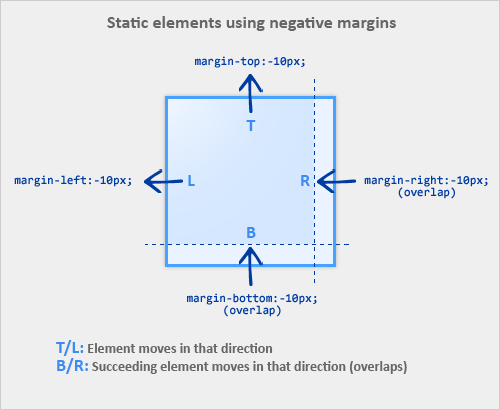
A static element is an element with no float applied. The image below illustrates how static elements react to negative margins.
- When a static element is given a negative margin on the top/left, it pulls the element in that specified direction. For example:
/* Moves the element 10px upwards */ #mydiv1 {margin-top:-10px;} - But if you apply it to the bottom/right, it doesn’t move the element down/right as you might think. Instead, it pulls any succeeding element into the main element, overlapping it.
/* * All elements succeeding #mydiv1 move up by * 10px, while #mydiv1 doesn’t even move an inch. */ #mydiv1 {margin-bottom:-10px;} - If no width is applied, adding Negative Margins to its left/right pulls the element in both directions increasing its width. It’s here that the margin acts like a padding.
Negative Margins on Floated Elements
Consider this as our actual markup:
HTML
<div id="mydiv1">First</div> <div id="mydiv2">Second</div>
- If a negative margin is applied opposite a float, it creates a void leading to the overlapping of content. This is great for liquid layouts where one column has a width of 100% while the other has a definite width, like 100px.
/* A negative margin is applied opposite the float */ #mydiv1 {float:left; margin-right:-100px;} - If both elements are floated left and
margin-right:-20pxis applied to#mydiv1, #mydiv2treats#mydiv1as if it were 20px smaller in width than it actually is (thus, overlapping it). What’s interesting is that the contents of#mydiv1don’t react at all and continue to retain its current width. - If the negative margin is equal to the actual width, then it overlaps it entirely. This is because margins, padding, borders, and width add up to the total width of an element. So if a negative margin is equal to the rest of the dimensions then the element’s width effectively becomes
0px.
3. Effective Techniques
Since we now know that applying a negative margin is valid CSS2 code, using it provides for some very interesting CSS techniques:
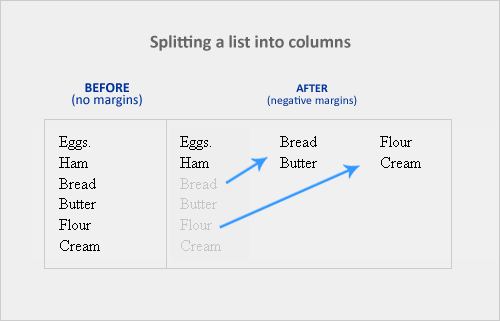
Making a single <ul> into a 3-column list

If you have a list of items which are just too long to display vertically, why not divide them into columns instead? Negative margins let you do this without having to add any floats or additional tags. It’s amazing how it easily lets you divide the list below into 3 separate columns, like so:
HTML
<ul> <li class="col1">Eggs</li> <li class="col1">Ham<li> <li class="col2 top">Bread<li> <li class="col2">Butter<li> <li class="col3 top">Flour<li> <li class="col3">Cream</li> </ul>
CSS
ul {list-style:none;}
li {line-height:1.3em;}
.col2 {margin-left:100px;}
.col3 {margin-left:200px;}
.top {margin-top:-2.6em;} /* the clincher */
By adding margin-top:-2.6em (twice the line-height of <li>) to .top, all elements move up in perfect alignment. Using a negative margin is more appropriate than applying relative positioning since you only have to apply it to the first of the new columns instead of to each <li> tag. Cool, huh?
Overlap for added emphasis
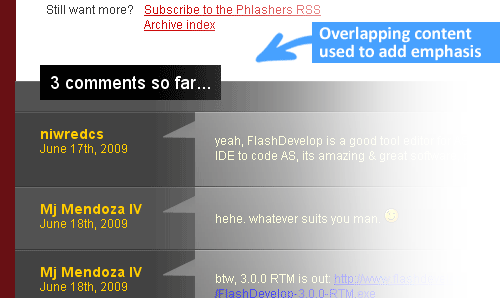
Overlapping elements on purpose is also a good design metaphor. It adds emphasis to specific elements since the overlapping effect creates the illusion of depth. A good example would be the comments section of Phlashers.com, which uses an overlapping technique to draw attention to the number of comments a post has. Combine this with the z-index property and a little creativity and you’ve got it made.
Smashing 3D text effects

Here’s a neat trick. Create Safari-like text, which are slightly beveled by creating 2 versions of your text in 2 different colors. Then use negative margins to overlap one over the other with a discrepancy of around 1 or 2 pixels and you’ve got selectable, robot-friendly beveled text! No need for huge jpegs or gifs which devour bandwidth like fat pigs.
Simple 2-column Layouts
Negative margins are also a great way to create simple 2-column liquid layouts where the sidebar has a preset width and the content has a liquid width of 100%
HTML
<div id="content"> <p>Main content in here</p> </div> <div id="sidebar"> <p>I’m the Sidebar! </p> </div>
CSS
#content {width:100%; float:left; margin-right:-200px;}
#sidebar {width:200px; float:left;}
And there you have a simple 2-column layout record time. It works flawlessly in IE6 too! Now, to prevent #sidebar from overlapping the text inside #content, simply add
/* Prevent text from being overlapped */
#content p {margin-right:210px;}
/* It’s 200px + 10px, the 10px being an additional margin.*/
When used properly, negative margins can also provide what’s called a Flexible Document Structure which absolutely kicks tables in the face. Flexible Document Structure is an accessibility and SEO technique which allows you to arrange your markup in almost any order depending on your intentions. Tom Wright wrote an interesting article which discusses possible applications of negative margins in multicolumn layouts.
Nudging elements into place
This is the most common (and simplest) usage for negative margins. If you’re inserting a 10th div in a sea of 9 other divs and somehow it just won’t align properly, use negative margins to nudge that 10th div into place instead of having to edit the other 9.
4. Bugfixes
Text and Link problems
Using negative margins with floats sometimes pisses off older browsers. Some symptoms include:
- Making links unclickable
- Text becomes difficult to select
- Tabbing any links disappears when you lose focus
Solution: Just add position:relative and it works!
My picture got cut-off
If you have the bad luck of using IE6 in the office, sometimes content will suddenly be cut-off when overlapping and floats are concerned.
Solution: Again, just add position:relative to the floated element and everything goes back to normal.
5. Conclusion
Negative margins have a place in modern web design because of its ability to position elements without any additional markup. With more users switching to more updated browsers (IE8 included), the future looks very bright for sites which rely on this technique.
If you have any unique experiences with negative margins, let me know by posting a comment.
6. Resources
More info on negative margins.
- Search This, The Positive Side of Negative Margins
- Severn Solutions, CSS Negative Margins Algebra
- Mindfly, Get Refreshed: Liquid Layouts With Simpler CSS and Without A Semantic Mess
- A List Apart, Creating Liquid Layouts with Negative Margins
- W3.org, Margin Properties
- Branbell, Using Negative Margins
- devarticles, Swapping Column Positions in Web Page Layouts with Negative Margins
- Simplebits, Exceptionally Negative
- CommunityMX, CSS Negative Margins
- brunildo, Horizontal Negative Margins
- Ben Nadel, Negative CSS Margins Are Not Cool

- bluerobo, Centering: Negative Margin


Stefan W,
July 27th, 2009 11:58 amGreat article!
John W
September 16th, 2010 8:39 amThank you so much. I had exhausted a ton of css solution to try to get my design cross-browser compliant and the solution was “position:relative;”.
Never would have thought of that!
Rick
July 27th, 2009 11:58 amGreat guide, thank you!
Ian
July 27th, 2009 12:06 pmAwesome tutorial! I thought it was a hack or some illegal thing, now I can safely use it!
Helen
July 27th, 2009 12:10 pmComing from Indesign it took me a while that there is a live outside the box in CSS. Same thing with negative positioning. Don’t forget to reset before you use negative values :)
Jay Selway
July 27th, 2009 12:15 pmCheck out http://www.eaglerockschool.org – site I designed a few years back. We used negative margins out the wazoo on that one.
g
July 27th, 2009 12:30 pmThanks!
Luke Jones
July 27th, 2009 12:34 pmGreat article, I don’t know why people are so scared about using negative margins, when used correctly they can make a site look one hundred per cent better than it did, it works particularly well with footers that you want to blend in.
One thing, remember that z-index:; is a handy tool when it comes to ;).
Mike
July 27th, 2009 12:38 pmMulti-column lists looks really handy, thanks!
Anne-Marie
July 27th, 2009 12:39 pmGreat article. Works great in Firefox but not in IE 6…. Any trick for this one?
Paul Gendek
July 27th, 2009 12:42 pmNegative margins should never be used to position elements. Use Top, Right, Bottom, or Left on either a relative or absolute positioned element instead.
Margins should only be used for separation, not positioning.
John G.
July 27th, 2009 1:00 pmI never knew there was much of any debate on the use of negative margins. I always used them with no issues, just following the spec. I tend to let others debate these things endlessly. The rest of us have work to do. Great piece, John.
Bekah
July 27th, 2009 1:07 pmBe very careful about saying “just add position:relative;.” IE6 and IE7 will not respect z-index values for relatively positioned elements; they are always put at the top of the stack. This will cause problems if they ever overlap with pull-down/ fly-out elements like menus, as the menu will always be beneath them. Relative positioning is very useful, but needs to be used with caution.
John Faulds
July 27th, 2009 1:12 pmWhy? Where is it written that using negative margins is illegal? In some cases, using position: relative/absolute isn’t appropriate or won’t work.
If you use position: absolute, the element is taken out of the flow and other elements will occupy whatever space the positioned element would normally have unless you make allowances to move the following elements out of the way.
If you use position: relative, then the element is moved, but the space that it would normally occupy is left behind, leaving a space in your layout. The only way to solve this is… wait for it… to use a negative margin to pull the following content back up into place.
As the author says, using negative margins is a perfectly valid technique and if you’re not using it due to some obscure notion of what is right and what isn’t, then you’re depriving yourself of a very useful CSS tool.
Bryce Howitson
July 27th, 2009 1:15 pmGreat article, I’ve never really understood why so many people are against the use of negative margins but this is a very clear and concise argument for their proper use.
@Paul Grendek thats a pretty strange stance especially when you consider that positioned elements are not treated the same way across all browsers (IE6 isn’t dead yet). Positioning elements in that format also causes problems with fluid pages/content so they are somewhat inadvisable when it comes to good usability.
@Mike they are nice for lists but be aware that you will have to know how many items are in the previous column to be able to correctly multiply the line height so its going to be a bit problematic for dynamic lists but otherwise a very handy trick.
Russell Heimlich
July 27th, 2009 1:20 pmPownce.com used negative margins on an image to create interest. It was such a neat effect -> http://web.archive.org/web/20071224051229/http://www.pownce.com/
ilz
July 27th, 2009 1:25 pmGood idea with the beveled text look.
j
July 27th, 2009 1:29 pm@John Faulds: absolutely. thats why i use negative margins all the time.
@Paul Gendek: how do you solve these spacing problems John Faulds speaks of without using negative margins?
John Faulds
July 27th, 2009 1:31 pmYes they do, they just don’t inherit them correctly from their parents but instead need to be stated explicitly. See Anne van Kesteren’s article for more details. So all you need to do is remember to declare z-index on relatively positioned elements where necessary and you’ll be fine.
And just a comment on the bevelled text technique: there’s two reasons why you’d be better off not using that technique:
1. you need to have the same piece of text written out twice in the source which means it’ll appear twice on the page if styles are off and will be read out twice by screenreader users (which would be very annoying).
2. the same effect can be achieved using text-shadow which is now supported by FF3.5, Opera 10 and all Webkit browsers.
yeah
July 27th, 2009 1:47 pmhm my site uses a negative margin to make a sidebar, just two divs in to a wrapper+subwrappers (and ofc a reset.css)
i already tested:
win: ie6, ie7, ie8, firefox 3.5, safari 4, opera 9.64
mac: safari 4, opera 9, opera 9.64, firefox 3.5
all of them display almost the same, but even reseting everything you still have some pixels difference, btw i’m using “em” to the width/min-width
any fix for this small diferences (its like 1 or 2 px) or any idea what element is causing this? there’s a difference (specially in opera) even with fixed width + negative margins
Sandeep Paul
July 27th, 2009 2:16 pmGood post. I have used negative margin without much issue in most of my projects. Difficulty in selecting text was an issue and had to find out the solution by trial and error.
Cooty
July 27th, 2009 2:23 pmWow the beveled text effect is an amasing idea! Never would have thought about it!
Mil
July 27th, 2009 2:32 pmGreat article. I’ve never looked into negative margins before, just started using it gradually as I found it handy.
A Website Designer
July 27th, 2009 3:31 pmI am just pleased to see in black and white negative margins are not a hack! :-)
Ena
July 27th, 2009 3:59 pmi use negative margins in The Guidon website. I used to think it’s weird to have them :))
John Imbong
July 8th, 2011 7:45 amSo you did, did you? I won’t tell.
Alexandre Romero
July 27th, 2009 5:43 pmNegative margins always causes me lots of trouble. I prefer not use it if i have other options.
Chris Newton
July 27th, 2009 6:21 pmNegative margins can also be helpful in multi-column layouts, if you want to reorder the columns without changing the HTML source, for example to keep your main content first in source order.
Another common use is when you want to keep some text in the HTML source for accessibility or SEO reasons, but hide that text on-screen, typically because you’re using some sort of background-image replacement technique.
frank
July 27th, 2009 7:58 pmvery useful, I am trying to implement it my own website
devpkj
July 27th, 2009 7:59 pmgreat! great! great!
thanks!
Davor
July 27th, 2009 10:00 pmI must admit, I pretty much avoided negative margins in the past for no particular reason. Maybe it was a negative value for a property that got me a bit ‘suspicious’ :) I did use negative margins when there was no other way to do the job, but after reading this article I will use this positioning technique just like any other. Thank you SM! :)
Tim Jensen
July 27th, 2009 10:23 pmGreat article! I feel more comfortable using negative margins – I was using them but thought it was risky :)
Yannik
July 27th, 2009 10:36 pmGreat article. I didn’t know that people don’t speak about negative margin!
I use negative margin for some elements in the background that I don’t want to be scrollable. For exemple, if I have a content column of width 700px, and some elements at the left and at the right in the background, I want that if I reduce the window size, there would have no horizontal scroll for them.
At the left, this elements have a negative margin-left to go at the right place, And so, the browser doesn’t count them as elements to be scrollable. Then small screen with a window open at 700px width won’t see background decorative elements that are not usefull to read content, and they won’t have the horizontal scroll.
I think this technic is nice to handle some wide decorative background, if only it would work also with the margin-right. Unlucky the horizontal scroll apears even with a simple negative margin-right. Any idea for the right side?
Thanks for this article
Sig. Tolleranza
July 27th, 2009 10:45 pmReally great tutorial. Thanks a lot!
ovaxio
July 27th, 2009 10:46 pmCool tips,
Thanks a lot. Now, i can use negative margin where i need.
Rafa Carrasco
July 27th, 2009 11:32 pmthe multicolumn list trick is cool!
thanks a lot
Felix Buenemann
July 27th, 2009 11:49 pmI use negative margins to line up column text in multi column layouts but keep headings above the text. Apply a margin-top on all columns, then use a negative margin-top of same amount on the first heading in that column with a class like h1.first-header.
Mezzair
July 27th, 2009 11:56 pmNegative margin is your friend! :)
Joel
July 28th, 2009 12:09 amLovely article :)
Optimator
July 28th, 2009 12:14 amConcerning the fantastic beveled text trick:
I’ve tried it now, and it “works” in FF, Chrome and Safari, BUT it differs with around 6px or so in IE8 and Opera.
Any workaround to avoid this without hacking (have tried position:relative already).
I’ve also added: * {margin:0;padding:0;} to the css.
SocialGeek
July 28th, 2009 12:25 amGreat article.
Negative margins can be used to create flexible cross-browser equal-height columns as described here: http://socialgeek.be/blog/read/flexible-equal-height-columns
Simon Day
July 28th, 2009 12:26 amI often wonder how afraid are the authors when it comes to subjects which are…let’s say a little more discussed than normal. Do they ever fear an angry CSS/HTML mob ready to burn you at the stake? ;-)
Seriously almost all hotly discussed topics have their place in a web designers tool bag and this works really well and I do use it. As long as it is only one tool in many and not the solution to all life’s problems it will always be very useful.
Volly
July 28th, 2009 1:47 amHi,
thanks for the article. I had the question about validity of negative margin since if first used them. Thanks for giving clarification.
Rakesh Sivan
July 28th, 2009 1:55 amSimple and great.. Thanks for effort.
Dylan Harrington
July 28th, 2009 1:57 ampretty neat article. fyi there are a few typos in the 3 column example (html part).
Riccardo
July 28th, 2009 2:15 amThanks for the informative article.
Nagaraj Hubli
July 28th, 2009 3:04 amThanks for the short and great article!
LC
July 28th, 2009 3:04 amI never understood the behavior of “position:relative”. It annoys me until I discovered negative margins were doing the trick ;)
All for Design
July 28th, 2009 3:42 amVery interesting article !
It has changed a little bit my opinion (very “negative”) on negative margins. To my mind it’s not necessary to put negative margins when we can avoid it. But, your examples make me realized that is sometimes usefull (example for the display of the ul list).
Thanks for sharing your knowledge about CSS.
rooc
July 28th, 2009 3:55 am3-column list technique was most unexpected for me. Thanks!
theCount
July 28th, 2009 4:11 amgreat article on a feature of css that many consider to be a bug…
Joël
July 28th, 2009 4:21 amThanks! Can’t wait to use the 3colomn list technique!
Hans2103
July 28th, 2009 4:23 amAnd pretty usefull when using sprite technology to reduce the httprequests on css images
Matt Berridge
July 28th, 2009 4:46 amGreat article.
The best use I’ve found is for something like the above ^^^ where you’ve got a left (name) and right (avatar) element.
Keep both elements in the normal flow of the page but use text-align: right; on the right element (or within a span set to display: block; containing that element.)
Then use a negative top margin to bring the right element up in line with the left element.
No containing div, no float. Easy :)
9swords
July 28th, 2009 4:49 amBeveled text effect is interesting looking and worth a try. Thanks.
Kashif M Qasim
July 28th, 2009 4:50 amGreat Article again! The column techniques are cool.
Michael
July 28th, 2009 4:57 amWhat if the contents of an spans across two lines?
Bekah
July 28th, 2009 5:44 am@LC: Although I cautioned against over-using position:relative; in my comment above, it has many very useful features. The one that I use most often is to define a container for a position:absolute; element. Absolutely positioned elements will base their positioning of whatever parent container it can find that is relatively positioned, defaulting to the body if none are found.
aR
July 28th, 2009 6:07 amHelpful idea. learn a nice technique. Thanks
aR
Bangla Hacks
Georgiy
July 28th, 2009 6:13 amBravo!
Multicolumn lists are really cool, yeah.
timuism
July 28th, 2009 6:38 ami love negative margins. i wish IE did too.
Chris
July 28th, 2009 6:52 amGreat article, minus the little bit about using it for beveled text. To create that effect you’d have to have two instances of the exact same tag. Not semantic, and certainly not effective separation of content and presentation (the goal of CSS in the first place). I suppose you could use JavaScript to generate the second tag (so it wouldn’t show up for robots and screen readers), but at that point you might as well use image/Cufon/sIFR
Elaine
July 28th, 2009 7:11 amVery interesting – I’m sure it’s going to come in handy.
foodie
July 28th, 2009 7:45 amAmazing article! I never new negative margins could do so much like that multicolumn unordered list. I can’t wait to see what your next post will be about.
Gaby
July 28th, 2009 8:19 amI love using negative margins. I hadn’t ever thought to do what you have with the list columns though, usually I’d use floats, which of course wouldn’t work for having a 2×3 grid like you do in the example (in the same order anyway).
Really fantastic article. I hope a lot of people learn from it :D
Chris
July 28th, 2009 9:03 amWhy not use tables for #3? It is, after all, tabular data and tables would mark it up more semantically than a mess of CSS and class attributes.
Caleb Kester
July 28th, 2009 11:01 amThanks! I knew a lot of this but it’s good to calm some of my fears about browsers not liking it.
Eduardo Ottaviani
July 28th, 2009 11:29 amThank God I´m not getting crazy.
I was criticesed once for using negative margin and they told me not to use it… Ever! But I’ve never know why.
I think that´s because people think “negative is a bad thing, and positive is a good thing” =)
To me, is way much better to use negative margins rather than relative or absolute positioning in some cases.
Marcelo Figueroa
July 28th, 2009 6:44 pmAwesome!
John Faulds
July 28th, 2009 8:01 pmNo it’s not; it’s a list of items split into three columns. It’s only tabular data if you need to define a relationship along horizontal and vertical axes where that relationship is different from that defined in other columns or rows, ie, do you need row or column headings to describe the content? In this case, you don’t – it’s just a list of items.
Afraz
July 28th, 2009 10:59 pmVery great article, I really appreciate it. But remain always positive :(
Joshua Sortino
July 29th, 2009 6:11 amNegative margins are one of the most underrated uses of CSS. Unfortunately, many designers feel as though they are “cheating” by using negative margins.
Gözde
July 29th, 2009 6:46 amGreat article! Thank you.
My favorite is #3
:)
jl
July 29th, 2009 12:24 pm‘It is highly compatible”
AHAHAHAHAHAHHAHAHAHAHHAHAHAHHAHAHA
Kruger Leminworthy
July 29th, 2009 2:34 pmI’m new to web design and all I use is Dreamweaver. Why shouldn’t I be editing my pages in Design View? Do you mean running it through a browser to see how it looks as a way of checking the pages? I know to do that, but if there’s something I shouldn’t be doing in Dreamweaver, then let me know!
John Imbong
July 8th, 2011 7:49 amIt’s always best to code off the bat in Code View then preview using real browsers. Think of it as web designer training except you’re both the student and the teacher. FYI, I use Dreamweaver for all my projects whether it’s a static site, WordPress Theme or Drupal Theme.
montage
July 29th, 2009 7:58 pmTell me if im wrong, but i never ever use relative or absolute positioning in my designs. Z index just causes problems down the line (IE6 relative bug – and if you have a ton, you need to sort through and remember the order – any forget it with mega dropdowns or flyouts). And I never thought there was anything wrong with neg. margins. Am i crazy?
When do I need to use positioning?
What I’d like to see is a universally accepted global reset. There are so many that claim to be “the one”.
Snookerman
July 29th, 2009 10:19 pmNice article, just one note about something totally unrelated: in the presentation about the author, CTO is wrapped with abbreviation tags, but it’s actually an acronym. An abbreviation would be something like Mr. or etc. I just had to say this because many people get this wrong.
Timo
July 30th, 2009 11:14 amQuestion about the 3-column-list: Why does the third column class have the same margin values than the second column class ? Why do they align so perfectly?
John Faulds
July 30th, 2009 10:28 pmBecause prior to CS4, DW used its own rendering engine to display pages in design view. As no-one browsing the web uses that rendering engine to view pages, you’re getting an inaccurate view of how your pages will appear in real browsers.
CS4 now uses the Webkit rendering engine so a lot of these problems are probably alleviated now but you’re still better off coding everything by hand and then previewing in browsers so you actually get an understanding of what you’re doing. Not having used CS4 myself, I also can’t vouch for the quality of CSS that CS4 outputs.
Simon
December 16th, 2009 12:08 pmSaying you can’t use a table if it isn’t tabular data is a lot like saying you can’t use negative margins because they are evil. If the end result is a well-formatted page, why not use a table for a 3 column list?
mojitopl
July 30th, 2009 11:03 pmGreat! You just solved some of my problems! Thanks
Vasily
July 31st, 2009 12:16 amNever thought this subject could deserve its own article and was brutally proved wrong. Very useful addition to my CSS skill set.
Carlos Eduardo
July 31st, 2009 4:01 amWe have to care about IE6 when we talk about negative margins… It have a lot of bugs!
Ilia
July 31st, 2009 6:19 amI didn’t realize negative margins were such a taboo topic, I’ve been using them for a while to great effect. I didn’t think of the 3-column list and the beveled text tricks though. Those would be very useful :) Great article.
Mon
July 31st, 2009 7:31 amThe IT guy I worked that he hated negative margins so much that he TOLD (as in authority) me not to use it. He’d rather rewrite my entire CSS than to apply my negative margins. Now I got something to shove at his face, too bad he quit.
Thanks for a great article.
Ben
July 31st, 2009 7:51 amGreat article, thanks!
Kruger Leminworthy
July 31st, 2009 8:48 am@ John Faulds
Thank you very much. I know little of what the standard work flow is in Web Design among web designers, so I’ll make it a priority to transition from DW to coding by hand, if that’s the sensible route to take. I appreciate the advice.
John Imbong
August 3rd, 2009 8:19 amHi, guys. I’m glad a lot of you found this article very usefull. Negative margins are actually very useful but like everything else CSS, it has to be used at the right time and in specific amounts. I’m just glad I was able to remove all your doubts concerning negative margins as a hack when in fact it’s not.
For those who are having IE6 issues, I always try several other methods which usually range from manipulating margins to positioning and if worst comes to worst: markup change. If there’s one good thing to say about IE6, it’s that if it didn’t exist then web design probably wouldn’t be as challenging/exciting as it is today.
Watch out for my next article which features a ton of other “why didn’t I think of that” techniques and, hopefully, a few others featuring the kick-ass jQuery javascript framework.
Cheers!
John Imbong
August 3rd, 2009 8:23 amMy ears are clapping. Thanks!
John Imbong
August 3rd, 2009 8:27 amWhat’s your problem look like? There’s always more than one way to do things in CSS. If HTML is all about what the most efficient markup would be, CSS would be about using what works. This is very evident in the use of CSS for specific browsers.
John Imbong
August 3rd, 2009 8:30 amHahaha! If you see him again, the pleasure is all yours. Make sure you count the number of times he stutters when he tries to defend himself.
Ironically, I know how he feels though.
bycolor
August 3rd, 2009 7:34 pmThat’s a very nice article, thank you.
CK
August 7th, 2009 9:44 amVery enlightening, always cool to have more tools.
Ed
August 17th, 2009 9:18 amI started using negative margins recently to nudge a few images a bit into an adjoining column. Gives a nice effect and makes the layout flow and look creative, as opposed to looking like it was made on a grid.
I don’t understand the CSS Police. If the code validates and you get the desired result in the major browsers, what’s the problem?
Ed
Kim H
August 24th, 2009 2:59 pmNegative margins aren’t really a thing of the devil; I think they can create neat effects, and break the borders a bit with graphics.
Silverzero
October 19th, 2009 8:41 amIncredibly awesome! Thanks!
Xyren
October 23rd, 2009 7:43 pmDreamweaver is Good!.. but we are all web designer. Dreamweaver doesn’t work as Cross-browser compatibility.
Remains Positive. :)
.wilk
November 4th, 2009 8:27 amExcellent overview of negative margins; complete yet concise. This helped me with my fluid layouts. I gave you credit in my blog (www.boxertech.com)
aviendha
February 25th, 2010 3:02 pmAny hints around how to fix that cool 3-column-list for IE ??? That would be helpful, I tried a lot but nothing worked …
am
April 19th, 2010 6:57 pmmxd
webeno
May 16th, 2010 11:56 amawesome help!
linked you in my blog post: background image overlap using negative (minus) margins
Abdul Ahad Bukhari
June 7th, 2010 3:48 amDidn’t thought negative margins will be so useful, i like the way ul is customized, thanks for the article
Tara
June 12th, 2010 8:32 amI LOVE you guys for this. This is the exact article I’ve been looking for. I’m good at everything in CSS except negative values.
Tara
June 12th, 2010 12:30 pmThanks for this. This really clears up negative margins and how they should be used.
Tara
September 22nd, 2010 1:55 pmI’m thankful for this article but, this is sooo complicated…I swear I could cry right now.
Devon
January 12th, 2011 2:36 pmposition; relative: THANK YOU!!!
Ed
January 22nd, 2011 2:53 amGreat article!
One question though:
I used to use a relative DIV “wrapper” to embed all content. In that case, if the browserscreen was smaller than the defined Width for the wrapper, on the right side of the screen part of the website became hidden.
With the negative margin option though, if the browserscreen becomes smaller than the defined Width of the website, then on BOTH left and right side of the browserscreen content is hidden.
How do I make sure content on the LEFT side of the browserscreen is NOT hidden (when using negative margins)?
Ravi
January 28th, 2011 10:26 pmvery nice and helpful article
Website design
February 12th, 2011 4:56 pmHi,
Has anybody experienced problems with Chrome not rendering a negative margin-top correctly?
Chris
Malta
May 27th, 2011 7:17 amI got the same bug here… Chrome is not showing a negative top margin correctly. The worse is that it only happens sometimes, and when it does, a browser refresh solves the problem. I’m looking for a workaround; suggestions are welcome.
Dan O
March 10th, 2011 1:54 pmJust because you can, doesn’t mean you should! Of all the things on the list of Do’s, this is the only one that I disagree with. It’s an amature move, seriously and I suggest you stop doing it and learn how to use positioning. In addition it’s a maintenance nightmare and if you do it in enterprise applications, you’re going to cause quite a headache for those who have to maintain the code after you. Just avoid it, you’ll look like a hack!
Ricardo
June 9th, 2011 8:40 pmI have developed more than 20 xhtml pages and never had a problem using negative margins. IMHO negative margins are a time saver in most cases, in other cases they can really help you if you are using some ‘hard to position’ script, well even when developing with javascript negative margins can be very useful.
I don’t understand the people that prohibits the use of negative margins, just typing a -1 you can easily fix a wrong positioned element. And it is valid!
hammad
June 26th, 2011 10:55 pmnice man it is very helpful to me for doing work…………………
John Imbong
July 8th, 2011 11:26 amIf you liked the beveled text effect, it’s much better now to use the new CSS 3 implementation of the text-shadow property.
It goes like this: #thistext {text-shadow:1px 1px #000;}
Nice and simple.
Reinier Kaper
December 2nd, 2011 8:35 pmNo, no, no, no, no! Sorry, but the examples are really, really bad practice.
You seriously think it’s a good idea to position elements using negative margins?
It doesn’t matter how “valid” it is, it’s still the “wrong” way of using CSS. Margins are used to create space between the bounding box of an element and its content, ignoring background. Much like padding, but outside the box, so to speak.
Even though this is an “old” article, please put a disclaimer on top stating there are better ways to achieve the effects mentioned, using positioning and CSS3 (for the beveled text example).
Geoffrey Hale
February 17th, 2012 9:01 pmJohn, thanks for the great article! This has been very helpful in my efforts to hack the WordPress Twenty Ten theme into a custom theme for Hale College. I’m looking forward to digging through some more of your articles. Cheers!
Marcos Martins
March 8th, 2012 3:41 pmThanks man. Excellent article. I’ve been looking for a solution to the negative margin-left in I.E. and I only found it in your post. I put position-relative as you told. Thanks a lot.