HTML5 and The Future of the Web
Some have embraced it, some have discarded it as too far in the future, and some have abandoned a misused friend in favor of an old flame in preparation. Whatever side of the debate you’re on, you’ve most likely heard all the blogging chatter surrounding the “new hotness” that is HTML5. It’s everywhere, it’s coming, and you want to know everything you can before it’s old news.
Things like jQuery plugins, formatting techniques, and design trends change very quickly throughout the Web community. And for the most part we’ve all accepted that some of the things we learn today can be obsolete tomorrow, but that’s the nature of our industry.
When looking for some stability, we can usually turn to the code itself as it tends to stay unchanged for a long time (relatively speaking). So when something comes along and changes our code, it’s a big deal; and there are going to be some growing pains we’ll have to work through. Luckily, rumor has it, that we have one less change to worry about.
In this article, I’m hoping to give you some tips and insight into HTML5 to help ease the inevitable pain that comes with transitioning to a slightly different syntax.
Welcome to HTML5.

What are the basics?
The DOCTYPE
When I first started researching HTML5 a few months ago, one of the main things I struggled to find was the doctype. A simple thing, you’d think it would be everywhere, but after much frustration, I finally found it buried within w3.org and here it is:
<!DOCTYPE html>
I was also curious why they chose to “html” rather than “html5″, it seemed like the logical way to tell a browser that the current document was written in HTML5, and offered a good template for the future. But I found that <!DOCTYPE html5> triggers Quirks Mode in IE6, and when taking backwards compatibility into consideration <!DOCTYPE html> is a pretty good choice (in my opinion).
Overall, I really like the new DOCTYPE; it’s small, meaningful, and maybe we’ll actually be able to remember this one by heart and not have to paste it from site to site.
New Elements you should know
At first glance, with HTML5, the new elements immediately jump out and command attention. The W3C really listened to the community and planned for the future when architecting the abundance of new elements available. We have everything from basic structural elements like <header> and <footer> to others like <canvas> and <audio> that tap into, what seems to be, a very powerful API which allows us the freedom to create more user-friendly applications while further distancing ourselves from reliance on Flash for saving data and intense animation.
The new structural elements
<header>
The header element contains introductory information to a section or page. This can involve anything from our normal documents headers (branding information) to an entire table of contents.<nav>
The nav element is reserved for a section of a document that contains links to other pages or links to sections of the same page. Not all link groups need to be contained within the <nav> element, just primary navigation.<section>
The section element represents a generic document or application section. It acts much the same way a<div>does by separating off a portion of the document.<article>
The article element represents a portion of a page which can stand alone such as: a blog post, a forum entry, user submitted comments or any independent item of content.<aside>
Aside, represents content related to the main area of the document. This is usually expressed in sidebars that contain elements like related posts, tag clouds, etc. They can also be used for pull quotes.<footer>
The footer element is for marking up the footer of, not only the current page, but each section contained in the page. So, it’s very likely that you’ll be using the <footer> element multiple times within one page.
When you take a look at these new elements, it looks like they’re just replacing our common DIV IDs; and in a way, it’s true. But, the diagram below shows that elements like <header> and <footer> can be used more than once on a single page where they behave more like classes and normal HTML elements that you can use over and over again to retain a semantic structure.
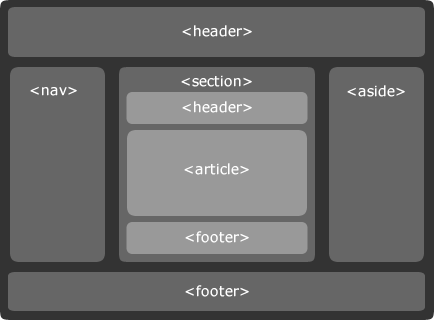
Elements like <header> and <footer> are not just meant to represent the top and bottom of the current document, but they also represent the <header> and <footer> of each document section, much the way we use <thead> and <tfoot> in data tables.
The benefits of using these structural elements is mainly due to the fact that they are extremely well defined and provide a great way to semantically structure your document. However, these elements do need to be used with some careful thought because they can, very easily be overused.
Further Reading on structural HTML5
- Steve Smith on Structural Tags in HTML5
- Lachlan Hunt’s Preview of HTML5
- Elliot Harold on New Elements in HTML5
- Bruce Lawson’s HTML5 Form Demo
Easing the transition from XHTML
Even though HTML 4.01, XHTML 1.0, & HTML5 are all very similar there are some small syntax differences that can, very easily, slip past anyone and invalidate code. Keeping this in mind, HTML5 has some built-in “slack” to make the transition a little easier.
For example, when marking up a form in HTML5, this is the proper syntax for an input text element:
<input type="text" id="name">
But this is also accepted as valid code in an attempt to ease the pain for avid XHTML coders (like myself) who are used to self-closing elements:
<input type="text" id="name"/>
The same rules apply to <meta> and other self closing elements. Legacy elements like <b> and <i> were also left in to help those coming over from HTML 4.01.l
What are the benefits?
With any new technology there has to be benefit; why else would you use it? If your old code works just as well and efficient as the new code there’s no reason to upgrade. No reason at all, trust me, I checked.
Luckily HTML5 is packed with cool new features, code slimming techniques and a lot of stuff I would call very large benefits. Most of which circle around the new APIs and the DOM tree.
Extending the API
The most obvious benefit built into HTML5 is the numerous APIs and the opportunities it opens up for the future of web apps with Holy Grail of application cache and offline capabilities. Google Gears gave us offline data storage and Flash introduced us to the power of application cache (Pandora uses it to save your log in information). With HTML5, these capabilities are now available to use right in the language and can easily be expanded with JavaScript.
HTML5 relies on light scripting to flex its muscles on the Web; this is very possibly the first time, other than jQuery, that one (front-end) technology has fully acknowledged another. Sure, we connect them with classes and IDs but up until now, they have been perceived as separate layers by the principles of progressive enhancement. But as the Web grows we need unity like this across the Web.

Offline Data Storage
The coolest part about HTML5 is definitely its offline capabilities. Programs like Thunderbird and Outlook (and now GMail to an extent) let you browse through your old data while staying offline. With HTML5, you’ll have this same functionality, but in the browser. This is the first serious step towards bridging the gap between the desktop and the Web, and opens all sorts of doors for the future of Web apps.
The W3C has taken the best parts from the various Web technologies and rolled them into, what is being dubbed the most powerful markup language to date.
Some other of the HTML5 APIs
- Drag & Drop
The drag and drop API defines an event-based drag and drop system. However, it never defines what “drag and drop” is. This API requires JavaScript to fully work as normal think drag and drop functionality. - Video & Audio
The audio & video APIs are massive upgrades in media embedding. Although support is limited right now, something like video embedding has never been easier:<video width="400" height="360" src="vid.mp4">
- Geolocation
Geolocation is a very cool API available within HTML5. Its object can be used to programmatically determine location information through a device’s user agent (hint hint: mobile devices).
Further reading on the HTML5 API
- Offline Web Applications
- Offline Application Caching
- Remy Sharp on JavaScript APIs HTML5 (presentation)
- O3D Beach Demo from Google (must have an HTML5 capable browser)
Where can I use it?
Even with the very limited support for HTML5, the Web is far too progressive to not create a testing environment for us to play around. Currently, Safari is our best testing platform, as it supports most of the new elements and APIs. Of course, that may change at anytime so keep and eye on Opera, Chrome and Firefox as well.
Normally you might think since Safari is a Webkit browser, by default, all Webkit browsers would support the same elements, unfortunately, this isn’t the case. While many of the HTML5 features are supported across the board in Webkit browsers, there are some, like <video>, that are not.
Mobile devices
To effectively use HTML5 right now, we need to be able to control the environment in which it is used. Since support is not as widespread as we’d like it doesn’t make real sense for it to be heavily used unless, of course, we can lock down the usage to certain platforms which have HTML5 support. With Webkit leading the way for HTML5, we can safely focus on devices powered by Webkit.

The 3 hottest mobile devices right now: The Palm Pre, iPhone 3Gs and the new Google Android phone all have browsers that are based off the Webkit rendering engine.
Safari is even leading the way on the mobile HTML5 front; The iPhone (with the latest software upgrade) is the only device I could get to properly render the <audio> element. Because these devices are so young and all use the same rendering engine, the likelihood of them pushing a rapid software upgrade is pretty high.
Right now, you can confidently use many of the HTML5 features in iPhone Web app development and mostly likely expect Pre and Android to follow in suit.
Further reading on where you can use HTML5
- HTML5 Features in latest iPhone
- GMail Web app for the iPhone
- GMail for HTML5
- Supported Features in HTML5
- HTML5 Cheat Sheet
How can we move forward?
Even with all the recent hype surrounding HTML5 and how we all want to use it, it is still going to be a very slow transition away from HTML4.01 & XHTML1.0. It will take time to get developers up to speed, test all the features, waiting for all the :ahem: browsers to catch up, and it will take an especially long time for users to transition out of those old browsers. With all that in mind, we know who we are, we’re all reading this article (I’ve read it about 30 times so far) and we know we have to find a legitimate way to move forward without damaging the past.
We can’t make the full switch yet and there’s no use at this point pointing out who is holding up the show. We all know that any responsible developer would not drop support for a browser that is still heavily used. So rather than yell at a brick wall, here are some things I’ve found that might help us move forward in a positive way:
Semantic DIV naming
Semantically aligning your DIV names with that of the new HTML5 elements will help you get used to the names themselves and also the new functionality and nesting that they want you to do with the <header> and <footer> elements. These are akin to learning the intro to Enter Sandman (for the guitarist out there); it’s not very difficult, but it takes a little practice to get it to feel natural.
Before jumping in full-force to HTML5 production sites, I recommend trying the soft transition with changing your DIV names slightly. There’s no downside that I’ve found to doing this, you can even use the new DOCTYPE with very little consequence.
Faking it with JavaScript
First off, I’d like to say: Please don’t do this in production. If the client side scripting fails, it will completely collapse the site in browsers that won’t take CSS applied to the new elements. This is simply not a good option. It is, however, an option and I’m all about knowing your options no matter what they are.
Creating the new elements with JavaScript
Working in jQuery is cool and all, but as it turns out, there is a built in function to JavaScript to deal with creating new elements:
document.createElement('header');
document.createElement('footer');
document.createElement('section');
document.createElement('aside');
document.createElement('nav');
document.createElement('article');
document.createElement('figure');
document.createElement('time');
…and so on in that fashion.
This will allow you to style these elements in Internet Explorer. Again, the downside of using this technique is that, without the all-important JavaScript, the site will not only be unstyled, all the unrecognized elements will default to inline. So your site will literally collapse on itself.
Client side JavaScript is not the answer for using HTML5. Server side javascript, now that’s a completely different story…
Building browser-specific apps
I’ve always promoted building sites for your audience, so depending on your audience, building browser-specific applications may be a real option. As I mentioned above, it’s all about controlling the environment, if we can control the environment we can control features delivered to the user much better. Google is currently attempting to do this with Google Wave.
The idea behind Google’s new monster product is to revolutionize communication, and do so with the newest technology. Google Wave is built in HTML5 and isn’t usable in all browsers yet. But that’s alright since they’re controlling the audience by only releasing it to select developers for testing.
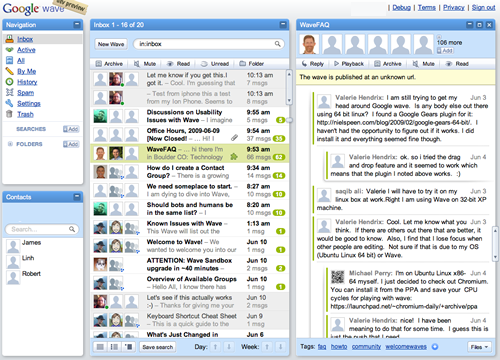
With Wave, Google is pushing HTML5 as far as it will go (and even a little further). They are taking blogs, wikis, instant messaging, e-mail and synchronous communication to the next level by combining them into place.
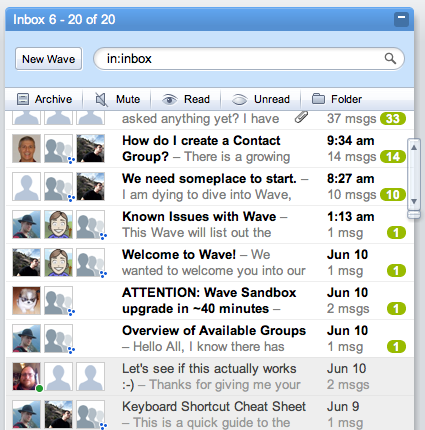
Here is what the Wave inbox looks like.
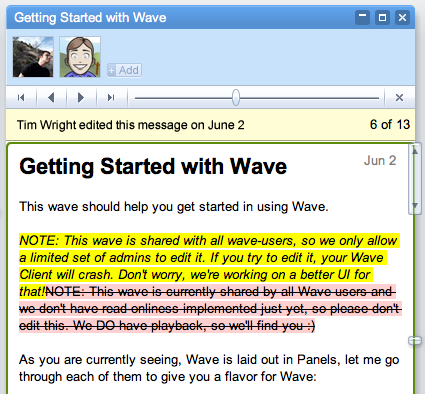
Below is a sort of wiki/chat area with all sorts of real-time communication treats for you to check out (once they release it).
Google Wave being powered by HTML5 is definitely the biggest step forward we have seen in this area. They have done a phenomenal job putting together a creative and innovative product.
Focusing on the mobile
Just like Google is currently doing with Wave by selectively releasing it to developers, we can control the viewing environment when working with mobile devices. By grabbing the user agent, we can design specific applications that use HTML5 for supported devices.
Targeting the user agent of a device is not an ideal method in designing for the general mobile web, but when we need to specifically target a device, like the iPhone, Pre or Google’s Android it’s a pretty solid option.
Right now, the best mobile testing platform we have is the iPhone. With the recent software upgrade, it is very close to having full support. But, if you just want to use the new elements, most any of the big 3 mobile platforms will work fine. If you’re looking for API support I suggest testing on the iPhone with the new upgraded software.
Conclusion
With the strong foundations set up by previous versions of (X)HTML and large community activity surrounding Web standards, we’re coming into a new age with a wealth of knowledge and the ability to learn from our past mistakes (and make some new ones). HTML5 is being set up with the expectations of a very powerful markup language and it’s up to us to utilize it in a way that can benefit us all.
There are so many great features to look forward to from new elements to tons of killer APIs. We can make data available offline, easily combine technologies and create very intricate animations all within a familiar landscape. If you have the time, I encourage you to browse through the entire spec and familiarize yourself even further with all the bells and whistles (there are a lot) so we can use HTML5 to build stronger, richer Web applications for years to come.
Here’s to HTML5, let’s hope it lives up to the hype.
Resources
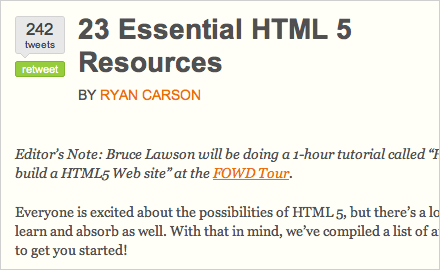
- 23 Essential HTML 5 Resources
A comprehensive list of articles and resources related to HTML 5. - HTML5 Demos
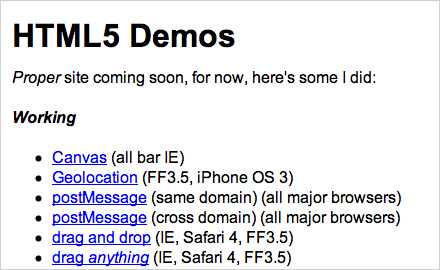
HTML5 Demos is a great resource for checking out the HTML5 APIs such as: geolocation, drag and drop, offline detection, and storage. This is a very good and unique resources to test out and see exactly with we can do with HTML5. - HTML5 Gallery
The HTML5 Gallery, like any gallery, is a web site showcase where you can see how others are using HTML5 in every day development. I’ve looked round though this site quite a bit and did some cross browser testing on some of the entries. Many are broken in older browsers, but there are some that hold up very well. - HTML5 Doctor

A resource that catered for the people who wished to find out more about implementing HTML5 and how to go about it. This blog publishes articles relating to HTML5 and it’s semantics and how to use them, here and now. - HTML5 Cheat Sheet
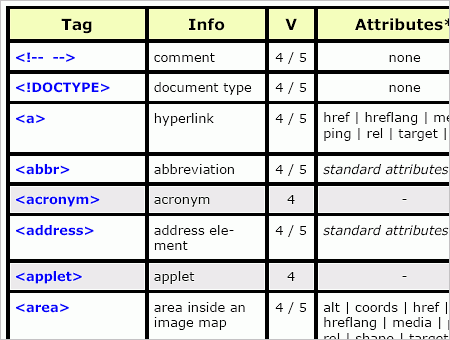
A handy printable HTML 5 Cheat Sheet that lists all currently supported tags, their descriptions, their attributes and their support in HTML 4. Released here, at Smashing Magazine. - W3C HTML5 Spec Overview
Whenever you want to know
about something that no one has written about on the Web, the W3C is your answer. I spent hours scouring this site in researching HTML5. It’s a great resource and I highly recommend reading through whatever you can. - HTML5 Validator
Even with such little support, we still want to make sure our code is valid. Validating your code is a great way to learn and ease yourself into developing with HTML5. - WHATWG Wiki
The HTML Working Group has put together some great documentation for tracking what exactly is going on in the world of HTML5.





Alex
July 16th, 2009 2:05 pmvery useful article
Jorge Linares
July 16th, 2009 2:07 pmwow, this is just what we needed. Great article and of course html5, such a masterpiece.
Jourdan
July 16th, 2009 2:08 pmGreat article! Very useful as usual!
Tolga Ergin
July 16th, 2009 2:10 pmthanks SM
Floris Fiedeldij Dop
July 16th, 2009 2:11 pmExcellent…. just excellent. :)
Seich
July 16th, 2009 2:21 pmGreat Article :) I just started experimenting with html5 and this showed me some options to do it in a better way.
Rafo
July 16th, 2009 2:28 pmNice article. Very informative. I like to start with HTML5 right now but there are still to many limitted browsers. Its a shame! It seems to be to “expensive” to switch to good browsers: http://www.boingboing.net/2009/07/14/state-department-app.html
Sven Lito
July 16th, 2009 2:33 pmvery useful, thanks!
Matthew Nuzum
July 16th, 2009 3:00 pmCan a .mobi domain server html5 content? As I understand the regulations a .mobi domain site must serve XHTML Mobile Profile documents.
#1 Fan
July 16th, 2009 3:11 pmBravo! Great Article from a Great writer.
Eric
July 16th, 2009 3:16 pmVery useful, but are you supposed to have src twice in the video element?
Tim Wright
July 16th, 2009 3:22 pmHi guys, thanks for all the great comments so far!
@Eric – That’s a typo, nice catch! I’m glad it’s getting read so closely!
Sneh | LBOI Blog
July 16th, 2009 3:32 pmBrilliant article and a great read! Thanks for this :-)
Anrkist
July 16th, 2009 3:46 pmBetter not take my tables!
loopz
July 16th, 2009 3:46 pmSmashing Magazine – the best and one step ahead as usual. Tim Wright – great writing!
Will
July 16th, 2009 4:05 pmI want to note that, at least according to my research, Firefox 3.5 has as much (if not quite the same) support for HTML5 as Webkit/Safari does.
All this recent discussion about HTML5 makes me also wonder when the CSS3 spec will be finalized.
lpro
July 16th, 2009 5:14 pmGreat article SM :D Thanks
oli
July 16th, 2009 5:17 pm@Will CSS3 in it’s entirety won’t be ready for quite a while, but because it’s modular some parts will be done much sooner. Also there’s nothing to stop you using the supported parts in modern browsers, as a lot of it adds progressive enhancement-style visual flourishes; eg rounded corners for modern browsers, square corners for … square browsers (cough IE cough) ;P
Also, here’s an introduction to HTML5 I wrote; HTML5 structure—HTML4 and XHTML1 to HTML5, which may be of interest…
peace – oli
Mr. Krystal
July 16th, 2009 5:23 pmIs there any particular reason why you have an extra ‘src=”‘ in the video tag? Looks like an error to me.
TFHackett
July 16th, 2009 6:11 pmThanks sooooo much for this. It’s been a very confusing couple of weeks, and this article puts it all in perspective better than anything I’ve read on the subject.
anon
July 16th, 2009 6:21 pmI’m revolted by “paving the cow paths” html 5; I use xhtml rdfa doctype now; and wonder if using rdfa will let me avoid html 5 and it’s uncertain advantages all together.
Mr K
July 16th, 2009 7:00 pmGreat to see you threw this post up, I’ve just finished my tutorial on how to leverage the HTML5 Geolocation stuff in iPhone3.0, Firefox 3.5 Tutorial for Geolocation – turns out it is actually really simple to do and allows you to do some really great stuff.
And NO you don’t need a Google API key like most other tutorials will tell you that you do!
Ben
July 16th, 2009 7:36 pmeh… I really don’t see a need for the so-called semantic header, footer, aside etc tags.
It seems to me to be a step back in the direction of the old tags we’ve been trying to get rid of, like center, b, font, etc. I’m perfectly happy with div#header.
anon
July 16th, 2009 8:06 pmhtml 5 is a sloppy step back; long live xhtml . No one says you can’t continue to use xhtml and its elegant, clean mark-up.
Justin
July 16th, 2009 9:41 pmI agree w/ the above 2 comments… I don’t see why we need these tags… We can do the very same with divs and name them whatever we want. Html5 seems like a LOT of hype at the moment. The only things I see that may be of value is Canvas and the Video/Audio embedding ability…YET the last I remember there’s not even an agreed upon codec for the video so there goes that gem for the time being. Plus, we have to wait for all the browsers to support this eventually… we’re all still hoping that ie6 won’t be supported.. lol.
xmachi
January 20th, 2010 1:04 amIs this justin henin………. sorry if its not/
Binoj Xavier
July 16th, 2009 9:51 pmThanks :)
Torrance
July 16th, 2009 9:56 pmRegarding the DOCTYPE, the reason for the avoidance of ‘html5′ in favour of plain ‘html’ is at least as much a result of the WHATWG’s decision to stop versioning html as it is a matter of avoiding triggering quirks mode. (Think instead of future updates as revisions, fully backwards compatible).
Dels
July 16th, 2009 10:50 pmI will learn benefits from CSS 3 before HTML 5 release, so i can prepare for the new band wagon (Web 3.0?)
Nice articles, i hope more browser can support most elements of HTML 5, Webkit, Gecko & Presto, and just left the Trident passed away LOL (gee i really hate IE6, why it still used by large percents of users?)
Luke Jones
July 16th, 2009 11:12 pmThere are a few spelling mistakes if you hadn’t noticed =(.
Jorg
July 16th, 2009 11:32 pmGood article, thanks!
Ragnis
July 16th, 2009 11:35 pmThanks, very useful article!
Water meter
July 17th, 2009 12:01 amGreat article Very useful
James
July 17th, 2009 12:16 am“Client side JavaScript is not the answer for using HTML5. Server side javascript, now that’s a completely different story…” …
I’m gonna take a bet that you don’t have any idea what you’re talking about…
Garry Aylott
July 17th, 2009 12:48 amNice article. I think as developers (and designers to an extent) we need to keep an eye on HTML5, regardless of our opinion on it.
In a few years we’ll all look back and go “crikey, can you image trying to do this in html 4!?”
Linda
July 17th, 2009 1:09 ambtw isn’t just for primary navigation as you state in the article. The spec now says “major”, see the Zeldamn article on nav ambiguity resolved
http://www.zeldman.com/2009/07/13/html-5-nav-ambiguity-resolved/
Silver
July 17th, 2009 1:19 amI know I am severely outnumbered but I am a bit afraid of the direction the web is going. Seems like everything must be a blog. And that is just BS.
xmachi
January 20th, 2010 1:17 amneenga verum silver eh illa ever silver eh
em
July 17th, 2009 1:29 amAny progress regarding 3D in HTML5? It’s already mentioned in the draft:
13.2 Declarative 3D scenes.
At the Web3D Symposium someone presented a proposed implementation:
X3DOM
gomathi
July 17th, 2009 1:43 amit’s very usefull to me and our students.pls give some details
xmachi
January 20th, 2010 1:03 am………………………………………………………………………………………………………………………………………………………………………………………………………………………………………………………………………………………………………………………………………………………………………………………………………………………………………………
dick
April 15th, 2010 3:29 am……………………………………………………………………………………………………………………………………………………………………………………………………………………………………………………………………………………………………………………………………………………………………………………………………………………………………………………………………………………….
Stoyan Delev
July 17th, 2009 2:28 am10x smashing its nice article
Michael
July 17th, 2009 3:11 amThe native Nokia Browser is a webkit, too. At least on the S60 platform. So, Nokia devices should handle html5 then. I’ll try this…
Ray Drainville
July 17th, 2009 4:02 amThe
DOCTYPEsituation is a really bad step back. Assuming HTML progresses beyond 5, how are we going to differentiate between versions? Ultimately, who will care about IE6 quirks mode, or IE6 at all, in two years’ time?I don’t know, HTML5 has a lot going for it: the
VIDEO&SECTION/NAVtags all are great; but re-mixing old tags likeB&I& its laxness regarding markup styles (close/don’t close yourINPUTtags) spells a lot of future trouble.Horia
July 17th, 2009 4:10 amI wonder whether HTML5 will come in several flavours (i.e. Transitional, Strict and so on) as HTML 4 or XHTML 1.0 did.
Kevin Althaus
July 17th, 2009 4:52 amI, personally, am looking forward to HTML5 and CSS3. When I read the ‘semantic’ layout section of this article, the first thing I too thought was ‘good god, isn’t this very assuming and almost limiting of design.’ It also screamed to me the HTML of the past ( center b , etc…) but I think I am going to like this better. When I get a document from someone or I have to modify code, it would be helpful to be able to pull out easily the , , etc… Yes, you can do this now, but some coders are so abstract with their coding and naming conventions (not to mention software coded pages) it sometimes takes longer than it should to modify a page.
Great article!
August Lilleaas
July 17th, 2009 4:55 amRegarding <aside>. It’s not supposed to be used as sidebars, as the grid seems to indicate. It’s supposed to be used in between <p> elements for related content that isn’t part of the flow of the text.
Helen
July 17th, 2009 5:21 amI am just creating the markup for a new site. It isn’t dedicated to designing and coding people with recent browser, but office people with IE7, so I decided to use xhtlm: div id=”section” instead of section. I’d would be a good idea if all of us use html5-tag-names as div-id’s as we already have done with “footer” and “nav” in the past.
But the mobile version for iPhones will be html5.
But can’t the MS guys not just implement these few new semantic tags? It’s ten lines of code!
Regarding the doctype: It is meaningless for the brwoser what doctype is specified in the file. Browser have a built-in library of tags etc. which the use. They do not look up the specification at w3c every time.
F1LT3R
July 17th, 2009 5:23 amVery well written! Today’s 5 stars of HTML goodness go to Tim Wright.
Tim Wright
July 17th, 2009 5:58 amHi guys, thanks for reading and all the great comments so far. I wanted to address some things real quick before they get buried in the comments:
@james – Sure do. I didn’t elaborate on server side scripting because I felted that John Resig did a great job in the article I linked to, also it is beyond the scope of the article. I’d be more than happy do talk more in-depth about it if you’d like.
For a quick overview: server-side JavaScript, does just what you’d think, it lets you manipulated the DOM on the server side so you don’t have to worry about a client having JS turned on or compatibility. Jaxer, for example, even lets you use the Gecko rendering engine (if you want) on the server side, so there are no cross browser issues as well. It’s very cool, I recommend reading through the Jaxer documentation if you have some time.
@august The official release from the w3c about “aside” is:
Sidebar is only one example of usage for this element. However, I don’t think anyone meant to imply positioning, Just an example of usage.
@michael – I didn’t know that about the Nokia browser, thanks for letting everyone know! I’d love to test some stuff out on it.
@everyone-who-hates-the-new-elements – you can still use divs
Lauren
July 17th, 2009 6:09 amThat’s a lot of info. Just when I thought I’ve learned all I need to know about html, this comes along. This is an article to archive to return to for references.
Sergio
July 17th, 2009 6:19 amWow. You mean instead of using countless div’s for headers, sections and navs, we can actually use headers, sections and navs?!? Progress, FTW!
winst0n
July 17th, 2009 6:29 amIt will be years until HTML5 is at a level were its viable in a commercial situation. At the moment, its a step backwards, as it creates more problems than it solves.
Expect to see hundreds of pretentious design blogs and portfolio sites making use of it over the next few years, but it wont be a commercial option for a long time to come.
Kashif M Qasim
July 17th, 2009 6:51 amGreat Article, Very informative. GOOD work again SM!
Tom
July 17th, 2009 7:05 amthis is by far one of the best and informative entries for me. you never can learn enough. take this post as reference. but not take away my tables!
Troy
July 17th, 2009 7:25 amFor those who read the Mezzoblue entry and are wondering ‘what’s so wrong about using xhtml?’ I think it’d be helpful to take the time and read up on the xhtml vs. html debate – here.
In short, the xhtml you’re writing may not be working the way you expect it to work.
Landon Miller
July 17th, 2009 7:44 amThis is a great article, Thanks SM!
Christopher Jack
July 17th, 2009 7:52 amthanks so much :)
Solidcolour
July 17th, 2009 7:54 amGreat article, very simple words.
John
July 17th, 2009 9:18 amThe article would be easier to read if you used punctuation properly.
Ryan Roberts
July 17th, 2009 9:40 amb and i weren’t left in to help those coming from HTML 4.01, they have updated semantic meaning in the HTML spec.
Randy
July 17th, 2009 9:44 amNice article, and HTML5 seems to be a good move forward, but I’m worried it won’t be supported and will just fall by the wayside. HTML4.01 still isn’t fully supported by some.
Michael
July 17th, 2009 10:19 am@Ryan from WHATWG FAQ about b and i:
I think Tim really hit the nail on the head with this one. Great article!
Paul
July 17th, 2009 11:03 amIts articles like these that remind me EXACTLY why Smashing Magazine is front and center on my FireFox speed dial. Everything anyone needs to know about HTML5 compiled here into one article! Great Job!
Time for me to move from XHTML Strict to HTML 4.1 : -) . The good thing is HTML 4.1 still allows for developers like me to basically code the same clean organized markup I have been with XHTML. Only a few things need changing.
srinivasarao marturi
March 8th, 2011 10:58 amnice article
Facundo
July 17th, 2009 11:15 ami like the idea of new elements, sometimes divs are a pain in the @ss
@everyone-who-hates-the-new-elements – you can still use divs
Rodrigo Soares
July 17th, 2009 3:36 pmI’ve been playing with HTML 5 for quite sometime now.
Another good place to learn about HTML5 is at opera dev site. http://dev.opera.com/search/?term=html5
I’ve notice that the article is missing the tag:
I’ve finished a simple case study website using html 5 structural tags http://www.designertweet.com
Thanks for the article
anon
July 17th, 2009 6:30 pmRevisiting this from timbl’s blog makes painful reading for those of us who expected to go forward with xhtml: http://www.w3.org/QA/2006/10/reinventing_html_discuss.html
There are some strong arguments there for why starting an html working group was a bad idea (in 2006). Still compelling for those of us who don’t care for cowpaths or sloppy markup.
Amy Stoddard
July 17th, 2009 6:32 pmThe mention of detecting user agents for mobile and properly delivering the right styles is such a hairy mess. I recently began using http://www.mobify.me. I wrote an article about it. My mobile version is at m.amystoddard.com. Here’s an article if you want to try it. Mobify.me is free. http://amystoddard.com/blog/article/making-a-mobile-version-of-your-site-with-mobify.me/
anon
July 17th, 2009 6:34 pmReading this again, linked from timbl’s blog, is painful for those of us who expected to go forward with xhtml:
http://www.w3.org/QA/2006/10/reinventing_html_discuss.html
The reasons given in the discussion are still compelling for why html is a bad choice; and depressing for those of us who dislike cowpaths and sloppy markup.
Ben
July 17th, 2009 7:59 pmOMFG would you stop with the HTML5 articles already! The spec isn’t going to be finalized till 2022! thats over 10 years from now!! Personally I will never use HTML5 because why reinvent the wheel? XHTML works wonders for me right now, I don’t have any problems with it. So please, please stop the stupid f****ing hype on HTML5 now! /rant
Now that is out of my system time to create some websites.
Jawad Shuaib
July 17th, 2009 10:24 pmThank you for an extremely helpful insightful article on HTML5.
- Jawad Shuaib
Kyle
July 18th, 2009 5:53 amThank you very much for this, I’ve been hearing a lot about HTML5 and it’s nice to find it all in one place. This was very well written, and very easy to follow a great time saver!
Dugg.
Jasmin Halkić
July 18th, 2009 9:59 amVery nice article :)
Juan Batista
July 18th, 2009 10:23 amOMG! I love your style. This is a thank you gift for being a friend GIFT
joey
July 18th, 2009 3:23 pmKyle (#69) > i can understand what you say, but you don’t need it to be totally finalized before it’s there and usable. Sometimes, the use even prevails the spec.
Unfortunately, some shitty browser vendors use this argument not to implement some really basic things designers NEED like rounded corners.
Hello MS, I hate you.
Richard Acquaye
July 19th, 2009 2:26 amI really like this article. I think it would definately be simpler for the new generation of upcoming web developers and designers. But who knows when this new coding technology will be released as a new web standard?
hello
July 19th, 2009 8:04 am“This API requires JavaScript to fully work as normal think drag and drop functionality.” What?
Patrick
July 19th, 2009 10:30 amNot to turn this into an xhtml vs. html4.01 debate, but all the arguments given against serving xhtml as text/html seem entirely theoretical in the vast majority of contexts. Obviously, being aware of what you’re doing is important, but I can’t see any reason why most people should bother converting back if they’re using xhtml served as text/html.
Joel Drapper
July 19th, 2009 3:53 pmI don’t know why they went and made a load more useless elements. Microformats make much more sense.
James Leslie Miller
July 20th, 2009 4:56 amThanks for the article. Despite what some people are saying, it is important for us to talk about this stuff now. The spec may not be finalized before I’m dead, but browsers sure will be implementing it, which means we can and will be using it. As a matter of fact, IIRC, working implementation in at least two separate browsers is required before it can move from draft to recommendation.
One small note on the article: the spec has been updated regarding the nav element. It’s now described as being used for “major navigation” as opposed to “primary navigation” (http://www.zeldman.com/2009/07/13/html-5-nav-ambiguity-resolved/. I wouldn’t have pointed it out, except that you’ve bolded “primary navigation”.
Cheers!
Sara Gioria
July 20th, 2009 8:10 amThank you for this article: I was interested in knowing more about html5 but never had time to search infos by my own :P
Leo
July 20th, 2009 3:03 pmVery complete, thanks.
Thomas
July 21st, 2009 6:17 amGood stuff, thanks!
Michael
July 21st, 2009 6:49 am@James I feel like “main navigation” and “primary navigation” are the same exact thing. Why would they change that in the spec?
Alex D
July 21st, 2009 6:58 amGreat article, thanks. The geolocation demo isn’t so accurate, though. How does it get it’s information? It got the state right, but put me 55 miles north of my actual location.
Anon
July 21st, 2009 7:54 amBut what about this: http://news.zdnet.com/2100-9595_22-318208.html
The Video tag will be great, but not if there is no common standard for the codec…
Mr-Yellow
July 21st, 2009 4:11 pmMight start using HTML4 in another 5 years or so.
Seriously. Who cares.
-Ben
rai
July 21st, 2009 9:45 pmGreat Article :) I just started experimenting with html5 and this showed me some options to do it in a better way.
Jayphen
July 22nd, 2009 1:39 amYou’d better watch out that Ulrich and Hetfield don’t come after you for using their song to demonstrate a point. Where are their royalties?
Tim Wright
July 22nd, 2009 1:18 pmHa!
Ulrich and Hetfield
July 22nd, 2009 8:06 pmyeah we want our royalties Tim!
tarun
July 23rd, 2009 6:44 amnice article,of great use…
Russell
July 23rd, 2009 7:11 pmMy understanding is that it will be years before it’s approved. Hopefully that’s wrong.
Tim Wright
July 24th, 2009 7:24 am@russell – Some of HTML5 is usable right now. We can use the new structural elements and fix IE style problems with Server side JavaScript to prevent a fail. Check out the article I linked to in the “Faking it with JavaScript” section. I found it pretty useful.
I actually had a fun/geeky time playing with some of the HTML5 stuff in Safari. It also works (more or less) nicely on mobile platforms (iphone, pre and g2). So hopefully we’ll get to use it sooner rather than later, but until then, test away!
netfreeman
July 26th, 2009 5:35 amaha, it will talk a long time to show!~
Narendra S. Pawar
July 27th, 2009 8:58 pmVery good & nice article. Very useful for all of us. Thanks.
Girish
July 29th, 2009 4:19 amIs it possible to create a complete client side application using HTML 5 (it will embed chat clients, stock ticker) + javascript, and then bundle is with underlines Firefox 3.5 engine, so that user can install it as a desktop app on linux, and then it runs in own window using firefox 3.5 engine. The app will store everything in localstorage – like urls, usernames etc, and will interact with any local server.
Tim Wright
August 3rd, 2009 8:59 am@Girish Maybe not quite yet, but that’s where I think we’re heading; bridging the gap between the web the desktop.
Agus P
August 6th, 2009 1:25 amobviously, this’s good articles ..even I’m still using html4..
Daniel De Aguiar
August 12th, 2009 5:54 amGreat article. Thanks.
Ibnu Zain
August 13th, 2009 11:00 pmGreat article. This article is the most useful that I have read. Thank you very much
Regards,
ibnu.zain
exfactor
August 18th, 2009 11:56 amI have yet to understand why making HTML more and more like a ‘web service’ is a good thing. The web will be full of spider-bots taking down sites one after another.
Lisa
September 8th, 2009 11:16 pmGreat info thanks, i have been reading through HTML 5 Tutorials website, this HTML 5 standard seems to have loads of good things about it, I like the embedded audio tag, that in it’s self should see sites loading way faster without having to load 3rd party apps like adobe flash player and so on.
Great read by the way
deviantz
September 21st, 2009 6:31 amThanks for sharing this.. very useful article.
Rachel
November 27th, 2009 1:33 amI really enjoyed this article, especially as there are thousands of them out there in relation to HTML5, but i’ve found this one the most beneficial to me.
Alexander
December 31st, 2009 4:41 amThank you for this atricle. It was very useful for me. Don’t you mind about Russian translation?
Aftab Khalid
January 12th, 2010 9:07 amHi All
Can anyone tell me what IE7 support to HTML5?
@Tim its a great article thanks for sharing it :)
joseph
January 20th, 2010 12:59 amNice article… very much useful
abdollah2
February 10th, 2010 11:11 amThanks for this.
Korean Boy
March 9th, 2010 3:55 pm좋은 글 감사합니다.(Thanks for the good article.)
mouhcine
May 7th, 2010 7:27 amnice smooth tech
mouhcine
May 7th, 2010 7:32 amHTML5 will be ready by 2012, it will not be entirely complete including test suites until 2022.
sayid
May 19th, 2010 3:28 pmVery usefull article
peque
June 12th, 2010 8:19 pmThanks for this great article! :-)
Eric Leads
November 3rd, 2010 11:30 pmYou might be interested in h5Validate – HTML5 Form Validation for jQuery.
Shawn
November 14th, 2010 7:57 amExcellent work, thanks a lot for sharing!
Karthick
December 8th, 2010 10:05 pmWhat about DRM (digital rights management)? HTML 5 Supports DRM? It’s a BIG concern for the publishers, right?
Lauren
December 17th, 2010 8:26 amAnyone have any well designed drag and drop examples? Working with a touch screen interface, so no mouse hover changing of states avail.
Radiant_Luv
February 17th, 2011 3:08 amShowcase your HTML5 beauties to the world at http://www.html5based.com
Rya
April 20th, 2011 9:38 amAwesome article. Thanks for posting that. Very informative and helpful. Helps a lot especially when you do research.
Mike
August 22nd, 2011 3:59 amPlease check these Articles on HTML5..
http://www.mindstick.com/Beginner/ContentPage.aspx?cdata=HTML5
Bob
September 8th, 2011 7:33 amHTML5 markup mistakes… http://html5doctor.com/avoiding-common-html5-mistakes/
Website Design Telford
October 18th, 2011 5:00 amGreat article! html 5 is amazing
sliceyweb
October 25th, 2011 2:21 amBest Article ever!
Thanks!