CSS3 Cheat Sheet (PDF)
Just last week we released an extensive printable HTML 5 Cheat Sheet that lists all currently supported HTML 5 tags, their descriptions, their attributes and their support in HTML 4. In comments to this post we received many requests for a similar CSS 3 cheat sheet that would present the main features of CSS 3 in a handy, printable reference card.
So we asked our friend Chris Hanscom from Veign.com (who created the HTML 5 cheat sheet) to create a quick reference card for CSS 3. We already encouraged you to experiment with CSS 3 in our last posts and now you can use this handy cheat sheet to use the new CSS 3 features in some modern browsers (Firefox 3.5, Opera 9.6, Safari 3+, Google Chrome and Co.). The result is a printable CSS 3 scrib sheet, created and released exclusively for the readers of Smashing Magazine. Thank you for your great work, Chris Hanscom!
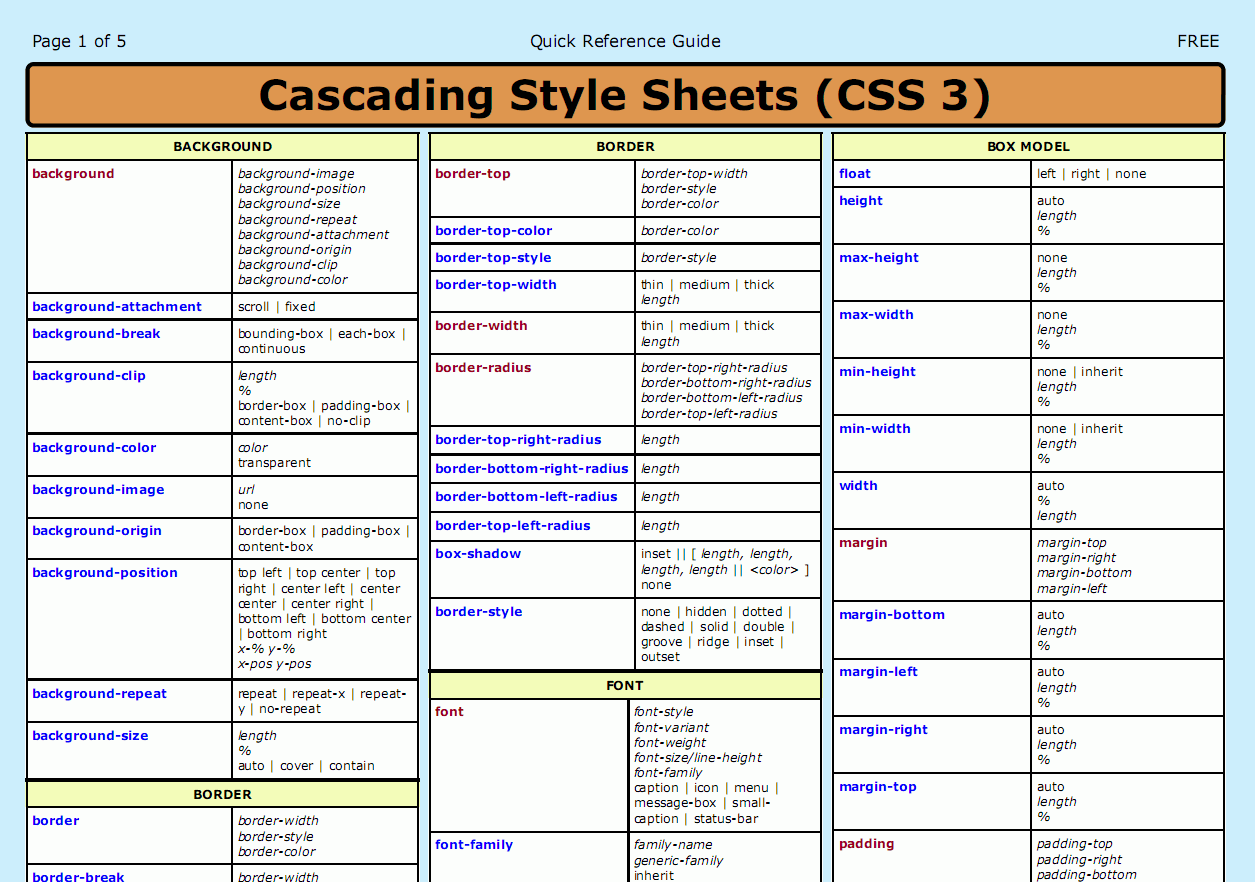
In this post we present a printable CSS 3 Cheat Sheet (PDF), a complete listing of all the properties, selectors types and allowed values in the current CSS 3 specification from the W3C. Each property is provided in a section that attempts to match it with the section (module) that it is most actively associated within the W3C specification. Next to each property is a listing of the expected values that that property takes (normal text shows named values it accepts and italics shows value types it will accept).
The cheat sheet was done in the same format as the CSS 2 Reference Guide that you may want to use for your projects as well.
Download the CSS 3 Cheat Sheet for free!
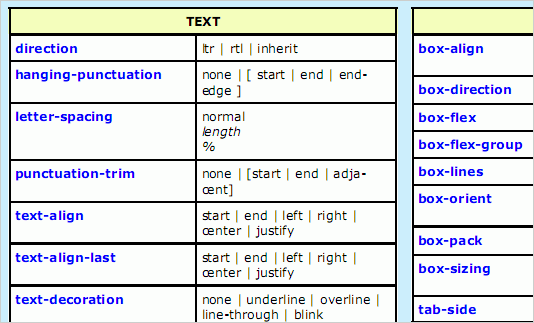
- preview (.gif, 1255×882px)
- download the pdf (5 pages, 123 Kb)
Thank you very much, Chris Hanscom! We appreciate your efforts.
Further Resources About CSS 3
- Take Your Design To The Next Level With CSS3
In this article, we’ll look at the advantages of CSS3 and some examples of how Web designers are already using it. By the end, we’ll know a bit of what to expect from CSS3 and how we can use its new features in our projects. - Push Your Web Design Into The Future With CSS3
A couple of HTML 5 examples and experiments. - Introduction to CSS3 – Part 1: What is it?
- CSS support in Opera 9.5
- CSS 3 Support In Firefox 3.5
- CSS3 Previews: CSS3.info

- CSS 3: Exciting Function and Features: 30 Useful Tutorials
- 5 CSS3 Techniques For Major Browsers using the Power of jQuery
Do you use CSS 3 already?
Do you already use CSS 3 in your projects? Would you recommend using CSS 3? Let us know in the comments!


Kevin Bishop
July 13th, 2009 7:09 amFirst!!! Cheers!
Cak Sony
July 27th, 2010 5:55 amPertamaX Gan
Radek
July 13th, 2009 7:19 amCSS 3 rocks, IE sucks ;-) .
I don’t understand why M$ doesn’t make IE CSS 3 compatible. If they don’t know how to do that, then why don’t they take a look in the source code of the Gecko engine?!
Mark Novak
July 13th, 2009 7:33 amSo, what browsers actually support CSS3 fully enough for it to actually be usable in projects? There is no point in using CSS3 for one or two specific browsers and then CSS2 for every other browser.
When will browser makers (especially Microsoft) start really delivering what developers need?
K M Mah'bub Alam
February 12th, 2012 3:04 pmI’m also with mark.
Bob
July 13th, 2009 7:42 amI agree with Mark – this stuff is cool but I’d never use it… I’ll reference this guide 2 years from now.
Michael
July 21st, 2011 12:03 pmAre you referencing this CSS3 resource now? (It seems to have been 2 years. ha!)
Sean McP
July 13th, 2009 8:09 amIn response to Mark, the latest versions of Firefox, Chrome, and Safari all support CSS 3, leaving Internet Explorer and others out of the look.
I think the important thing to note is the subtle additions with CSS 3. Rounded corners and drop shadows add to a page on a browser that supports CSS 3, but are additions that aren’t sorely missed if they aren’t supported.
jeroen
July 13th, 2009 8:11 amIsn’t there any third pary work-around to make older browsers compatible with the css3 support?
jojo
May 11th, 2011 1:12 pmNo and there woun’t be.
The world is only moving foreword
hopefully the browsers of the future will support css3.
But then you might want to use css4 or even 5
Timbronze
July 13th, 2009 8:11 amI have used a few bits and bobs with regards to CSS3 and so far I am quite happy, the only problem is finding solutions when they don’t render in no CSS3 compliant browsers. It is a very similar situation to HTML5 which they say will replace XHTML. V.good, but browsers need to catch up.
Cheers for the cheat sheet thought SM.
Come on Microsoft, IE is the bain of every designer and devleopers life… get it sorted…
John G.
July 13th, 2009 8:15 amNice work, gents! I’ve been experimenting with CSS3 in my own projects. Sadly, I’m not allowed to incorporate many of these into projects at my day job. Thanks!
Lisztomania
July 13th, 2009 8:31 amThat’s exactly what I needed thank you! Will come in great handy with my web developing ;)
joey
July 13th, 2009 8:46 amsweet
Leonard
July 13th, 2009 8:58 amIt seems every web design site and his dog has an article on CSS3 at the moment, which is silly. Its good to know where things are headed but everyone is making out like we can actually use it!
It’d be nice to use it but clients aren’t going to want to pay you to do two versions!
LeDude
June 20th, 2010 12:31 amThose articles are good to put pressure on M$ and friends…
Mitch
July 13th, 2009 9:15 amI just twittered this.. great!
Erik
July 13th, 2009 9:50 amI’m still wondering what’s the use of using CSS3 if Uncle Bill doesn’t use CSS3 in IE?
simmuji
July 13th, 2009 10:14 amWhy and when using css3? well, think about progressive enhancement.
Manuel
July 13th, 2009 10:35 amThis Cheat Sheet is ugly and useless – a cobbler should stick to his last.
Naushad
November 23rd, 2010 3:27 amYou are an idiot…………………
Chris Robinson
July 13th, 2009 11:02 amSeems a little early to premature a CSS3 cheat sheet seeing as how the browser support is slim to none at the current.
Mirko
July 13th, 2009 11:51 amCool & useful stuff, looking forward to use CSS3 more.
salman
July 13th, 2009 11:53 amThanks for this and we need more cheat sheets
Brent Lintner
July 13th, 2009 11:59 amthanks!
now for the browsers…
Mugros
July 13th, 2009 12:07 pmThese cheat sheets are just too ugly.
Henrique
July 13th, 2009 12:18 pmJust use CSS3. The longer you developers/designers don’t start using it, the longer will take to s**** browsers (e.g., IE) to adopt it as a standard.
John Faulds
July 13th, 2009 1:33 pmTo answer the final question, I’ve been using text-shadow, border-radius and RGBa quite a bit lately. I always use it in such a way that if a browser doesn’t support it, it doesn’t really affect the usability of the layout.
A comment on the cheat-sheet, it would’ve been good if it indicated which properties were those included in CSS3, and not already included in previous versions.
tracyshaun
July 13th, 2009 2:00 pmHey – nice cheatsheet. But it’s not very “printable”. It’s going to use all my cyan ink. :-(
Could you make both a printable and toner-friendly version, too?!?
News O Mator
July 13th, 2009 2:40 pmTo be honest – This .PDF (while appreciated) isn’t exactly an exclusive CSS3 only cheat-sheet. I could have done without the additions of what floats, text-align and other non-CSS3 attributes do.
And to the people asking if there is something to make non-compatible browsers do these CSS3 attributes (there isn’t, that I know about) – But, jQuery does allow you to do many things CSS3 does (through the use of plugins and core functionality). 95% of all browsers have JavaScript enabled, which is better odds than those who use browsers that cannot support CSS3.
elton lester
July 13th, 2009 3:07 pmCool – how about a smaller one with just the changes/additions etc between CSS2 and CSS3 – thanks
Kevin Althaus
July 13th, 2009 3:17 pmYES! I can’t wait to be able to use this 2012.
But thanks to smashing for providing this, seriously.
Matt Barnes
July 13th, 2009 3:51 pmI’m taken aback by all the downer comments about CSS3 here. Need we remind ourselves that most browsers will simply ignore a CSS rule it doesn’t understand? Unless you’re sadly deluded into thinking that designs must look the exactly same in every browser (or work for a company that is similarly misinformed), should the fact that one browser will show round corners while another shows square corners really bother us that much? I think not.
Could subtle shadows, nicer fonts and rounded corners help make a good design even better? Sure. But take those things away and what are you left with? A good design!
The thinking around here seems to be that if IE doesn’t support it, why bother? But since rewarding those with more capable browsers doesn’t necessarily mean punishing those using IE, why not use these features now, and let IE catch up later?
venkatesh
July 13th, 2009 7:00 pmthanks a lot for this great CSS3 Tutorial. mill thanks. thats off to SM.
Ben
July 13th, 2009 7:10 pmForward to the arrival of CCS3
Helen
July 13th, 2009 7:38 pm!Viva la CSS3!
sophy
July 13th, 2009 8:05 pmThanks a lot , good work
Zeriz
July 13th, 2009 8:15 pmThis sucks. CSS3 got so many hot new features and Microcock’s Internet Exploder issn’t compatible with it. :(
WHEN.. WHEN??!! When can MS realize that they’ve gotta work alot more on their precious little crap browser?
Sunny Singh
July 13th, 2009 8:46 pmI constantly use CSS3 within my sites, mostly border-radius, text-shadow, and custom fonts now that Firefox supports it.
It allows for you to keep up and use the advancing technology of the web, and if you’re not using it just because IE or some other browser does not support it then you fail. CSS3 is degradable, so use it a bit where you can still view the content in an appropriate design. So don’t go ahead and using it for rounded corners on your template, but I could really care less if IE doesn’t add roundness on some of my boxes.
Łukasz Adamczuk
July 13th, 2009 9:01 pmCSS3 is a great technology, but its support in browsers is very poor. Only some of new features, especially selectors are supported by modern browsers, like Firefox, Safari or Opera, but it’s long way to full support CSS3 in all browsers.
CSS3 Cheat Sheet is better than HTML5 Cheat Sheet.
Greg
July 13th, 2009 10:10 pmi wish so badly that browser developers would update past browsers to support CSS3.
Ardhian Satrya
July 13th, 2009 11:27 pmForget about IE! It doesn’t support internet! Use Mozilla and Webkit browsers for the future standards. You can try to use HTML 5+CSS 3 for your personal website even thought it won’t be a valid XHTML+CSS site at the moment, but worth to try and learn. So you’ll be ready once the standard is adopted in the next years. Thanks for the post anyway :)
Mort
July 14th, 2009 12:07 amI do this: Develop the entire site so that it validates as XHTML 1 and CSS 2, then add CSS 3 sparingly to improve the aesthetics for browsers that support CSS 3. Browsers that do not support CSS 3 will just ignore the new additions.
Use the fact that your (and many others’) sites look so much better on Firefox/Safari/Opera/Chrome to convince your clients, their clients, friends, family, everyone to switch to a better browser. By accommodating IE, you are limiting yourself and those around you to old technology.
Meh
July 14th, 2009 12:17 amPersonally I think there are many more sources of this information that are much easier to use, not to mention the needless waste of printing it …
Jens Anders Bakke
July 14th, 2009 12:22 amAs both AIR and Titanium is built on webkit, I find this really useful already today :D
jurica
July 14th, 2009 1:00 amCSS Validation Service can not validate css3, actually css3 is validate as error.
Why?
http://jigsaw.w3.org/css-validator/
Andris
July 14th, 2009 3:50 amAwesome! This will come in handy, when css3 is a standard. Like in 10 years or so ;-)
r_jake
July 14th, 2009 4:32 amIt seems to me that select elements of CSS3 are more ready to use in an ‘progessively enhanced’ way than HTML5, which I’m not going to even consider yet, so this sheet has its uses.
Silverback
July 14th, 2009 4:44 amThere is some CSS 3 scripts, witch even don´t work propertly in Firefox, but really few of them. But IE is really s**t … in this case and … to be honest – it is bad browser in every case, anyway :-) It is true, that you can use rounded corners, shadows, web-fonts and some other AT NOW – and even if IE doesn´t support it, id doesn´t crash your site. CSS3 just show us some new ways and techniques and i hope so there is lot more to discover in Cascade Style Sheet language.
James Hopkins
July 14th, 2009 5:04 amThe Link ::selection selector is a pseudo-element *not* a pseudo-class as your table suggests, however it’s been taken out of Selectors Level 3, anyway.
Dave
July 14th, 2009 5:34 am@jurica: to validate as CSS3, you need to select More Options, and then select the CSS3 profile. I just tried it with a site of mine which validated OK as CSS3 (no errors). But then, CSS3 is not finalised so I suppose it’s actually not possible to be fully CSS3 valid ;)
@Matt Barnes: I take it then you’ve never worked for a major brand company? If you were to say that to them (“oh it will look it’s best for 30% of users”) they’d sack you. Sorry, but for some people (especially those with a BIG investment in a brand identity) the site MUST look the same in ALL browsers – especially IE. So while I can understand and actually agree with you (to a certain extent); what you are suggesting is actually a really bad idea in some cases. Yes, use advanced features where supported, but if the design calls for rounded edges, or a particular layout and styling you should do your best to replicate it across all browsers – especially those that are important to your client / business.
Joel Drapper
July 14th, 2009 6:12 amThanks for this. Very useful!
Trina
July 14th, 2009 10:51 amThis is great! I want to change some items on my blog but feared the code. This will make it much easier :)
Stephen Hay
July 14th, 2009 12:11 pmThe section on Template Layout is incorrect. That’s Flexible Box Layout module, not Template Layout module.
Simon Day
July 16th, 2009 2:56 amMatt barnes (27) – Sorry but I disagree. I have worked for a few companies (including blue chips) and I freelance. I have only successfully managed to convince one client to adapt some CSS3.
The sorry fact is they WANT it work in exactly in IE as it does for other browsers regardless or what you or I think. Even worse; most of my clients still have IE6 accounting for 10%-49% of the visitors depending on the site. Commercial sites which have commercial visitors will still have to support IE6 for years to come so I don’t see CSS3 starting to become mainstream in the corporate world for a long time.
Yes I love it and yes I use it but only on my own sites which is a shame…
Kyle
July 16th, 2009 5:12 amI’m not sure why people are complaining about it being released before it’s fully supported. By doing so it gives you plenty of time to hone your skills and to start developing future sites, testing them out. Yes, browsers have some serious catching up to do however would you prefer to be a head of the game or trying to play catch up?
Cynara Peixoto
July 16th, 2009 5:36 amThis link is broked for me. I just download em I change the address to http://media.smashingmagazine.com/wp-content/uploads/images/css3-cheat-sheet/css3-cheat-sheet.pdf.
Reynald Bouttard
July 16th, 2009 1:27 pmThanks a lot, it could be my start in the use of css 3
Marc
July 17th, 2009 12:25 pmhey smashing team,
how about an HTML 5 sheet as well !?
love your site, cheers!
nevermind, you are awesome! thank you!
http://www.smashingmagazine.com/2009/07/06/html-5-cheat-sheet-pdf/
Fabiano
July 18th, 2009 11:27 amOh Jesus
Could it be uglier ? :)
Thanks anyway
arnold
July 18th, 2009 3:50 pmlook at the poll…most of the people never use css3..LOL
me too..
Pradeep CD
July 19th, 2009 7:18 amthanks…waiting for HTML 5…
Zerizcreations.net
August 16th, 2009 2:44 pmJust wondering, when are all the browsers css compatible? I know that IE6 never will be, but how ’bout IE7 and 8?
Mary Boon
August 24th, 2009 11:27 amhi, love your website….
Omagaz
August 27th, 2009 7:48 pmThank for share
create a website
November 1st, 2009 10:06 pmI have just downloaded this cheat sheet. I’ll certainly go back to my style sheet and see if everything is fine.
Josh
December 15th, 2009 5:49 amCSS3 is going to be compatible in the next IE, just to let you know ;)
伦子
December 28th, 2009 6:15 pmThanks,hoho
Javi
January 17th, 2010 4:20 pmGreat!!, thanks.
Lemonc
January 17th, 2010 5:03 pmThanks a lot~
Aravind
January 23rd, 2010 9:36 pmHi…..I am using CSS3. But, This is nice tips…..Thanks….
Ahmad Ali
March 5th, 2010 11:40 amIt’s help,, thanks I ♥ it
Sidd
March 31st, 2010 3:00 pmThanks.
nazpro
April 7th, 2010 11:18 amthanx alot….
i was need it…thank u again!
Erik Reppen
April 17th, 2010 9:33 amIs it just me or is it kind of funny to include a CSS cheat sheet in PDF form as opposed to say… an HTML document? ; )
Gary
May 6th, 2010 5:26 pmI can’t download either file. Thought you should know.
Gary
May 7th, 2010 2:11 pmEverything is fine now. Got em! Thanks!
Owain
May 14th, 2010 12:15 amFantastic thanks!
Ayen
May 14th, 2010 7:06 amThank you! I’ve been curious and been wondering how to implement them. Now with this cheat sheet, maybe I can start using them. :D
Albion
July 8th, 2010 5:00 amThis cheat sheet would be awesome if there was a third column showing browser compatibility.
Faith
July 18th, 2010 12:52 pmPlease remove the blue background from the pdf :)
Ugo
July 26th, 2010 2:40 pmCSS is the foundation of web BEAUTY!
jen
August 4th, 2010 11:40 amI’m curious why the css3 selectors information isn’t included in the cheatsheet.
Natalie
January 16th, 2011 5:15 pmAs someone else already requested, please remove the blue background from this “printable” document.
Brittney
March 3rd, 2011 2:48 pmThis is great, but I cannot copy and paste. Not a huge problem. Anyone know a workaround?
dan mackinlay
May 23rd, 2011 5:26 amHm – the PDF attachment now shows as a 404. Is that intentional?
Sven Lennartz
May 23rd, 2011 7:09 amfixed! sorry dan.
Cathey Allcorn
June 13th, 2011 2:03 amYet another thing is that while looking for a good on the internet electronics retail outlet, look for web shops that are consistently updated, always keeping up-to-date with the newest products, the most beneficial deals, along with helpful information on product or service. This will ensure that you are handling a shop that really stays over the competition and provide you things to make knowledgeable, well-informed electronics buying. Thanks for the significant tips I’ve learned from the blog.
Casey
July 28th, 2011 9:56 amThis will def. Be useful. Ill be able to remember everythinh faster and soon enough wont need a cheat sheet thanks a ton!
Naresh
September 16th, 2011 8:06 amhai….
plz send the css3 advanced user guide…
Thanks dude…..
Anuj
February 2nd, 2012 10:48 amAwesome guide.. That’s exactly what i needed.. thanks..