CSS Float Theory: Things You Should Know
The concept of floats is probably one of the most unintuitive concepts in CSS. Floats are often misunderstood and blamed for floating all the context around it, causing readability and usability problems. However, the reason for these problems isn’t the theory itself, but the way the theory is interpreted – by developers and browsers.
Still, if you take a closer look at the float theory, you’ll find out out that it isn’t that complex as it appears to be. Most related problems are caused by the older versions of (take a guess) Internet Explorer. If you know the bugs, you can control the way information is presented in a more sophisticated, profound way.
Let’s try to tackle the issue and clarify some usual misunderstandings, which always appear once floats are being used. We’ve browsed through dozens of related articles and selected the most important things you should keep in mind developing css-based layouts with floats.
What You Should Know About Floats
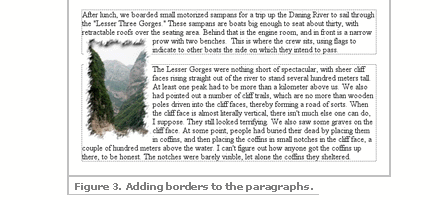
- “The practice of flowing text around an image goes back a long, long time. That’s why the ability was added to the Web starting with Netscape 1.1, and why CSS makes it possible using the property float. The term “float” refers to the way in which an element floats to one side and down, as described in the original “Additions to HTML 2.0″ document that accompanied the release of Netscape 1.1.”

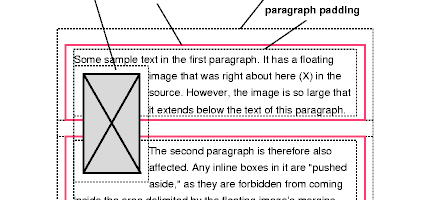
[Containing Floats] - “A floated box is positioned within the normal flow, then taken out of the flow and shifted to the left or right as far as possible. Content may flow along the side of a float. [...] When a box is taken out of normal flow, all content that is still within normal flow will ignore it completely and not make space for it.” [Float Positioning]
- “When you float an element it becomes a block box. This box can then be shifted to the left or right on the current line. The markup options are
float: left,float: rightorfloat: none.” [Floatutorial: Float Basics] - “You should always set a width on floated items (except if applied directly to an image – which has implicit width). If no width is set, the results can be unpredictable.” [Floatutorial: Float Basics]
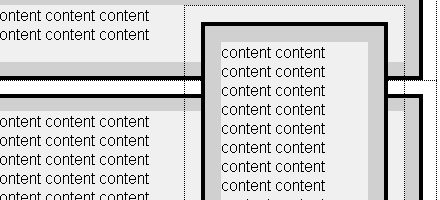
- “For one, the box being floated should have a width defined for it, either explicitly or implicitly. Otherwise, it will fill its containing block horizontally, just like non-floated content, leaving no room for other content to flow around it. Second, unlike boxes in the normal flow, the vertical margins of a floated box are not collapsed with the margins of boxes either above or below it. Finally, a floated box can overlap block-level boxes adjacent to it in the normal flow.”

[CSS Positioning: Floats] - “The first thing we need to remember is that a floating element is shifted either to the left or to the right. It is not possible to make an element float in the centre, something that often is frustrating for beginners. The basic rule is that a floating element is only shifted sideways.” [Float Layouts]
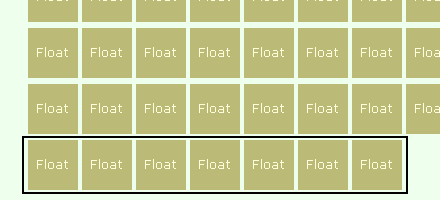
- “When we float an element it is shifted to the right or to the left until it reaches the edge of the containing block. If we then float another element nearby in the same direction, it will be shifted until its edge reaches the edge of the first floating element. [...] If we float more elements in the same direction they will stack up, but sooner or later we’ll run out of space [...] when there is insufficient space on the line, they are shifted downward until they fit.” [Float Layouts]
- Containing blocks or containing boxes: “A containing block is a box or block that contains other elements (descendant boxes). An element’s containing block means “the containing block in which the element lives”. [Floatutorial]
- “Floated boxes will move to the left or right until their outer edge touches the containing block edge or the outer edge of another float.” [Floatutorial: Float Basics]
- “When specified, the box is positioned vertically as it would be within the normal flow, its top aligned with the top of the current line box. But horizontally, it is shifted as far to the right or left of its containing block as possible, within that block’s padding (just like other content). Surrounding inline content is then allowed to flow around the opposite side.” [CSS Positioning: Floats]
- “Since a float is not in the flow, non-positioned block boxes created before and after the float box flow vertically as if the float didn’t exist. However, line boxes created next to the float are shortened to make room for the floated box. Any content in the current line before a floated box is reflowed in the first available line on the other side of the float.”

[W3C Visual Formatting Model] - “If there isn’t enough horizontal room on the current line for the floated box, it will move downward, line by line, until a line has room for it.” [Floatutorial: Float Basics]
- “A floating box can never end up above the upper edge of the line where it’s created. [...] The upper edge of a floating box is aligned with the upper edge of the current line box (or with the bottom edge of the previous block box, if there is no line box).” [Float Layouts]
- “In order to really understand float theory you have to understand what a line box means in CSS. Unfortunately, that in turn requires you to understand what is meant by an inline box. [...] An inline box is generated by those elements that aren’t block-level, such as EM. [...] A line box is an imaginary rectangle that contains all the inline boxes that make up a line in the containing block-level element. It is (at least) as tall as its tallest line box.” [Float Layouts]
- “If we enclose each column in a DIV element with
float: leftthey will appear side by side, just as we expect columns to do. If we then want a full-width footer to be shown at the bottom, no matter which column happens to be longest, we only need to setclear: bothon it.” [Float Layouts] - “The potential drawback to using floats to contain floats is that you rely on browsers to consistently interpret the layout of multiple nested floated elements. The situation becomes more fragile if these floats are part of a more complicated layout, one possibly using floats, positioning, or tables.” [Containing Floats]
Clearing the floats
- “Elements following a floated element will wrap around the floated element. If you do not want this to occur, you can apply the “clear” property to these following elements. The four options are
clear: left,clear: right,clear: bothorclear: none.” [Floats and "clear"] - How to clear CSS floats without extra markup – different techniques explained. There are three major approaches: a) Floating the containing element as well, b) Using
overflow: hiddenon the container, c) Generating content using the:afterCSS pseudo-class. A test-page for techniques. [How to clear CSS floats without extra markup] - “The standard method of making an outer container appear to “enclose” a nested float is to place a complete “cleared” element last in the container, which has the effect of ‘dragging’ the lower edge of the containing box lower than the float.”
<div> <!-- float container --><div style="float:left; width:30%;"><p>Some content</p></div><p>Text not inside the float</p><div style="clear:both;"></div></div>
- [How To Clear Floats Without Structural Markup]
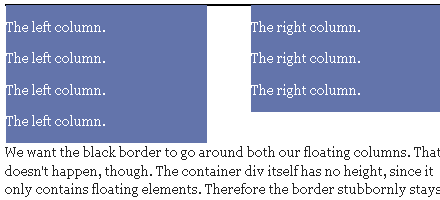
- “A common problem with float-based layouts is that the floats’ container doesn’t want to stretch up to accomodate the floats. If you want to add, say, a border around all floats (ie. a border around the container) you’ll have to command the browsers somehow to stretch up the container all the way. You can clear the floats using overflow method.”

[Clearing floats] - Using
:after: imagine that we use :after to insert a simple character like a ‘period’, and then give that generated element{clear: both;}. That’s all you really need to do the job, but no one wants a line space messing up the end of their clean container box, so we also use{height: 0;}and{visibility: hidden;}to keep our period from showing.
.clearfix:after {content: ".";display: block;height: 0;clear: both;visibility: hidden;}
- [How To Clear Floats Without Structural Markup]
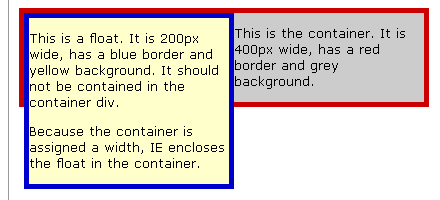
- Clearfix: “When a float is contained within a container box that has a visible border or background, that float does not automatically force the container’s bottom edge down as the float is made taller. Instead the float is ignored by the container and will hang down out of the container bottom like a flag. [...] IE/Win does enclose a float within a container ‘automatically’, but only if the container element has a stated dimension.” [Easyclearing: How To Clear Floats Without Structural Markup]
CSS Float Bugs
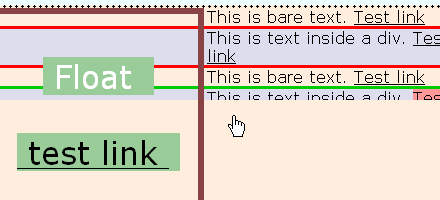
- When [...] container element has links inside, following the float. When this happens and certain links are hovered, the auto-enclosing behavior is toggled or “switched off”, causing the lower edge of the container box to suddenly jump up to the bottom of the non-floated content. Hovering other links restores the behavior. This interesting effect is of course called the IE/Win Guillotine Bug. The toggling only occurs when a:hover is used to change the link background or many other styling changes, such as padding, margin, or any font styling on the link. Strangely, having the text color change on hover does not toggle the bug.

[How To Clear Floats Without Structural Markup] - The IE Escaping Floats Bug: “If you use a div box with margins, borders and a number of left floated divs, you’ll get two display errors in IE Win. One, the container is only containing the last line of floats , and the floats are also running off to the right, all the way to the right screen edge. also causes a horizontal scrollbar at many screen sizes. [...] Solution: a height can be given to IE/win and not affect the displayed height of the container. This is possible because IE has another non-standard behavior concerning boxes and dimensions.” Holly Hack: assigning a height to the element, i.e.
height: 1%;.

- The Win/IE6 Peekaboo bug: “A liquid box has a float inside, and content that appears along side that float. In IE6 the content disappears. When you scroll down, or perhaps switch to another window, upon returning back there it all is (this long standing bug has been suppressed in IE7).

- “IE/Win gives a left floated block a right margin of 3px. No matter what you do, the margin is still there. To see this in action, check the floating bug first and then the double float fix.” This bug is also called The IE Three Pixel Text-Jog [Floating Bugs].
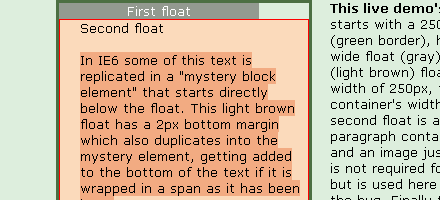
- IE Duplicate Character Bug: “Internet Explorer 6 has a puzzling bug involving multiple floated elements; text characters from the last of the floated elements are sometimes duplicated below the last float. The direct cause is nothing more than ordinary HTML comments, such as,
<!-- end left column -->, sandwiched between floats that come in sequence. Bugfix.

[IE Duplicate Character Bug] - “One of the most common tasks when laying out the content of a web page is floating images to the right or left so that text flows around them. The addition of the clear to the floated image ensures that each one will always sit below the previous one. However, placing the float and clear properties on the same element can cause large gaps to appear in Internet Explorer (IE) — gaps that take more complicated CSS to fix than what we’ve used so far. Bugfix.” [Close Gaps Next to Floated Images in Internet Explorer]
- “You place a left float into a container box, and use a left margin on the float to push it away from the left side of the container. In Internet Explorer the left float margin has been doubled in length!” [The IE Doubled Float-Margin Bug]
- “The bug demonstrated here causes in-line elements (images, text) adjacent to a floated div to appear to be indented from their expected location. The indentation is caused by IE/Win’s weird handling of margins on floated elements.” [Floats, Margins and IE]
- “There is a simple solution that fixes many of the IE float bugs. All floats become a block box; the standard says that the display property is to be ignored for floats, unless it’s specified as
none. If we setdisplay:inlinefor a floating element, some of the IE/Win bugs disappears as if by magic. IE/Win doesn’t make the element into an inline box, but many of the bugs are fixed.” [Float Layouts] - “Using a combination of float and negative margins on an element makes any links in the element unclickable in Safari 1.3 and Safari 2.0. Text also becomes very difficult to select, and if you tab through the links they disappear when they lose focus. A workaround is to add
position:relativeto the CSS declaration for any floated elements with negative margins.” [Float + negative margin problems in Safari] - “MSIE 7 now correctly implements the W3C specification by collapsing containers that include floated children. However, as it has not implemented generated content, the so called easy clearing method is not an option for clearing floats in MSIE 7. The overflow method is an appropriate solution for all versions of Internet Explorer:
#content { overflow : hidden; _height : 1%; }
CSS Float Tutorials and Techniques
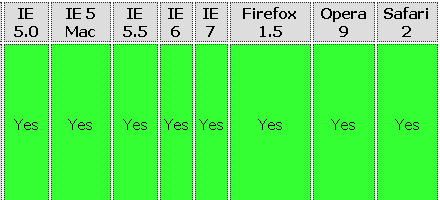
- Float Containing Rules By Browser

The table shows which rules cause a container to clear its floats in each of the main browsers. - CSS vertical centering using float and clear – crossbrowser
“The box stays in the middle of the browser’s viewport. The content does not disappear when the viewport gets smaller than the box.” - A floated page layout
This tutorial shows you how to create a page layout like this, using web standards and CSS. Such a layout could have any number of uses, of which a photo gallery is only the most obvious. The page I’ve linked to there clearly isn’t finished, I’ve just tried to keep it simple so we can focus on the layout of the images and the text. - Build a better Web site by understanding floated elements in CSS
This article provides a brief introduction to these floated elements, explaining the CSS float and clear directives and providing some examples of how you can use them to better position HTML elements on a Web page. - Create Columns with Floats
In general, there are currently two ways to create a multi-column layout in CSS: absolute positioning or floating. The vast majority of the time, floating will be your method of choice in laying out your web pages with CSS. In this tutorial, you’ll learn how to create the look of columns using the float, width and margin properties. - Safe Lists Next to Left-Floated Elements
There are lots of different methods to format nice html lists. But are those methods reliable in all contexts and in all browsers? In this article, we’ll have a look at a simple context: a list with some left-floated element next to it. - Creating Liquid Layouts with Negative Margins [and Floats]
I took opportunity to demonstrate an under-used aspect of CSS: negative margins. Negative margins allow us to push the content area away from the sides of the browser, leaving room for the sidebar. - Image floats, without the text wrap!

How many times do you have an image floated left in a block of content, but want to keep that content from wrapping around your image? - Floating an image to the right

Float an image to the right of a block of text and apply a border to the image. - Floating an image and caption

Float an image and caption to the right of a block of text and apply borders using Descendant Selectors. - Floating a series of “clear: right” images

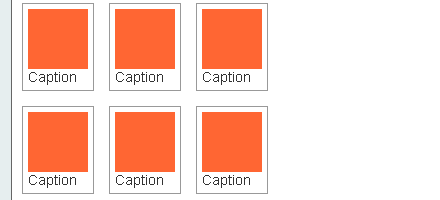
Float a series of images down the right side of the page, with content flowing beside them. - Floating an image thumbnail gallery

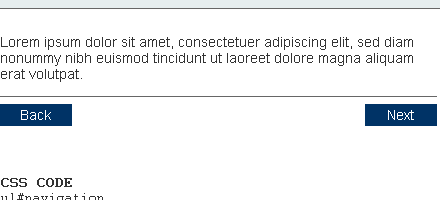
Float a series of thumbnail images and captions to achieve an image gallery. - Floating next and back buttons using lists

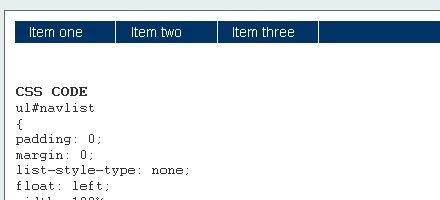
Float a simple list into rollover “back” and next “buttons”. - Floating inline list items

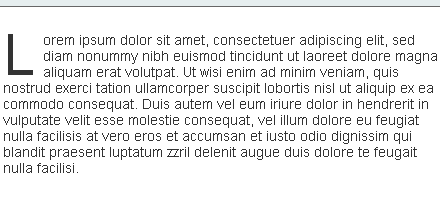
Float a simple list, converting it into a horizontal navigation bar. - Floating a scaleable drop cap

Float a scaleable drop cap to the left, resize it and adjust line-heights to suit your needs. - Liquid two column layout
Float a left nav to achieve a two column layout with header and footer. - Liquid three column layout
Float left and right columns to achieve a three column layout with header and footer. - CSS Float Html Tutorial
It’s time to think outside the box, or maybe, more accurately, floating alongside of it. Where did we lose our collective CSS coding creativity? CSS allows so much freedom from traditional table based layouts that we sometimes do not consider page and layout design alternatives. What a pity. Time to think outside the box!




Jesswa
May 2nd, 2007 6:52 amFinally! An informative article! Don’t get me wrong, you guys put together some decent lists of cool designs and whatnot, but lots of it isn’t very useful. This on the otherhand, is simply an amazing post. Thanks!
Markus
May 2nd, 2007 4:24 pmLooks like you used my del.icio.us float bookmarks ;)
Digilee
May 2nd, 2007 4:47 pmVery helpful piece.
Your commenting was broken for the last few days, but still I return!
vickeybird
May 2nd, 2007 7:39 pmExcellent article. CSS Float has been a little gray area with me. The information is very well organized and crisp.
Keep them coming!!
Ranu Mandan
May 2nd, 2007 8:32 pmexcellent article
Keep going…
Mityan
May 2nd, 2007 9:52 pmThanx! Very useful article!
All Diggs
May 3rd, 2007 4:45 amHimm nice and usefully article.
Thank you for these informations.
A. Alyan
May 2nd, 2007 7:53 pmReally very helpful .
You have collected all tips and hacks in one place.
Phil From Loreauville
May 4th, 2007 1:13 amAwesome info once again! One of the biggest problems i have with CSS is the positioning of elements. This can only help.
One request- Would it be possible for Smashing Magazine to make it where we can print up these articles?
gsuez
May 4th, 2007 3:10 amthanks for you excellent site!
Web Contempo
May 4th, 2007 7:31 amGreat article. I’ve come across many of these errors and wish I would have read all this a long time ago!
Robert Tipping
May 5th, 2007 9:08 amYou guys have the best site on the web period keep up the great work .This is an amazing collection of css info answered questions iv had for years brilliant.
figgy
May 5th, 2007 10:24 amThis is great but why do you call it a “theory”?
Kavoir
May 5th, 2007 3:17 pmIt smashes. But, don’t you think sometimes there’s too much information there that readers rarely come to a point after reading them?
The excessive abundance of information may lead to disinformation.
Andy
May 9th, 2007 12:50 amWow,
Nice article. Thanks!
Dimitar Yanev
May 12th, 2007 6:25 amI’m using
a) Floating the containing element as well,
b) Using overflow: hidden on the container
I didn’t know about
c) Generating content using the :after CSS pseudo-class.
Thanks
Jacob
May 14th, 2007 10:00 pmAwesome! Thanks for the article…
flash web design
May 28th, 2007 6:13 pmIt’s certainly a very useful article for budding programmers as me . I appreciate your efforts. We use to come across all these problems in our daily work. It’s always good to put some light on an Imp. subject as this.
Coder
June 29th, 2007 4:50 amThank you.
Floats can be quite a pain when floating multiple items.
Courtland
July 31st, 2007 12:45 amAmazing article!
—-
One thing though.
One quote says: A line box “is (at least) as tall as its tallest line box,”
Shouldn’t it say: A line box “is (at least) as tall as its tallest INline box”?
David Ebony
July 31st, 2007 1:45 pmThanks for good stuff and cool site.
Syed Balkhi
August 27th, 2007 5:45 pmfloating is the best way to go when you are coding for a script based template like wordpress or phpLD. It makes the life so much easier and you can change the site in like minutes.
Narender
October 17th, 2007 2:18 pmIts indeed a good tutorial, covers most of the tricky parts of floating. Dealing with floats is probably the most frustrating part of CSS, especially when you get your layout just right for Firefox, only to realize that it’s totally messed up in IE. Thanks for the detail explanation.
ryofansu
December 5th, 2007 1:26 pmthis is help me out, coz I’m new in css & really got a lot problem with float teory, thanks, I would practice it.
Web Design Company
January 14th, 2008 10:34 amGreat Article. Many Thanks for quality post. I appreciate your efforts.
Abdul Majid
January 24th, 2008 8:14 amExcellent article!
Tom
January 24th, 2008 1:13 pmHello,
It would be good fo see an additional tutorial that explains how to properly float an image right or left when the image height is TALLER than the text next to the image being floated.
I tried the clearfix remedy and it seems to work in FF 2, but fails horribly in IE 7, I don’t know yet what happens in IE 6.
It may be more complicated because I am working within DotNetNuke.
Please email me if my question is unclear.
Thank you, Tom
chai
January 29th, 2008 2:12 amThis article solved a lot of misunderstandings I had with floats!
Thank you!
1websitedesign
February 6th, 2008 2:01 ami think it,s a great article a very good article.
Alex
February 7th, 2008 10:04 amI love you… I truly, deeply love you
cynglas
February 12th, 2008 2:58 amInformative and comprehensive. BUT surely anything that needs this level of complexity and so many qualifications to explain it then so many wriggles and workarounds to implement is fundamentally flawed in theory.
NO it isn’t just that IE is a pain (although it is). The admission is there in the theory that floated divs can’t be centred, that they don’t keep any height relationship to neighbouring divs, and “… non-positioned block boxes created before and after the float box flow vertically as if the float didn’t exist”. etc etc.
OK this is all consistent with the theory, but the theory is simply not fit for purpose in that case. There’s got to be a simpler way to control onsreen layout without contravening the principle of separating content from markup. We live in hope…
3r
February 16th, 2008 6:01 pmI would appreciate any help about this problem:
I want to create a layout with a navigation div at the left and a content div on the right. I’m using float:left on the nav div to accomplish it.
Unfortunately, everytime I use floats in the content div, I can’t clear them without also clearing the navigation div.
Does anyone have a solution to this problem?
John Moriarty
February 20th, 2008 6:29 amNot quite certain I am correctly visualizing what you are saying, the way I am understanding you, it should work. Are you, perhaps, clearing the content div rather than elements within it?
kevin
February 22nd, 2008 10:07 ama million ways to skin a cat. ewwww. i suggest Andy Budd’s “CSS Mastery” book for all concerned with floats as well as standards in general and proper css techniques. it provides a great background to help understand all of the strangeness. it has made my life complete.
A possible point of confusion: The second bullet point given at the top of this article may be confusing to some because it reads: “A floated box is positioned within the normal flow, then taken out of the flow and shifted to the left or right as far as possible.” Shouldn’t it be a little more clear and simply read “A floated box is taken out of the normal flow of the document” ? Sounds picky, I know, but I thought it was worth mentioning.
deltawing1
March 5th, 2008 10:34 pmThanks for the great article!
As a software engineer (not a designer) I find learning CSS difficult because often it is incredibly illogical, counter-intuitive and just doesn’t do what you tell it to do. From a computer science point of view this is pretty bad. Software engineers except things to be logical and intuitive. Then again, CSS is not programming so I can’t compare it to programming languages.
So thanks for the great information! It’s cleared many things up about floats.
For me, I need to spend most of my time on the backend and only have a fraction of time to devote to the front-end (e.i XHTML/CSS). Unfortunately I find myself spending an unacceptable amount of time working on CSS hacks and making things line up to within 1 pixel and other insane stuff like that. The reason why I can’t tolerate hacks and “tweaking” is because those things are big sins in computer science. Without smashing magazine I would be stuck forever.
Thanks.
cowfish
March 5th, 2008 11:00 pm“A possible point of confusion: The second bullet point given at the top of this article may be confusing to some because it reads: “A floated box is positioned within the normal flow, then taken out of the flow and shifted to the left or right as far as possible.” Shouldn’t it be a little more clear and simply read “A floated box is taken out of the normal flow of the document” ? Sounds picky, I know, but I thought it was worth mentioning.”
I think they were trying to be as specific as possible. When a floated box is taken out of the normal flow of the document, what does that mean? Does it mean it “breaks out” of its containing DIV too? It’s more clear to say that it is “shifted to the left or right as far as possible”. If the float is inside a div, it will shift as far as possible ONLY to the edge of the containg div.
Ajit
March 18th, 2008 10:39 pmGood article. Being a new to div based HTML, I found it very usefull. The links provided within the article are really good. ThnX .
Adam
March 22nd, 2008 9:40 pmHmm…. something odd is up. The words “CSS”, “float” and “images” are all highlighted despite not arriving at this site via google, but rather through the css category.
It makes it a little distracting to read and I’m sure it’s not an intended display for versions of this page *not* arrived at via a Google search.
I’m not being at all critical, just trying to be helpful. :-)
Adam Brault
March 23rd, 2008 9:36 amBrilliant! Thanks for fixing it. So much more delightful to read now! :-)
Adam Brault
March 23rd, 2008 10:04 am…er, maybe not. I spoke too soon.
Sorry if I seem ridiculous.
PAMELA ANDERSON
June 6th, 2008 3:16 amThanks for clearing the Float concept.
But who ever is commenting should remember that this site is being read by lots of people so kindly and please stop using slang languages.That acts like a rotten apple among the good ones.
JP
June 20th, 2008 11:32 pmWoohoo! I can now delete my “float” bookmark folder with it’s 100 or so links and replace it with this one page :)
Chad the Great
June 25th, 2008 9:40 amThe pseudo class doesn’t work in every browser.
Reina
August 12th, 2008 6:49 amThe overflow hidden / width 100% methode works in IE6 and higher, FF and Safari. I don’t ever have to use any hacks, which is better I think.
div.wrapper {
width: 100%;
overflow: hidden;
}
div.col1 {
float: left;
width: 200px;
}
div.col2 {
float: right;
width: 600px;
}
A advantage of using float:left and float:right if you need 2 columns is that you automatically create a padding/margin in the middle you don’t have to define.
Another advantage is that all your items inside these columns don’t need any width’s, they automatically take the space they have and can be used in other column width with the same code.
A disadvantage of the wrapper div is that you can’t add any horizontal paddings or margin (because of the width: 100%), vertical however is no problem.
csszenmaster
August 18th, 2008 11:18 amCSS hacks are for non-ninja developers. Ultimate mastery comes not of the body, but of the mind.
Chris Peters
October 2nd, 2008 7:40 pmOver a year later, and this article is still saving lives. Thank you!
shadoobie
October 5th, 2008 3:29 am1-800 thank you. over the last 8 years i’ve beat my head against the wall many a time dealing with floats. hopefully this much needed compendium of float knowledge will save someone starting out the hours, no days, of time i’ve spent wrangling the ever elusive float.
Terry H
October 16th, 2008 2:51 pmMan, I’m gonna buy you a monkey. I have been battling and issue with floats messing things up for me all day. Your article solved my prob in two seconds. Where do I send the monkey?
lol
thanks
Luke
November 5th, 2008 12:10 pmThis is awesome, the float clear :after is exactly the sort of thing I’ve been looking for! Thanks, this website is amazing
Andre Rafael
December 11th, 2008 10:11 amHi, nice tutorial but for so long I have been sufering with a bug between float elements and any IE version. For test take a look at this code:
<a href="AnyPage.aspx"><span
style="float:left;">
<img src="images/icon.gif"/>Test</span></a>
In a anchor If I put an img tag in tags like span, p, div… that has a float css property the event click doesn’t works if I click over the image. The event only ocurrs if I click over the text.
I use floats elements and anchor css events to create a visual dynamic for buttons.
Eric
February 10th, 2009 2:45 pmI’ve been coding with floats for a couple of years and have never used “clear” in the code. I haven’t seen a good reason to actually use this based on the way i build sites. It appears that if you make sure your width fits within your container divs and remember where everything is going to be wrapping you’re good to go.
Could anyone explain why you would actually need to clear your float? showing an example of a non cleared and a cleared examples?
thanks
photofolio
February 24th, 2009 5:31 amOne to keep. A nice comprehension of the float soup. Still IE will break it somewhere down the road for you; at least that’s my experience. On a side note: why are we still waiting for a vertical align possibility in CSS?
marcus
March 27th, 2009 6:59 amI faced some css clearing errors listed bolow.
In ie6 it is not showing content under footer.
(URL address blocked: See forum rules)/index.php
(URL address blocked: See forum rules)/kompiuteriai.php
(URL address blocked: See forum rules)/naudoti.php
I sinceraly hope someone could help me by telling that I missed ;)
peter
April 3rd, 2009 5:58 amgood article, thanks
chao
April 15th, 2009 8:05 pmNice article. fix one defect using technics there.
Ant
June 22nd, 2009 6:44 amAlso may be useful:
http://www.artlebedev.com/tools/technogrette/html/fix_floats_in_ie_by_padding/
John
July 3rd, 2009 1:35 pmThanks, ive just spent the 2nd half of today going through this, some really helpful explanations and it clears up some of the confusions.
Sum
July 12th, 2009 11:10 pmNice article…. it helps a lot :)
Mark Stewart
July 16th, 2009 6:49 pmNo mention of liquid images to scale content dimensions?
Mark Stewart
July 16th, 2009 6:54 pmkindly use your imagination to interpret the following round brackets – this blog comment tool appears to remove code inside html brackets
…
baking accessible floats for thumbs
…
The focus of this comment would would be LIQUID images.
…
Floating a liquid image into the margin makes zooming fun and information accessible. Nice thing about liquid image dimensions is they fit almost any device, and are easily avoided by print machines, teletypers and similar machines. Floating liquidity can also dress-up inline elements, leaving extra room for creative tweaks.
…
.floatcenter{margin:1em auto;width:70%;}
.imgthumb{float:left;}
–
(blockquote class=”floatcenter”)
(img alt=”" class=”imgthumb” height=”10%” width=”10%” src=”image.png” /)
Lorem ipsum dolor sit amet, consectetuer adipiscing elit. Praesent aliquam, justo convallis luctus rutrum, erat nulla fermentum diam, at nonummy quam ante ac quam.
(/blockquote)
…
Why this works is because the same extra top secret patents browsers use to build their box models around screen center are not crimped for media the way they are for that glaring “float:center” [oops] ommision.
In the now dead original xhtml2.1 draft the manufacturers even tried to kill this inline image gem too. To be kind, we should consider the entirely boxed liquid image.
…
But that is for another Smashing article.
Eric
July 20th, 2009 5:07 amThis statement is not accurate:
“For one, the box being floated should have a width defined for it, either explicitly or implicitly. Otherwise, it will fill its containing block horizontally,”
Floating a box is often the ONLY way to get it to shrink wrap it’s content, NOT expand to fill it’s containing block horizontally. You have described the opposite of the actual behavoir here.
ROhan
August 4th, 2009 2:56 amexcellent article
Bryan
September 4th, 2009 8:11 amOne possible way to “shrink wrap” your content would be to use width: auto;. But, as with many CSS selectors and attributes, your mileage may vary based on browser make and model. ;)
Charlie
January 8th, 2010 9:52 amThe quote about not being able to center with float is so true! I found it so frustrating when I first started.
Avangelist
February 17th, 2010 2:39 pmI have been researching issues with IE7 only, which is strange – the flow operates in all browsers including IE8.
A containing block is floated and has multiple tiers of nested elements, some of which contain floated elements themselves.
The container has a fixed width, the two child containers are floated and also have fixed widths.
The total sum of the two child containers is double that of the parent. Using overflow, the children are floated left and the last block in the order is hidden from view (similar to a mask in Flash.
This works in all browsers except IE7, where the last block on the order is shown floated next to the first block, but appears broken outside of the parent (i.e with borders on, the border does not wrap both elements).
No idea how to resolve it but I think that it is to do with a large quantity of nested floats.
darren a
May 29th, 2010 4:40 amgreat thanks
bishua
June 1st, 2010 7:45 pmvery useful article!!!thinks
Marc Watts
July 16th, 2010 4:15 pmI like to add the clear float solution to nearly all block level elements except for the footer and p element. It can mess up the vertical margins as elements don’t collapse correctly, but if you using padding instead, it works really well. I wrote an article on it.
clear float
RT
July 27th, 2010 9:49 amThanks, clear: was exactly what I was looking for and new information for me! Very helpful!
Emilio
September 1st, 2010 4:55 amIncredible article ! I was banging my head since this morning over “CSS float” issues, but your article provided me the solution right away. Thank you !
E-Jelome
September 2nd, 2010 7:47 amI’m sorry but I just read some 8 sentences (I guess, some 3 paragraphs) then scrolled directly to the bottom to view the comments.
May I argue about setting every floated element with a width, I mean, giving a width for every floated element is unnecessary, as long as you clear the following tag or element which is next to it that you don’t want to float with it, something like …
#search {
float: right;
}
#content {
clear: right;
}
Unless you will explicitly use “position: relative” to place it beside (or along) the floated element, that’s the only case I see where giving widths for the floated one will be necessary; otherwise, it’s only wasting the file size.
The tricks are also helpful but remember that tricks should only be the last resort; they are non-essential if you have used the floats properly in the first place.
njmehta
September 7th, 2010 6:53 amOh my goodness!!! This is such a lifesaver for a web developer. I am able to keep clean, semantic and valid code with its help. Darn IE … I ought to choke the life … uhmm yeah
vahid mohammadi
November 4th, 2010 12:49 amgreat thanks
CJ
December 14th, 2010 4:53 pmEXCELLENT information!
bipan singh
February 2nd, 2011 11:40 pmthis is very useful article to me but i have a question. i want make Liquid three column layout. both left and right panel should be fixed and middle panel will be stretchable. when we will remove right panel than middle panel should be cover all remaining space.
geonerstiem
June 28th, 2011 7:00 am:)
Bevis
October 10th, 2011 9:00 amI will be continually searching on line for ideas that will help me. Thanks a lot!
michele
November 18th, 2011 10:11 amHello,
I’m getting through this amzing tutorial but the links “floatelayouts” at the top (http://www.autisticcuckoo.net/archive.php?id=2004/12/10/floating) don’t work. Could you fix, please?
thanks.